Thread Closed

Windows GodMode: for Vista, Windows 7

 
Share Thread Thread Tools
Jan8-10, 08:35 PM   #1
 
Recognitions:
Gold Membership Gold Member

Windows GodMode: for Vista, Windows 7


In explorer, create a folder, anywhere, I put it under windows:

Name it; GodMode.{ED7BA470-8E54-465E-825C-99712043E01C}

Note: make sure you include a period "." after GodMode

Once explorer parses the key, it will turn the icon GodMode blue, when you click it, you should see:
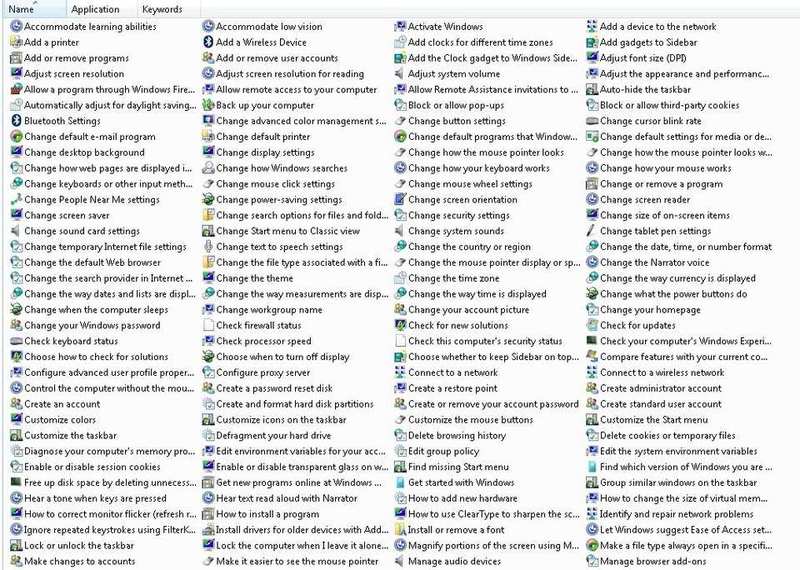
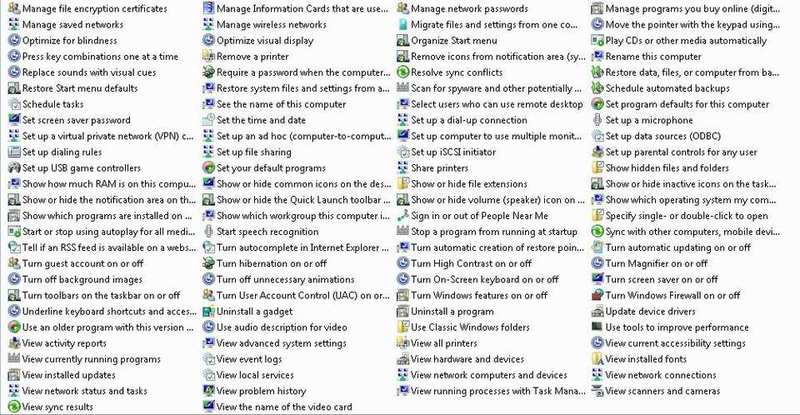


Most (if not all) of these functions are available from different areas in Control Panel, Taskbar, etc...

Now you have them all in one place.

I believe this DOES NOT work in earlier Windows versions, please post back to this thread if earlier versions work.

Enjoy...

Rhody...
 
PhysOrg.com
PhysOrg
science news on PhysOrg.com

>> Front-row seats to climate change
>> Attacking MRSA with metals from antibacterial clays
>> New formula invented for microscope viewing, substitutes for federally controlled drug
Jan11-10, 09:14 PM   #2
 
Blog Entries: 1
Just tried it (Vista). This is cute. Thanks for the tip.
 
Jan12-10, 04:46 PM   #3
 
Worked on Windows 7. Nice!
 
Jan12-10, 05:16 PM   #4
 
Admin

Windows GodMode: for Vista, Windows 7


IDDQD?

Does God Mode mean that Windows won't crash?
 
Jan12-10, 09:00 PM   #5
 
Recognitions:
Gold Membership Gold Member
Quote by Borek View Post
IDDQD?

Does God Mode mean that Windows won't crash?
One can only hope, I am switching to Windows 7 after having reliability issues with XP and Vista, I am told mother Microsoft finally got it right, well, we will have to wait and see to be sure...

Rhody...
 
Jan24-10, 05:13 PM   #6
 
Recognitions:
Gold Membership Gold Member
Since this thread has generated a fair amount of interest, I am thinking of starting another with a more generic title, "Best Windows advice..." I have a number of things I think PF members could benefit from... A couple of things are listed below...

1. Secure your banking or private transactions 100% (requires a fair amount of effort on your part)
2. Protect from web spider's indexing personal/family semi private web pages

Interest ???

Rhody...
 
Feb9-10, 11:27 AM   #7
 
Recognitions:
Gold Membership Gold Member
Quote by Borek View Post
IDDQD? ...
Doom!!

I wonder if IDKFA.{ED7BA470-8E54-465E-825C-99712043E01C} would give you unlimited free software.
 
Feb9-10, 11:33 AM   #8
 
Recognitions:
Homework Helper Homework Help
Science Advisor Science Advisor
Quote by Borek View Post
Does God Mode mean that Windows won't crash?
No but it does restart itself after 3days
 
Feb9-10, 05:31 PM   #9
 
Quote by Dembadon View Post
Doom!!

I wonder if IDKFA.{ED7BA470-8E54-465E-825C-99712043E01C} would give you unlimited free software.
Wow Rob. You seem to have some time on your hands. I'm sure Aaron appreciates it!
 
Feb9-10, 05:55 PM   #10
 
Blog Entries: 1
Recognitions:
Gold Membership Gold Member
Nice tip. I will have to check it when my new computer arrives this week. Thanks.
Quote by rhody View Post
I believe this DOES NOT work in earlier Windows versions, please post back to this thread if earlier versions work.

Enjoy...

Rhody...
I checked it on XP - doesn't work.
 
Feb11-10, 12:55 PM   #11
 
Recognitions:
Gold Membership Gold Member
Quote by Dembadon View Post
Doom!!

I wonder if IDKFA.{ED7BA470-8E54-465E-825C-99712043E01C} would give you unlimited free software.
The bottom line is you can use any name you want, someone invented GodMode and as the saying goes, the name stuck, you can put in your favorite dish, pet's name etc... it doesn't matter what is important is the .{} and the parse key inside the brackets. I am told there are other codes like this, so if some of you patient adventurous souls find them and post them, they would be most appreciated.

Rhody...
 
Feb16-10, 04:19 AM   #12
 
Blog Entries: 1
Recognitions:
Gold Membership Gold Member
Got my new computer yesterday with Windows 7. I'm really glad that you put this tip up since I'm having a bad time trying to configure the computer. At least I can find all of the settings in one place.

Microsoft has added tons of My This and My That trash to Windows 7. When I try to clear them from the default user account, it won't let me in the Documents and Settings folder anymore - even though I have 'Administrator' privileges. I also can't create an account named Administrator because it apparently uses that for itself. There are some new features that I like but, I'll be grumbling at it for a while.
 
Feb16-10, 07:56 AM   #13
 
Recognitions:
Gold Membership Gold Member
This trick did not work with my VISTA. Actually the explorer stoped and restarted itself continuously until I deleted this folder
 
Feb16-10, 08:11 AM   #14
 
I cursed Win 7 for a few days, then began to like it quite well. The only thing I still hate after months is the Windows Explorer, which needs a few tweaks to be more friendly.
 
Feb16-10, 08:25 AM   #15
 
Blog Entries: 1
Recognitions:
Gold Membership Gold Member
Quote by harborsparrow View Post
I cursed Win 7 for a few days, then began to like it quite well. The only thing I still hate after months is the Windows Explorer, which needs a few tweaks to be more friendly.
I'll see how it goes. There really are some nice features and the graphics are nice. I'll have to agree on the Windows Explorer though. The one that they give you refuses to default where you want it. They used to have a second one in the WINDOWS directory (C:\WINDOWS\explorer.scf) that would default to the C:\ directory but, it's not there. I may try loading it from another computer running XP - if it doesn't throw a fit. I think that we need to start a thread on Windows 7 tweaks.
 
Feb16-10, 07:57 PM   #16
 
Blog Entries: 2
Quote by Borg View Post
...
Microsoft has added tons of My This and My That trash to Windows 7. When I try to clear them from the default user account, it won't let me in the Documents and Settings folder anymore - even though I have 'Administrator' privileges.
...
These My... "folders" are symbolic links for Windows XP user account folders that are used to let programs that refer directly to these locations use the correct "Windows 7" location to store their data. You will also find an inaccessible "Documents and Settings" symlink in your root directory for the same reason. Ie., programs that try to store data in the "<user>/My Documents/..." folder will now correctly store data in the "<user>/Documents/..." folder. Removing these folders will cause irreverent "<user>/My Documents/..." folders to populate your user directory by older programs that still hard-code these locations instead of using the newer method of environment variables. The symlinks use next to 0 disk space to resolve this problem.

...
I also can't create an account named Administrator because it apparently uses that for itself.
...
This is a special account that is created in advance and disabled to protect the "average" computer user who doesn't know much about computers. Ie., it simultaneously prevents the simple password work-around of Windows XP and the necessity of special offline tools to get around people who do create passwords for it and then forget them. Most users won't need to enable it.
 
Feb17-10, 02:08 PM   #17
 
Blog Entries: 1
Recognitions:
Gold Membership Gold Member
Quote by slider142 View Post
These My... "folders" are symbolic links for Windows XP user account folders that are used to let programs that refer directly to these locations use the correct "Windows 7" location to store their data. You will also find an inaccessible "Documents and Settings" symlink in your root directory for the same reason. Ie., programs that try to store data in the "<user>/My Documents/..." folder will now correctly store data in the "<user>/Documents/..." folder. Removing these folders will cause irreverent "<user>/My Documents/..." folders to populate your user directory by older programs that still hard-code these locations instead of using the newer method of environment variables. The symlinks use next to 0 disk space to resolve this problem.

This is a special account that is created in advance and disabled to protect the "average" computer user who doesn't know much about computers. Ie., it simultaneously prevents the simple password work-around of Windows XP and the necessity of special offline tools to get around people who do create passwords for it and then forget them. Most users won't need to enable it.
Fortunately, I'm not an average user. I have it running as Administrator and have found out how to get past the protected directories. Thanks for the info on the symlinks. I did some initial searches on them and they look like their Unix counterparts. It also led me to info on junction points which is what the Documents and Settings folder is in Windows 7. It's just a special type of symbolic link but you sure don't want to delete it.
 
Thread Closed

Tags
vista, windows 7, windows godmode
Thread Tools


Similar Threads for: Windows GodMode: for Vista, Windows 7
Thread Forum Replies
Windows XP of Vista Computing & Technology 30
Windows Vista Delayed Again Computing & Technology 20
Windows Vista Website Computing & Technology 37
Windows Vista Computing & Technology 30
Windows Vista Computing & Technology 22