50Cent
- 33
- 0
Simulating "Bonded Contact" from ANSYS Mechanical in ANSYS APDL
Hi,
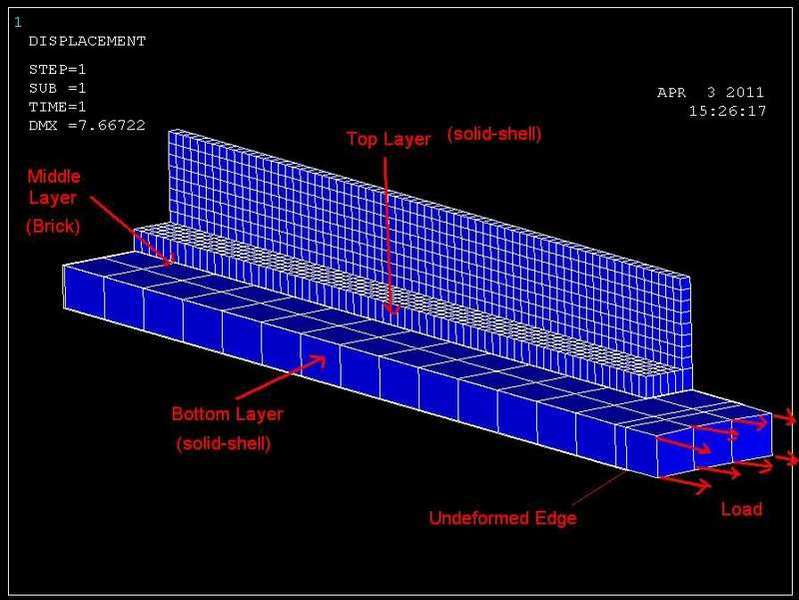
Im looking into the accuracy of using different element types to model a particular structure. As a simple approximation think of it as a beam split into 3 horizontal sections. Shown in the diagram as top, middle & bottom layer. (The middle layer is very thin!)
I have modeled the structure in ANSYS Mechanical and obtained the results using Solid Brick Elements. Now I am trying to create the same model in ANSYS Classic using a combination of Solid-Shell and 8-node brick elements.
I have all the loading conditions set up, but I'm having a problem with contact settings. In ANSYS Mechanical i used "bonded" symmetric contact on the areas in contact.
In APDL I am trying to use the contact wizard to do the same, but don't know the friction coefficeints that would be comparable to that of the "bonded" contact in mechanical. The model is not deforming how i would expect, if all the layers are bonded the structure should experience bending stresses and displacement on the LHS rather than the RHS.
I have a feeling my contact is not set up correctly. Any tips? ideas?
Many thanks
Hi,
Im looking into the accuracy of using different element types to model a particular structure. As a simple approximation think of it as a beam split into 3 horizontal sections. Shown in the diagram as top, middle & bottom layer. (The middle layer is very thin!)
I have modeled the structure in ANSYS Mechanical and obtained the results using Solid Brick Elements. Now I am trying to create the same model in ANSYS Classic using a combination of Solid-Shell and 8-node brick elements.
I have all the loading conditions set up, but I'm having a problem with contact settings. In ANSYS Mechanical i used "bonded" symmetric contact on the areas in contact.
In APDL I am trying to use the contact wizard to do the same, but don't know the friction coefficeints that would be comparable to that of the "bonded" contact in mechanical. The model is not deforming how i would expect, if all the layers are bonded the structure should experience bending stresses and displacement on the LHS rather than the RHS.
I have a feeling my contact is not set up correctly. Any tips? ideas?
Many thanks