Briggs
- 34
- 0
OOoLatex Extension for Open Office
The extension can be installed in Open Office by way of Tools -> Extension Manager -> Add. You will also need the following dependencies to carry out the behind the scenes LaTeX makery.
Dependencies:
MikText
Ghostscript
MinSYS
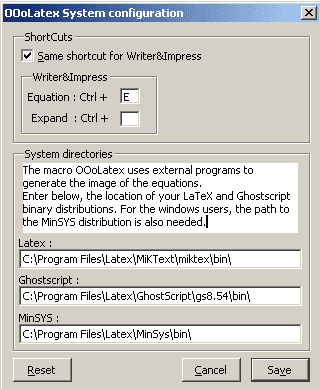
It is probably best to install all the programs to one directory and set up the paths in the extension as follows
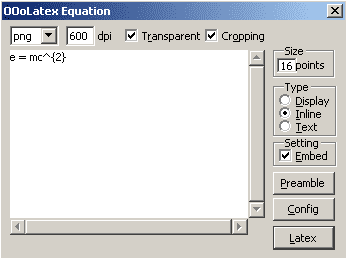
Once installed and configured there will be a new toolbar in the top left of the Open Office window. Press equation and input your LaTeX - there are a few options you can play about with if desired - when you're done hit Latex and some magic stuff will happen
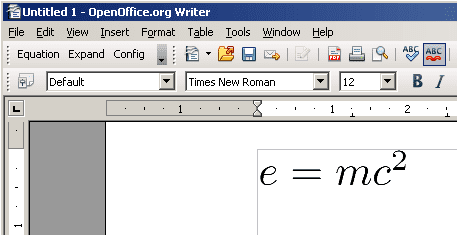
Don't worry: it will look nice and smooth when exported to pdf.
The extension can be installed in Open Office by way of Tools -> Extension Manager -> Add. You will also need the following dependencies to carry out the behind the scenes LaTeX makery.
Dependencies:
MikText
Ghostscript
MinSYS
It is probably best to install all the programs to one directory and set up the paths in the extension as follows
Once installed and configured there will be a new toolbar in the top left of the Open Office window. Press equation and input your LaTeX - there are a few options you can play about with if desired - when you're done hit Latex and some magic stuff will happen
Don't worry: it will look nice and smooth when exported to pdf.
 .
.