View Full Version : Eclipse PTP Setup: FORTRAN
Saladsamurai
Dec28-11, 11:40 PM
Alrighty then :smile: So in order to solve a problem in a previous thread, I simply reinstalled Eclipse, but this time i went with the Parallel Tools Platform since it is supposed to work with FOTRAN too.
I created a C++ project first and did the 'Hello World' thing to make sure it was working. C++ is working fine as far as I can tell.
So I switched to a FORTRAN project and I am having trouble Building. I have a screenshot below. Perhaps someone can help me out with what this might mean? I am used to using Digital Fortran (yeah, I know--old as dinosaurs) where I simply write code, build and run.
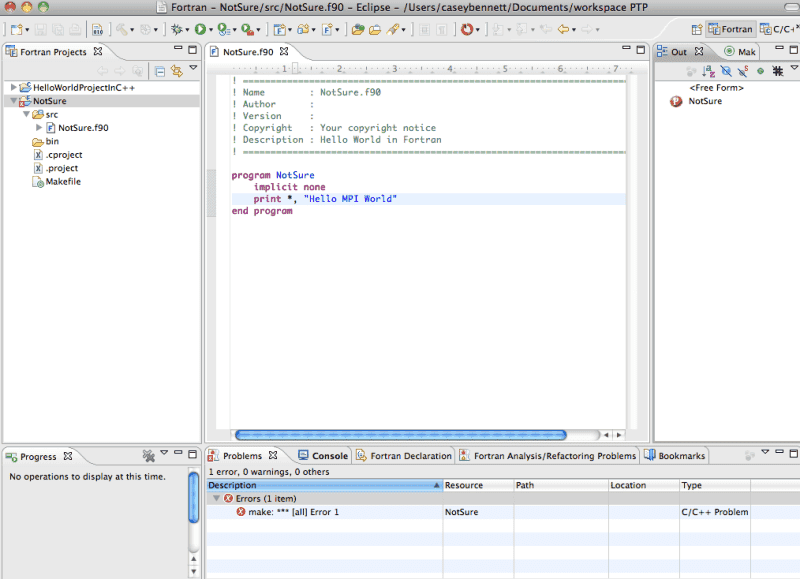
http://i12.photobucket.com/albums/a220/saladsamurai/Screenshot2011-12-29at123700AM.png
Saladsamurai
Dec29-11, 12:36 AM
EDIT: I think I should include some more details:
I am using a Mac OS = Snow Leopard.
The exact steps I used to generate the error in the screenshot above:
1) Right-click in Package Explorer: New -> FORRAN Project ->Makefile Project ->Demo Hello World FORTRAN
2) Attempt to Build the source code that was generated by the Hello World Project creation.
*Note:
a) I don't know why I use the 'Makefile' projects, I just saw it in a tutorial. Can someone enlighten me?
b) When I select the Makefile project, there are options in the 'Toolchains' window. I think this might be related to my problem: When the box that says "Show project types and toolchains only if they are supported on the platform" is checked I only see the XLF Tool Chain. But if I uncheck it, I can see GCC Fortran. (See new screen shots below). Selecting the GCC Fortran does not help resolve the issue, but it raises my question of why does is it NOT available when the box IS checked?
With Box checked:
http://i12.photobucket.com/albums/a220/saladsamurai/Screenshot2011-12-29at13243AM.png
With Box Unchecked:
http://i12.photobucket.com/albums/a220/saladsamurai/Screenshot2011-12-29at13252AM.png
I like Serena
Dec29-11, 12:38 PM
In your first screenshot you can see a file named "Makefile".
Can you show its contents?
Saladsamurai
Dec29-11, 01:23 PM
In your first screenshot you can see a file named "Makefile".
Can you show its contents?
Hi ILS :smile: There actually are no contents in the makefile. Perhaps that is the problem. I don't know a lot (anything really) about makefiles. It seems like most "modern" languages don't need you to explicitly make a makefile. Am I correct in saying that? After some Googling, it seems like the types of things that a makefile does are the types of things that get done automatically when you build/link etc.
I have written plenty of FORTRAN code in my graduate work, but never once encountered a makefile. I think I should look into getting a different project type to work. For example, I think that I should be using the option "Executable (GNU Fortran on MacOS X)" would be a more "normal" option. Normal as in 'just type some source code and then run it'.
However I recall that project type gave me errors too. I'll post back momentarily with the new errors. Thanks!
I like Serena
Dec29-11, 01:40 PM
Hi! ;)
FYI, you always need a file specifying which files to compile and link.
Also where to find include files and libraries.
And in particular which compiler and linker to use.
This information is kept in either a project file or a makefile.
When you already have a makefile you can tell Eclipse to get this information from it by creating a Makefile project.
Otherwise you have to tell Eclipse this, although it can make an educated guess, after which Eclipse generates a makefile and uses that.
Saladsamurai
Dec29-11, 01:41 PM
So if I follow these steps:
1) New -> Fortran Project -> Executable (Gnu Fortran on MacOS X)
2) In the Project: New -> source folder
3) In Source folder: New -> Named HelloWorld1.for -> Select from dropdown: fixed form template
Upon running a simple Hello World I get the following screen. Here is what is bothering me:
a) The source folder icon named HelloWorld1 in the package explorer on the left has a little superscripted "C" on it whereas the project folder icon has a superscripted "F". So I think Eclpipse is thinking this is C or something.
b) In the error window there is the C/C++ thing under 'type' which makes me think the same.
http://i12.photobucket.com/albums/a220/saladsamurai/Screenshot2011-12-29at23949PM.png
I like Serena
Dec29-11, 01:48 PM
I think your problem is: "gfortran: command not found."
This error shows that Eclipse does understand that you are compiling a fortran file.
So the question is: do you have gfortran on your system?
And if so, perhaps you need to configure in which directory it is.
In the Console tab-sheet you should be able to see which command is actually given.
Perhaps you can show what it says?
Saladsamurai
Dec29-11, 01:55 PM
I do have gfortran installed. I confirmed this by typing: gfortran --version in a terminal window. The console tab contents are as follows.
**** Build of configuration Debug for project HellowWorld1 ****
make all
Building file: ../HelloWorld1/HelloWorld1.for
Invoking: GNU Fortran Compiler
gfortran -funderscoring -O0 -g -Wall -c -fmessage-length=0 -o "HelloWorld1/HelloWorld1.o" "../HelloWorld1/HelloWorld1.for"
/bin/sh: gfortran: command not found
make: *** [HelloWorld1/HelloWorld1.o] Error 127
**** Build Finished ****
Thanks again :smile:
I like Serena
Dec29-11, 01:57 PM
So what happens if you type:
gfortran -funderscoring -O0 -g -Wall -c -fmessage-length=0 -o "HelloWorld1/HelloWorld1.o" "../HelloWorld1/HelloWorld1.for"
in a terminal window?
Saladsamurai
Dec29-11, 02:01 PM
So what happens if you type:
gfortran -funderscoring -O0 -g -Wall -c -fmessage-length=0 -o "HelloWorld1/HelloWorld1.o" "../HelloWorld1/HelloWorld1.for"
in a terminal window?
I get the following error:
Last login: Thu Dec 29 14:51:40 on ttys000
Salad-Samurais-MacBook-Pro:~ saladsamurai$ gfortran -funderscoring -O0 -g -Wall -c -fmessage-length=0 -o "HelloWorld1/HelloWorld1.o" "../HelloWorld1/HelloWorld1.for"
gfortran: error: ../HelloWorld1/HelloWorld1.for: No such file or directory
gfortran: fatal error: no input files
compilation terminated.
I like Serena
Dec29-11, 02:06 PM
Can you change the current directory first to the "HelloWorld1" directory?
That way the gfortran compiler should be able to find the source file "../HelloWorld1/HelloWorld1.for".
Anyway, apparently you have a PATH environment problem, meaning that Eclipse cannot find gfortran in the default PATH, but from the terminal window you can.
Did you already reboot your computer?
Saladsamurai
Dec29-11, 02:16 PM
Can you change the current directory first to the "HelloWorld1" directory?
That way the gfortran compiler should be able to find the source file "../HelloWorld1/HelloWorld1.for".
Anyway, apparently you have a PATH environment problem, meaning that Eclipse cannot find gfortran in the default PATH, but from the terminal window you can.
Did you already reboot your computer?
Hi ILS. I changed to the correct directory (duh :blushing:) and I still get the same error.
With regard to rebooting: Since when do you mean? If you mean since last night, yes. Also, I keep hearing about this PATH thingy, what is that? Is that an environmental variable?
I think we are certainly honing in on the problem: The C++ code works fine, so I wonder why the gfortran is not. I guess we need a way of checking "where" the gfortran compiler and where Eclipse is expecting it to be. As of now, it seems that the problem is that the two are not equal.
I like Serena
Dec29-11, 02:20 PM
If you are in the correct directory, you should not get the same error...
So apparently you are not in the correct directory.
I meant rebooting since you installed fortran...
Let's check this.
Can you type the following commands in a terminal window?
which gfortran
echo $PATH
Saladsamurai
Dec29-11, 02:30 PM
If you are in the correct directory, you should not get the same error...
So apparently you are not in the correct directory.
I meant rebooting since you installed fortran...
Let's check this.
Can you type the following commands in a terminal window?
which gfortran
echo $PATH
Oof! You're write. I only went to the parent 'project' folder. This is what I get:
--MacBook-Pro:HellowWorld1 saladsamurai$ cd HelloWorld1
saladsamurai-MacBook-Pro:HelloWorld1 saladsamurai$ gfortran -funderscoring -O0 -g -Wall -c -fmessage-length=0 -o "HelloWorld1/HelloWorld1.o" "../HelloWorld1/HelloWorld1.for"
/var/folders/9K/9KvTsFwDELOjojSdLl+IFU+++TI/-Tmp-//ccQVvBsP.s:unknown:FATAL:can't create output file: HelloWorld1/HelloWorld1.o
saladsamurais-MacBook-Pro:HelloWorld1 saladsamurai$
When I type "which gfortran" I get:
/usr/local/bin/gfortran
ANd when I type "echo $PATH" I get:
/usr/bin:/bin:/usr/sbin:/sbin:/usr/local/bin:/usr/texbin:/usr/X11/bin
I like Serena
Dec29-11, 02:36 PM
Can you close eclipse and then restart eclipse from the terminal window by typing:
eclipse
That way Eclipse will inherit the PATH environment variable from your terminal window effectively fixing the problem that gfortran cannot be found.
Saladsamurai
Dec29-11, 02:41 PM
Hmmm. When I type eclipse in a terminal I get the error:
-bash: eclipse: command not found
Saladsamurai
Dec29-11, 02:44 PM
Let me guess: eclipse is not on the PATH ? :tongue:
I like Serena
Dec29-11, 02:45 PM
Okay.
Try to find out where eclipse is and start it with the entire path.
On my linux system it is:
$ /opt/eclipse/eclipse
Perhaps you can find it with:
$ locate eclipse
Let me guess: eclipse is not on the PATH ? :tongue:
Right! :wink:
Saladsamurai
Dec29-11, 02:51 PM
Okay.
Try to find out where eclipse is and start it with the entire path.
On my linux system it is:
$ /opt/eclipse/eclipse
Perhaps you can find it with:
$ locate eclipse
Right! :wink:
the locate command needs to generate a database as this is the 1st time I have used it. Before doing so, what exactly am I looking for? Eclipse is weird to me in that it's not installed in my applications folder like all other programs. It's just a 'folder' that I downloaded from the site. I run it by clicking on an icon inside of this folder.
The thing is, I have Eclipse PTP and Eclipse SDK. Both of them have their own folder on my desktop. I run each from within their respective folders. Is that helpul?
I like Serena
Dec29-11, 02:57 PM
Perhaps you can right-click on the icon and select "Properties" or something like that (I'm not a Mac user).
That should tell you what it's named and where it is...
Alternatively you can try:
$ cd ~/Desktop
$ ls
and see if you can find those folders...
Or perhaps you can drag and drop (or copy and paste) the icon in the Terminal window...
Of perhaps you can open some sort of file explorer and search for a file named eclipse...
Or...
Saladsamurai
Dec29-11, 03:04 PM
Perhaps you can right-click on the icon and select "Properties" or something like that (I'm not a Mac user).
That should tell you what it's named and where it is...
OK. Also. I just ran that sudo command to generate the database. DO you know how I will know when it is done? I am not used to terminal and it just occurred to me that there is no nice 'time remaining' window to tell me when it is done.
Anywho: Eclipse in: /Users/saladsamurai/Desktop/eclipse PTP
So I typed: /Users/saladsamurai/Desktop/eclipse PTP/eclipse at the terminal and I get the error:
No such file or directory
I also tried /Users/saladsamurai/Desktop/eclipse PTP/eclipse.app
to no avail.
EDIT: Hold on a minute. Drag and drop is supported in my Terminal. Trying that.
I like Serena
Dec29-11, 03:05 PM
Try:
$ '/Users/saladsamurai/Desktop/eclipse PTP/eclipse'
(Those spaces in directory names or file names will kill you every time. :wink:)
OK. Also. I just ran that sudo command to generate the database. DO you know how I will know when it is done? I am not used to terminal and it just occurred to me that there is no nice 'time remaining' window to tell me when it is done.
It typically takes a couple of minutes (can also be 15 or more minutes depending how much to do there is on your system), unless it tries to index a DVD or a network drive (which it shouldn't).
You don't have those I hope?
You can see that it's done when the command prompt returns.
Saladsamurai
Dec29-11, 03:09 PM
If I drag and drop the launch icon into terminal, I get:
salad$ /Users/salad/Desktop/eclipse\ PTP/Eclipse.app
-bash: /Users/salad/Desktop/eclipse PTP/Eclipse.app: is a directory
Maybe Eclipse can't be open from terminal. Can you open it this way in Linux?
Is there another way to accomplish the goal of adding the gfortran directory to the PATH? That is what we are trying to do right?
I like Serena
Dec29-11, 03:18 PM
Eclipse can be opened from the terminal.
Presumably Eclipse.app is a shortcut file.
Can you inspect its properties?
And yes, we are trying to add gfortran to the path.
Apparently /usr/local/bin is not in your default PATH yet when you boot your computer.
But it is in your path when you start a terminal window.
You could use:
$ ln -s /usr/local/bin/gfortran /usr/bin/gfortran
This will create a symbolic link to gfortran in the directory that will certainly be in your PATH.
It will fix your problem.
Saladsamurai
Dec29-11, 03:49 PM
Eclipse can be opened from the terminal.
Presumably Eclipse.app is a shortcut file.
Can you inspect its properties?
And yes, we are trying to add gfortran to the path.
Apparently /usr/local/bin is not in your default PATH yet when you boot your computer.
But it is in your path when you start a terminal window.
You could use:
$ ln -s /usr/local/bin/gfortran /usr/bin/gfortran
This will create a symbolic link to gfortran in the directory that will certainly be in your PATH.
It will fix your problem.
I am getting an error in executing this command:
/Users/saladsamurai
saladsamurais-MacBook-Pro:~ saladsamurai$ ln -s /usr/local/bin/gfortran /usr/bin/gfortran
ln: /usr/bin/gfortran: Permission denied
I like Serena
Dec29-11, 03:50 PM
Try it with:
$ sudo ln -s /usr/local/bin/gfortran /usr/bin/gfortran
Saladsamurai
Dec29-11, 04:00 PM
Okay! That got the symbolic link made. I went back into Eclipse and the Source code Builds successfully without errors/warnings. BUT, when I click: Run ->Run As Local Fortran App I get the error:
Launch Failed: Binary Not Found.
I feel like we are almost there! But without a non-generic error message, I am not sure what the next step is.
Thanks for all of your time and patience so far ILS!!!
I like Serena
Dec29-11, 04:04 PM
Check in the Console tab-sheet which executable binary was generated.
Check if you can run it from a terminal window.
You run it with something like:
$ ./HelloWorld1
Saladsamurai
Dec29-11, 04:19 PM
Check in the Console tab-sheet which executable binary was generated.
It's weird. This is all I get in the Console Tab. A bunch of other stuff appears while it's building. But Upon completion, this is all tere is:
**** Build of configuration Debug for project HelloWorldProjectInC++ ****
make all
make: Nothing to be done for `all'.
**** Build Finished ****
Check if you can run it from a terminal window.
You run it with something like:
$ ./HelloWorld1
I am having trouble with this. I am not sure what directory I need to be in to run it in this manner. It might be that what I am trying to run has not actually been built.
I swept through all of the directories that I thought I should try running $ ./HelloWorld2 from. All of them gave me the error: -bash: ./HelloWorld2: No such file or directory
EXCEPT when I ran that command from within the /Debug directory. It simpky returned the command prompt to me. I did not actually see any evidence that HelloWorld2 actually ran.
EDIT: This is what I did:
$ pwd
/Users/SS/Documents/workspace PTP/HelloWorld2/Debug
$ ./HelloWorld2
$
I like Serena
Dec29-11, 04:24 PM
It appears you tried to build HelloWorldProjectInC++, but that is not in fortran.
Furthermore Eclipse knows there is nothing to do.
Right-click on your project and select "Clean".
Then right-click on your project again and select "Build".
This will force Eclipse to rebuild.
Yes, the Debug directory would be where the executable is.
Apparently it does run there.
It seems it does not print anything, otherwise you would have seen this in the output...
Saladsamurai
Dec29-11, 04:29 PM
It appears you tried to build HelloWorldProjectInC++, but that is not in fortran.
Furthermore Eclipse knows there is nothing to do.
Right-click on your project and select "Clean".
Then right-click on your project again and select "Build".
This will force Eclipse to rebuild.
Yes, the Debug directory would be where the executable is.
Apparently it does run there.
It seems it does not print anything, otherwise you would have seen this in the output...
OMG. I am really starting to dislike Eclipse. Why would it build 'HelloWorldProjectInC++' when my active window is the source code in my Fortran project? Anywho: After Clean/Build, this is what I get:
**** Build of configuration Debug for project HelloWorld2 ****
make all
Building file: ../HelloWorld2SourceFolder/HelloWorld2.for
Invoking: GNU Fortran Compiler
gfortran -funderscoring -O0 -g -Wall -c -fmessage-length=0 -o "HelloWorld2SourceFolder/HelloWorld2.o" "../HelloWorld2SourceFolder/HelloWorld2.for"
Finished building: ../HelloWorld2SourceFolder/HelloWorld2.for
Building target: HelloWorld2
Invoking: MacOS X Fortran Linker
gfortran -o "HelloWorld2" ./HelloWorld2SourceFolder/HelloWorld2.o
Finished building target: HelloWorld2
**** Build Finished ****
I still get the Binary Not Found error when I try to run it. :cry:
I like Serena
Dec29-11, 04:33 PM
Check the project explorer window in Eclipse (the left window).
In the Debug directory you should be able to find the binary HelloWorld2.
Right-click it and select Run.
If you can't find it, right-click Debug and select Refresh first.
Saladsamurai
Dec29-11, 04:39 PM
Check the project explorer window in Eclipse (the left window).
In the Debug directory you should be able to find the binary HelloWorld2.
Right-click it and select Run.
If you can't find it, right-click Debug and select Refresh first.
I don't seem to have any Binaries (And hence the Error). This is all I have (refreshing does not improve):
http://i12.photobucket.com/albums/a220/saladsamurai/Screenshot2011-12-29at53706PM.png
I like Serena
Dec29-11, 04:41 PM
Do you see the document "HelloWorld2" in the Debug folder?
Try right-clicking that...
Saladsamurai
Dec29-11, 04:58 PM
Do you see the document "HelloWorld2" in the Debug folder?
Try right-clicking that...
Jeesh. I right click that and I can choose 'Run As' -> Run Configurations
http://i12.photobucket.com/albums/a220/saladsamurai/Screenshot2011-12-29at55512PM.png
which brings me to the following screen:
http://i12.photobucket.com/albums/a220/saladsamurai/Screenshot2011-12-29at55536PM.png
I am not sure where to go from here. Everything is prefilled with the C++ project stuff. I don't understand why. I am clearly right clicking on the HelloWOrld2 bin which is in the fortran project.
I like Serena
Dec29-11, 05:09 PM
Perhaps you could select HelloWorld2 Debug in the project explorer in the left window?
And then perhaps click the button Run?
Saladsamurai
Dec29-11, 05:19 PM
Perhaps you could select HelloWorld2 Debug in the project explorer in the left window?
And then perhaps click the button Run?
I erased the C++ project so Eclipse doesn't get confused. I highlighted the debug folder and this is what I get when I click run. Notice the rather empty build message in the console again. This is pretty awful. If Eclipse is this difficult to get Hello World running, I cannot imagine getting any real work done on it. Thanks again for all your help. Feel free to call it a day whenever you need to. Getting Fortran to run on a Mac is the stuff of legend and I am now seeing why.
http://i12.photobucket.com/albums/a220/saladsamurai/Screenshot2011-12-29at61459PM.png
I like Serena
Dec29-11, 05:24 PM
Perhaps you can show the Run Configurations screen that you used?
It appears that the first edit field (where you had C/C++ Application before) was not filled properly...
Saladsamurai
Dec29-11, 05:32 PM
Perhaps you can show the Run Configurations screen that you used?
It appears that the first edit field (where you had C/C++ Application before) was not filled properly...
I did not set up a run config this time. I just clicked the 'play' button.
I like Serena
Dec29-11, 05:40 PM
Ah, I'm afraid the Play button only works after the first time that you've succesfully run the application.
It's a sort of most-recently-run menu option.
The first time round it won't do anything useful.
Saladsamurai
Dec29-11, 06:27 PM
Ah, I'm afraid the Play button only works after the first time that you've succesfully run the application.
It's a sort of most-recently-run menu option.
The first time round it won't do anything useful.
Hmmm. Ok. Now that I have removed the C++ project, the context sensitive options I am given are a little different. There is a Rin Config option now. I am going to delete the workspace folder and the current projects and start fresh. I will post exact step-by-step screenshots of what I do.
Thanks again boss!
I like Serena
Dec29-11, 06:33 PM
If it's not too late already, try to avoid directories with spaces in them!
Command line tools (such as used in Eclipse) are notoriously bad with those and can respond unpredictably.
Saladsamurai
Dec29-11, 06:56 PM
This is what I have done:
.
.
.
1) Launch Eclipse and Open a 'Fortran Perspective'
http://i12.photobucket.com/albums/a220/saladsamurai/Screenshot2011-12-29at73441PM-1.png
.
.
.
2) Create New Fortran Project:
http://i12.photobucket.com/albums/a220/saladsamurai/Screenshot2011-12-29at73531PM.png
.
.
.
3) Add Source Folder and File
http://i12.photobucket.com/albums/a220/saladsamurai/Screenshot2011-12-29at73726PM.png
.
.
.
4)Write Source Code and Build Project...
http://i12.photobucket.com/albums/a220/saladsamurai/Screenshot2011-12-29at73926PM.png
...Resulting in Following Console output:
**** Build of configuration Debug for project HelloWorldProject ****
make all
Building file: ../HelloWorldSource/HelloWorld.for
Invoking: GNU Fortran Compiler
gfortran -funderscoring -O0 -g -Wall -c -fmessage-length=0 -o "HelloWorldSource/HelloWorld.o" "../HelloWorldSource/HelloWorld.for"
Finished building: ../HelloWorldSource/HelloWorld.for
Building target: HelloWorldProject
Invoking: MacOS X Fortran Linker
gfortran -o "HelloWorldProject" ./HelloWorldSource/HelloWorld.o
Finished building target: HelloWorldProject
**** Build Finished ****
.
.
.
5) On Toolbar go to: 'Run' and I am presented with the following options:
http://i12.photobucket.com/albums/a220/saladsamurai/Screenshot2011-12-29at75301PM.png
.
.
.
.
.
I am tempted to say that I should just be able to go to 'Local Fortran Application' and run it. Do I need to actually go into the 'Run Configurations...' menu ?
I like Serena
Dec29-11, 06:59 PM
"Run As / Local Fortran Application" should be fine.
Saladsamurai
Dec29-11, 07:06 PM
"Run As / Local Fortran Application" should be fine.
Should be but is not. I get the Launch Failed: Binary Not Found error again:
.
.
.
6)
http://i12.photobucket.com/albums/a220/saladsamurai/Screenshot2011-12-29at80309PM.png
I like Serena
Dec29-11, 07:07 PM
Can you right-click the binary HelloWorldProject and select Run configurations?
Saladsamurai
Dec29-11, 07:15 PM
Can you right-click the binary HelloWorldProject and select Run configurations?
When I Right-Click the Binary and select Run As -> Run Configurations I am presented with the following screen:
http://i12.photobucket.com/albums/a220/saladsamurai/Screenshot2011-12-29at81206PM.png
I am not sure what to do next? I am thinking click on 'Fortran Local Application' and then click the 'New' button. What do you think?
I like Serena
Dec29-11, 07:15 PM
Yep. That's it.
Saladsamurai
Dec29-11, 07:22 PM
Ok :smile: When I click on 'Fortran Local Application' and then click the 'New' button I am presented with the following screen:
http://i12.photobucket.com/albums/a220/saladsamurai/Screenshot2011-12-29at81725PM.png
It looks like Eclipse wants me to specify the Binary? If I click: 'Search Project...' I am presented with:
http://i12.photobucket.com/albums/a220/saladsamurai/Screenshot2011-12-29at81931PM.png
Does this mean Eclipse is not 'seeing' the binary (maybe this explains error message)?
Maybe I should try to 'Browse' all the way to the Binary?
I like Serena
Dec29-11, 07:23 PM
Yep. Try Browse all the way to the binary.
Btw, Search project should work, but we'll see... just keep an eye out for weird stuff.
Saladsamurai
Dec29-11, 07:29 PM
Yep. Try Browse all the way to the binary.
Ok. Should I 'Apply' or 'Run' ? I am thinking Apply, then Run if necessary.
Btw, Search project should work, but we'll see... just keep an eye out for weird stuff.
Yeah. Search Project definitely not working. You can see that the window it gave me is empty.
I like Serena
Dec29-11, 07:30 PM
Yeah, do Apply first and then Run.
What is the path to your binary?
Does it contain a space?
Saladsamurai
Dec29-11, 07:35 PM
Yeah, do Apply first and then Run.
I can't believe that this worked!!!!! All that work for a simple Hello World.
What is the path to your binary?
Does it contain a space?
/Users/saladsamurai/Documents/workspace_PTP/HelloWorldProject/Debug/HelloWorldProject
No spaces.
Now I am wondering what I will need to do every time I create a new project. I will create a HelloWorld2 project to see what Eclipse "remembers" and what it forgets.
Thanks SO MUCH for all of your effort ILS! Next time you're in the US I'll buy you a coffee :smile:
I like Serena
Dec29-11, 07:38 PM
Cheers! :smile:
Saladsamurai
Dec29-11, 07:41 PM
Cheers! :smile:
Now for the hard part: Getting C++ and Java to work in the same IDE! I am pretty sure C++ is ready to go. But I had some trouble with Java.... I'll mess around a bunch and post back with my findings!
AlephZero
Dec29-11, 08:49 PM
Or, you could save yourself a lot of grief by
1. Learn how to use "make"
2. Learn how to configure your favorite text editor to run "make" with a single keystroke
3. Never use an IDE again ....
Everybody who writes an IDE seems to have their own ideas about what is "easy and intuitive". And none of them ever match MY ideas about what is easy and intuitive!
Saladsamurai
Dec29-11, 09:12 PM
Or, you could save yourself a lot of grief by
1. Learn how to use "make"
2. Learn how to configure your favorite text editor to run "make" with a single keystroke
3. Never use an IDE again ....
Everybody who writes an IDE seems to have their own ideas about what is "easy and intuitive". And none of them ever match MY ideas about what is easy and intuitive!
Indeed! How do you debug without an IDE?
Saladsamurai
Dec30-11, 09:30 AM
It appears that I have to navigate to the path manually every time and set up run configurations. I am still convinced that when I click on 'search project' Eclipse should be 'seeing' the binary it just created, but as in Post #49 in the 2nd screenshot, it is not seeing it.
When I click 'Search Project' could it be looking on the wrong path? I am assuming that Eclipse must be looking on what is referred to as the "Build Path." There must be a way to check what it thinks the Build path is...
I like Serena
Dec30-11, 11:26 AM
Eclipse keeps a cache in which it remembers what it has built.
When you build an executable using the terminal window, you typically get this problem that Eclipse doesn't "see" the executable with "Search project".
The way I know to recover from that, is to let Eclipse rebuild everything (Ctrl+B).
Anyhow, after the first time you adjusted the run configuration, Eclipse will remember the location of the executable.
AlephZero
Dec30-11, 04:20 PM
Indeed! How do you debug without an IDE?
An IDE doesn't debug your code for you.
You debug code by thinking. and playing with an IDE is often a distraction from that.
Of course you need a debugger to tell you the basic information like where your code crashed. But 99% of the time you can get all the information you need from a core dump and a stack trace, wthout the pretty graphics.
Saladsamurai
Dec30-11, 04:28 PM
An IDE doesn't debug your code for you.
You debug code by thinking. and playing with an IDE is often a distraction from that.
Of course you need a debugger to tell you the basic information like where your code crashed. But 99% of the time you can get all the information you need from a core dump and a stack trace, wthout the pretty graphics.
I AlphaZero! :smile: I was just messing around with XCode and I noticed the term GDB everywhere. So I looked it up. It's a debugger! So yes, I understand now that an IDE is not a debugger.
So let's say for a second that I want to get into programming without an IDE. So I would need to learn about these things that you mentioned: core dump, stack trace and probably other things as well. Are these things that are generated by the 'debugger' (e.g. GDB)?
I like Serena
Dec30-11, 04:29 PM
An IDE doesn't debug your code for you.
You debug code by thinking. and playing with an IDE is often a distraction from that.
Of course you need a debugger to tell you the basic information like where your code crashed. But 99% of the time you can get all the information you need from a core dump and a stack trace, wthout the pretty graphics.
I kind of like point-and-click, multiple-views and language-sensitive-keyboard-shortcuts to make it easier to find compiler errors and to debug code. :)
To find problems in mathematical formulas I agree that an IDE tends to distract.
vBulletin® v3.8.7, Copyright ©2000-2012, vBulletin Solutions, Inc.