blahblah8724
- 31
- 0
Does anyone know how to use MATLAB to produce this graph??
I'm writing a mathematical essay on Option Pricing and would like to include a graph which displays a process called a Wiener Process.
This is basically a process where the change \Delta z in a time interval \Delta t is modeled by
\Delta z = \epsilon\sqrt{\Delta t}
where \epsilon is a normal random variable with mean 1 and variance 0.
So for each \Delta t, \epsilon computes one normal random variable. And the true graph is obtained when \Delta t \to 0. The graph should look something like this
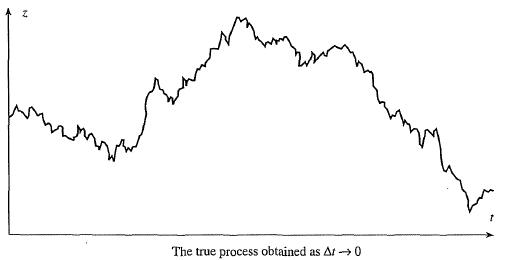
Does anyone know what the MATLAB sequence would be to compute this??
I would really appreciate any help!
Thank :)
I'm writing a mathematical essay on Option Pricing and would like to include a graph which displays a process called a Wiener Process.
This is basically a process where the change \Delta z in a time interval \Delta t is modeled by
\Delta z = \epsilon\sqrt{\Delta t}
where \epsilon is a normal random variable with mean 1 and variance 0.
So for each \Delta t, \epsilon computes one normal random variable. And the true graph is obtained when \Delta t \to 0. The graph should look something like this
Does anyone know what the MATLAB sequence would be to compute this??
I would really appreciate any help!
Thank :)