Got the new Microsoft Flight Sim for Christmas

  • Thread starter Thread starter Janus
  • Start date Start date
  • Tags Tags
    Christmas Flight
Click For Summary

Discussion Overview

The discussion revolves around experiences and opinions regarding the new Microsoft Flight Simulator 2020, including its graphics, hardware requirements, and compatibility with VR technology. Participants share their personal experiences, equipment used, and specific features of the simulator.

Discussion Character

  • Exploratory
  • Technical explanation
  • Conceptual clarification
  • Debate/contested

Main Points Raised

  • One participant expresses admiration for the simulator's realism, noting the ability to recognize their house while flying over their neighborhood.
  • Another participant agrees on the impressive nature of the simulator but emphasizes the need for a high-powered computer to fully utilize its capabilities.
  • Some participants discuss the pros and cons of using VR equipment, with one noting that the Oculus Rift's resolution is insufficient for reading instruments, while another mentions the immersive experience of VR.
  • There is a question about the ability to fly out of any airport, with one participant confirming that there are 37,000 airports available in the simulator.
  • Several participants mention their hardware setups, including specific computers and joysticks used for the simulator, highlighting the importance of suitable equipment for an optimal experience.
  • One participant shares their intention to explore various locations, including Antarctica, using the simulator.
  • Another participant reflects on the incremental improvements in the simulator compared to previous versions they have played.
  • There are discussions about the limitations of older hardware and the need for manual setup of joysticks in the simulator.

Areas of Agreement / Disagreement

Participants generally agree on the impressive nature of the simulator, but there are multiple competing views regarding the effectiveness of VR technology and the hardware requirements needed to run the simulator optimally. The discussion remains unresolved on the best approach to using VR and the overall experience with different hardware setups.

Contextual Notes

Some participants express uncertainty about the effectiveness of VR equipment, particularly regarding resolution and immersion. There are also mentions of limitations in hardware compatibility and the need for manual configuration of controls.

Who May Find This Useful

Individuals interested in flight simulation, gaming hardware, and virtual reality technology may find this discussion relevant, especially those considering upgrading their systems or exploring new flight simulation experiences.

Janus
Staff Emeritus
Science Advisor
Homework Helper
Insights Author
Gold Member
Messages
3,766
Reaction score
1,981
It was a gift from my daughter and her boyfriend. I had the older Flight Simulator X, and the timing of the release of this new version coincided with my getting a new computer.
I'll have to say that I am impressed. Even though I'm not running the graphics at the full realism setting, I was able to recognize our house when I "flew" over our neighborhood.
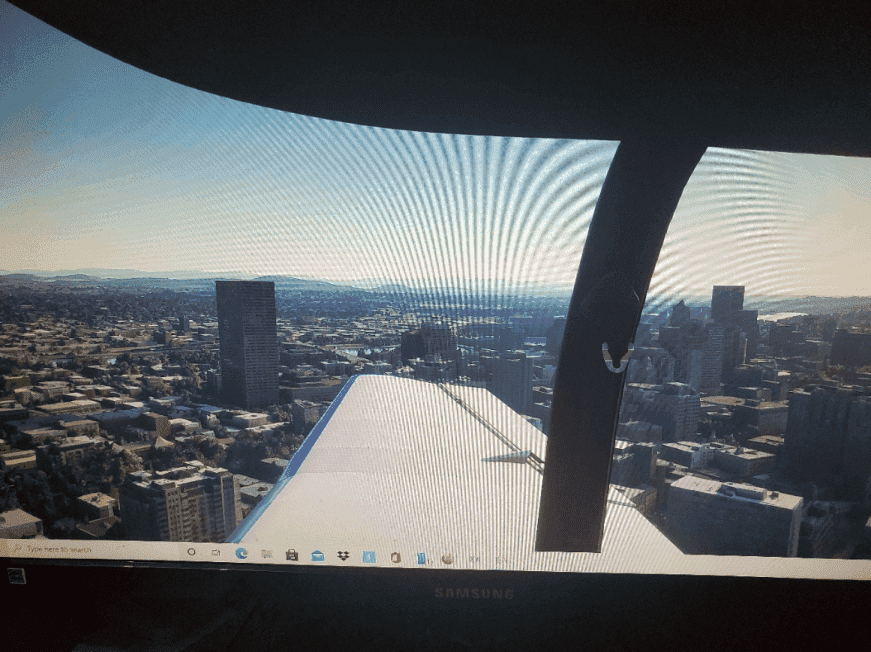
Here's a photo taken with my phone* of my monitor showing a shot of downtown Portland, looking out over the right wing.
skyline1.png


I realize doing a screenshot would given a better result, But my new keyboard requires a three button combo to do this, and I haven't committed to memory yet. (I really need to write it down until I do.)
This at least gives some idea of the level of realism with this new sim. And it is also compatible with a VR headset, if I get one down the road. This is one aspect earlier Flight sims that always bugged me. While you could change the view direction to look out a side window ( to check your position relative to the runway, etc.) Your head was still facing forward looking at the monitor, and this threw off your coordination in handling the stick.
 
  • Like
  • Wow
Likes   Reactions: Hamiltonian, Greg Bernhardt, collinsmark and 4 others
Physics news on Phys.org
I have it too, and I agree it's pretty amazing -- but needs a very high power system to get the most of it.

I also have/use the original Oculus Rift and a Track IR to try to deal with that big downside you mention. Pros/cons:
  • True VR is totally immersive/convincing, but the Oculus Rift resolution is too low to read the instruments. Also, again; requires a very high power computer. I haven't yet tried it on the new flight sim, but used it on FSX and X-Plane 11 with a medium-high end system.
  • Track-IR has the benefit of using your monitor resolution (much higher than VR), but isn't as immersive and creates a weird eye-tracking sensation. If you're not familiar; it provides head tracking in a compressed angle range, to enable free-look while still looking at the monitor. In other words, you turn your head [for example] 10 degrees to the left while keeping your eyes pointed at the monitor, and it shows you a view 90 degrees to the left.
 
Can you "fly" out of any airport? PNI (Pohnpei) has some outstanding views. And Hong Kong Kai Tak had an approach that was truly terrifying. That would be fun to do on a simulator.
 
Vanadium 50 said:
Can you "fly" out of any airport? PNI (Pohnpei) has some outstanding views. And Hong Kong Kai Tak had an approach that was truly terrifying. That would be fun to do on a simulator.
You can choose which airport to fly out of. There are 37,000 airports from around the world to choose from.
 
russ_watters said:
I have it too, and I agree it's pretty amazing -- but needs a very high power system to get the most of it.
I just recently replaced my 7+ yr old computer with an HP OMEN. AMD Ryzen 3700xx 8 core processor with a Geforce RTX 2060 graphics card.
 
  • Like
Likes   Reactions: russ_watters
I bought a joystick specifically for Microsoft Flight Simulator 2020. [Edit: the joystick is not limited to Microsoft Flight Simulator 2020, it's just the only thing I'm personally going to use it for, is what I mean.] Although I almost always play games using a mouse and keyboard, this is one and only "game" for which I'll break out the joystick (I don't own a "game controller" either).

73_t_16000m_fcs_flight_stick_1478797550000_1296153.jpg


The game [simulator] is very detailed. While things outside an airport don't look perfect at ground level, they are extremely convincing even at a couple hundred feet or so (a hundred meters or so). I've landed on the street in front of my house, and even in the parking lot of my neighborhood shopping center (it was a rough landing, but technically a landing). I'm really impressed. :smile: I'm planning to soon take off from South America and check out the various stations in Antarctica.

I see from the release notes that VR is now supported. Yes, that could be interesting. 🤔 Interesting indeed.

The thing is, I don't own any VR equipment (yet). VR equipment is expensive, and I haven't convinced myself that I'll use it enough to make it worthwhile. That said, I would get to play Half Life: Alyx. Anybody who knows me knows that I'm a big fan of the Half Life series. And I haven't played Alyx yet. Hmmm. And I could, I suppose, give Skyrim another run, but in VR. Hmmm.
 
Last edited:
It's nice to see that there have been incremental improvements since the last flight simulator game I played:

 
  • Like
  • Haha
Likes   Reactions: diogenesNY, hutchphd and collinsmark
collinsmark said:
I bought a joystick specifically for Microsoft Flight Simulator 2020. [Edit: the joystick is not limited to Microsoft Flight Simulator 2020, it's just the only thing I'm personally going to use it for, is what I mean.] Although I almost always play games using a mouse and keyboard, this is one and only "game" for which I'll break out the joystick (I don't own a "game controller" either).

View attachment 275354
I'm using my 20 year old Sidewinder 2*. I've been flying different versions of MS flight simulator( including the Combat versions) for at least that long. ( I even had a software package which allowed you to build your own aircraft models to fly in FS5) .
Way back in the day I did try to "fly by mouse", but without that naturally centered position a joystick gives, it was always dicey. (And it definitely didn't help that some of the sims I was trying to fly were a bit much for the computer I had, which led to a significant lag between moving the mouse and the program responding to it. )
Prior to the stick I have now I had a Saitek stick similar to this:
https://images-na.ssl-images-amazon.com/images/I/410Z23NCFHL._SX466_.jpg

It was a good stick for gaming. You could customize it to your hand, and the way the buttons on the stick were placed made it so that it took just a little shift of your thumb to use them.

While FS2020 recognized that the stick was installed, it couldn't assign a default setting to it, which meant I had to manually set it up.

* It is a force feedback stick, but apparently this version of new version of FS doesn't support force feedback. ( A shame, as it does add to the realism of the simulator.)
 
  • Like
Likes   Reactions: collinsmark and hutchphd

Similar threads

  • · Replies 24 ·
Replies
24
Views
3K
  • · Replies 27 ·
Replies
27
Views
4K
Replies
35
Views
11K
  • · Replies 2 ·
Replies
2
Views
6K
  • · Replies 67 ·
3
Replies
67
Views
16K
  • · Replies 30 ·
2
Replies
30
Views
6K
  • · Replies 3 ·
Replies
3
Views
3K
Replies
18
Views
3K
  • · Replies 7 ·
Replies
7
Views
3K
  • · Replies 28 ·
Replies
28
Views
6K