PGFPLOTS Histogram: Customizing X-Axis Labels

  • Context: MHB 
  • Thread starter Thread starter Ackbach
  • Start date Start date
  • Tags Tags
    Histogram
Click For Summary
SUMMARY

The discussion focuses on customizing x-axis labels in histograms created with the pgfplots package in LaTeX. Users aim to label the boundaries of histogram intervals rather than the intervals themselves for clarity. The solution involves removing the "ybar interval" option and adding "xtick=data" to align the labels correctly. Additionally, it is noted that pgfplots handles bin boundaries in a standard way, ensuring no ambiguity in data point placement.

PREREQUISITES
  • Familiarity with LaTeX typesetting
  • Understanding of the pgfplots package (version 1.17 or later)
  • Basic knowledge of histogram data representation
  • Experience with TikZ for graphical representation
NEXT STEPS
  • Explore pgfplots documentation for advanced histogram customization techniques
  • Learn about TikZ for creating complex graphics in LaTeX
  • Investigate the use of pgfmathparser for automated calculations in plots
  • Study best practices for data binning in statistical visualizations
USEFUL FOR

Data scientists, statisticians, and LaTeX users looking to enhance their histogram visualizations with clear and informative x-axis labeling.

Ackbach
Gold Member
MHB
Messages
4,148
Reaction score
94
Warning: requires the tikz and pgfplots packages.

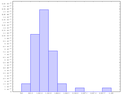
I've got my histogram almost where I want it:

Code:
\begin{center}
\begin{tikzpicture}
\begin{axis}[
  tiny,
  width=6in,
  ymin=0,
  ybar interval,
  ]
  \addplot+[hist={bins=10,density}]
    table[row sep=\\,y index=0] {
    	data \\
      565 \\ 786 \\ 870 \\ 923 \\ 948 \\ 951 \\ 964 \\ 968 \\
      997 \\1007 \\1013 \\1037 \\1040 \\1051 \\1056 \\1080 \\
     1088 \\1090 \\1102 \\1103 \\1104 \\1120 \\1151 \\1159 \\
     1165 \\1185 \\1189 \\1207 \\1216 \\1233 \\1251 \\1256 \\
     1261 \\1292 \\1312 \\1317 \\1347 \\1358 \\1385 \\1416 \\
     1477 \\1500 \\1514 \\1567 \\1592 \\1588 \\1615 \\1713 \\
     2325 \\3168 \\};
\end{axis}
\end{tikzpicture}
\end{center}

The one thing I want to change is where the $x$-axis labels are showing up. Instead of labeling the intervals (which I think is extremely confusing and unhelpful unless you give the range, which won't fit here), I want to label the boundaries between the intervals. How can I get pgfplots to do that? Thanks!
 
Physics news on Phys.org
Ackbach said:
Warning: requires the tikz and pgfplots packages.

I've got my histogram almost where I want it:

Code:
\begin{center}
\begin{tikzpicture}
\begin{axis}[
  tiny,
  width=6in,
  ymin=0,
  ybar interval,
  ]
  \addplot+[hist={bins=10,density}]
    table[row sep=\\,y index=0] {
        data \\
      565 \\ 786 \\ 870 \\ 923 \\ 948 \\ 951 \\ 964 \\ 968 \\
      997 \\1007 \\1013 \\1037 \\1040 \\1051 \\1056 \\1080 \\
     1088 \\1090 \\1102 \\1103 \\1104 \\1120 \\1151 \\1159 \\
     1165 \\1185 \\1189 \\1207 \\1216 \\1233 \\1251 \\1256 \\
     1261 \\1292 \\1312 \\1317 \\1347 \\1358 \\1385 \\1416 \\
     1477 \\1500 \\1514 \\1567 \\1592 \\1588 \\1615 \\1713 \\
     2325 \\3168 \\};
\end{axis}
\end{tikzpicture}
\end{center}

The one thing I want to change is where the $x$-axis labels are showing up. Instead of labeling the intervals (which I think is extremely confusing and unhelpful unless you give the range, which won't fit here), I want to label the boundaries between the intervals. How can I get pgfplots to do that? Thanks!
can you post a picture of what it looks like and what you want?
 
Sure. Here's a screenshot of a histogram produced by code very similar to what I posted.

View attachment 1947

Now you see the numbers on the horizontal axis - they're lined up with the intervals, and I find that rather ambiguous. I want to have numbers (they might be different from the ones currently showing) marking the boundaries of the intervals, not the intervals themselves, and I want the numbers aligned under the boundaries.

Does that further clarify what I'm after?
 

Attachments

  • Histogram.png
    Histogram.png
    2.5 KB · Views: 177
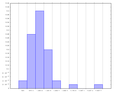
Hmm, you mean something like this?

View attachment 1948

[LATEXS]\documentclass{article}
\usepackage{tikz}
\usepackage{pgfplots}

\begin{document}
\begin{tikzpicture}
\begin{axis}[
width=6in,
ymin=0,
xtick=data,
]
\addplot[
ybar interval,
draw=black!60,
fill=blue!20,
mark=none,
] coordinates {
(750, 0.02) (1000, 0.16) (1250, 0.42) (1500, 0.24) (1750, 0.12) (2000, 0)
(2250, 0) (2500, 0.02) (2750, 0) (3000, 0) (3250, 0.02) (3500, 0.02)
};
\end{axis}
\end{tikzpicture}
\end{document}[/LATEXS]
 

Attachments

  • tikz_histogram.png
    tikz_histogram.png
    2.7 KB · Views: 168
Yes! Very nice, thank you! I don't suppose you can get TiKZ to to that automatically? (I know, I'm only asking for the moon, here.) I see you have to compute the values yourself, which is fine. But if TiKZ could compute those for me, that would be AWESOME.
 
Ackbach said:
Yes! Very nice, thank you! I don't suppose you can get TiKZ to to that automatically? (I know, I'm only asking for the moon, here.) I see you have to compute the values yourself, which is fine. But if TiKZ could compute those for me, that would be AWESOME.

The pgfmathparser can do calculations. Check out the manual.
 
Ackbach said:
Yes! Very nice, thank you! I don't suppose you can get TiKZ to to that automatically? (I know, I'm only asking for the moon, here.) I see you have to compute the values yourself, which is fine. But if TiKZ could compute those for me, that would be AWESOME.

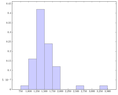
Mmmmh, suppose you remove the "ybar interval" so TikZ won't be confused which type of plot you want, and add "xtick=data" to indicate you want to use the x coordinates of the data as labels...

View attachment 1950

[LATEXS]\documentclass{article}
\usepackage{tikz, pgfplots}
\begin{document}
\begin{tikzpicture}
\begin{axis}[ tiny,
width=6in,
xtick=data,
ymin=0 ]
\addplot+[
hist={ bins=10, density },
fill=blue!20,
mark=none,
] table[ row sep=\\, y index=0 ] {
data \\ 565 \\ 786 \\ 870 \\ 923 \\ 948 \\ 951 \\ 964 \\ 968 \\
997 \\1007 \\1013 \\1037 \\1040 \\1051 \\1056 \\1080 \\
1088 \\1090 \\1102 \\1103 \\1104 \\1120 \\1151 \\1159 \\
1165 \\1185 \\1189 \\1207 \\1216 \\1233 \\1251 \\1256 \\
1261 \\1292 \\1312 \\1317 \\1347 \\1358 \\1385 \\1416 \\
1477 \\1500 \\1514 \\1567 \\1592 \\1588 \\1615 \\1713 \\
2325 \\3168 \\
};
\end{axis}
\end{tikzpicture}
\end{document}[/LATEXS]
 

Attachments

  • tikz_histogram2.png
    tikz_histogram2.png
    2.8 KB · Views: 152
I like Serena said:
Mmmmh, suppose you remove the "ybar interval" so TikZ won't be confused which type of plot you want, and add "xtick=data" to indicate you want to use the x coordinates of the data as labels...

View attachment 1950

[LATEXS]\documentclass{article}
\usepackage{tikz, pgfplots}
\begin{document}
\begin{tikzpicture}
\begin{axis}[ tiny,
width=6in,
xtick=data,
ymin=0 ]
\addplot+[
hist={ bins=10, density },
fill=blue!20,
mark=none,
] table[ row sep=\\, y index=0 ] {
data \\ 565 \\ 786 \\ 870 \\ 923 \\ 948 \\ 951 \\ 964 \\ 968 \\
997 \\1007 \\1013 \\1037 \\1040 \\1051 \\1056 \\1080 \\
1088 \\1090 \\1102 \\1103 \\1104 \\1120 \\1151 \\1159 \\
1165 \\1185 \\1189 \\1207 \\1216 \\1233 \\1251 \\1256 \\
1261 \\1292 \\1312 \\1317 \\1347 \\1358 \\1385 \\1416 \\
1477 \\1500 \\1514 \\1567 \\1592 \\1588 \\1615 \\1713 \\
2325 \\3168 \\
};
\end{axis}
\end{tikzpicture}
\end{document}[/LATEXS]

Better and better! The only catch with this is that according to my statistics book, it's not considered a good idea to have any data points fall directly on a boundary. Then it's confusing which bin that data point is supposed to be in. Now, if in the plot you gave, that only happens at the endpoints (possibly only one?), then I suppose that wouldn't be ambiguous. And if it does happen somewhere in the middle, maybe I could mitigate that by changing the number of bins. Does that sound reasonable?
 
Ackbach said:
Better and better! The only catch with this is that according to my statistics book, it's not considered a good idea to have any data points fall directly on a boundary. Then it's confusing which bin that data point is supposed to be in. Now, if in the plot you gave, that only happens at the endpoints (possibly only one?), then I suppose that wouldn't be ambiguous. And if it does happen somewhere in the middle, maybe I could mitigate that by changing the number of bins. Does that sound reasonable?

Pgfplots documentation says that each bin includes the left boundary and excludes the right boundary so there is no ambiguity. That is an interval of the type [a,b). As far as I'm concerned that is pretty standard.
That is with the exception of the rightmost bin that does include the right boundary, which is not ambiguous.
In this particular histogram both the leftmost bin and the rightmost bin have 1 data point on the boundary simply because the bins are bounded this way. That should be okay since there is no ambiguity.
Btw, my own preference is to assign bins on nice coordinates, as I did in the my first response.
 
  • #10
I like Serena said:
Pgfplots documentation says that each bin includes the left boundary and excludes the right boundary so there is no ambiguity. That is an interval of the type [a,b). As far as I'm concerned that is pretty standard.
That is with the exception of the rightmost bin that does include the right boundary, which is not ambiguous.
In this particular histogram both the leftmost bin and the rightmost bin have 1 data point on the boundary simply because the bins are bounded this way. That should be okay since there is no ambiguity.
Btw, my own preference is to assign bins on nice coordinates, as I did in the my first response.

Gotcha. Thanks very much, I like Serena and dwsmith! You've been very helpful.
 

Similar threads

  • · Replies 0 ·
Replies
0
Views
6K