Plot some 2d graphs in a 3d fashion

Click For Summary
SUMMARY

This discussion focuses on plotting 2D graphs in a 3D fashion using Excel and MATLAB, with a mention of gnuplot as an alternative. Users are advised to utilize the Chart Wizard in Excel to create line graphs, adjusting data points with specific offsets to achieve the desired 3D effect. For instance, applying an x-offset of -1 and a y-offset of +1 for the second curve, and doubling these offsets for subsequent curves, is recommended. Experimentation with formulas such as ROW() and COLUMN() is encouraged to automate the offset adjustments.

PREREQUISITES
  • Familiarity with Excel Chart Wizard
  • Basic understanding of MATLAB plotting functions
  • Knowledge of data manipulation in spreadsheets
  • Experience with formula functions like ROW() and COLUMN()
NEXT STEPS
  • Learn how to use gnuplot for 3D graphing
  • Explore advanced Excel charting techniques for 3D visualizations
  • Investigate MATLAB's 3D plotting capabilities
  • Study data offset techniques in spreadsheet applications
USEFUL FOR

This discussion is beneficial for data analysts, Excel users, and MATLAB programmers looking to enhance their graphing skills and create visually appealing 3D representations of 2D data.
Si14
Messages
75
Reaction score
0
Hi,

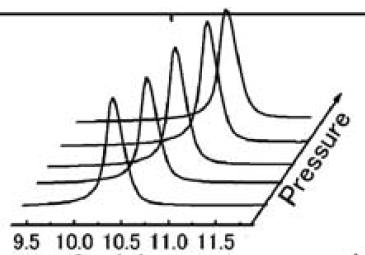
How can I plot some 2d graphs in a 3d fashion like the following picture using excel or matlab?

2Molf.jpg


Any idea is appreciated.
 
Physics news on Phys.org
gnuplot is easiest
 
I don't know how to work with gnuplot. If anyone knows how to plot these with excel/matlab, that would be great.
 
Different versions of Excel do things differently, so see if you can adapt this to yours.

You probably want the Chart Wizard to create a line graph, but before you do that you need to know what data you are going to graph.

Suppose your data points for your first curve are in A1:A10, your second curve are in B1:B10, your third curve are in C1:C10, etc. But you want to include an x and y offset for the second curve, double that offset for the third curve, etc. The offset you want to have will shift each curve up and to the right to give the 3D impression you are looking for. So for the second curve you substitute x-1 for every x (to shift it right) and you add 1 to the function (to shift it up). Then use -2 and +2 for the third curve, etc. This sounds like a lot of work. Maybe you can add constants to each of your cells to make this work. Or maybe there is a trick you might use. ROW() in a formula will give you the number of the row the cell is in, COLUMN() in a formula will give you the number of the column the cell is in. So if you insert ROW() or COLUMN() in your formulas in just the right places then you might be able to get each one offset by just what you need so that when you plot a Series of columns in Chart Wizard, one for each curve, it will give you your desired 3D effect.

Now you are probably going to have to experiment with this until you begin to see how to get it to do what you want. Start simple and make small changes until you hopefully see how to get this to do what you want
 
Brilliant. I didn't think about it that way. Thanks man.
 

Similar threads

  • · Replies 5 ·
Replies
5
Views
2K
  • · Replies 3 ·
Replies
3
Views
3K
  • · Replies 1 ·
Replies
1
Views
2K
  • · Replies 5 ·
Replies
5
Views
2K
  • · Replies 4 ·
Replies
4
Views
4K
  • · Replies 6 ·
Replies
6
Views
2K
  • · Replies 1 ·
Replies
1
Views
2K
  • · Replies 3 ·
Replies
3
Views
3K
  • · Replies 3 ·
Replies
3
Views
2K
  • · Replies 2 ·
Replies
2
Views
2K