| New Reply |
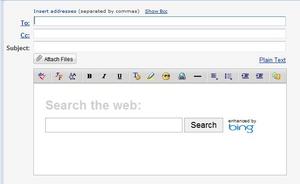
How do I get this out of my email? |
Share Thread | Thread Tools |
| Mar29-11, 02:53 AM | #1 |
| Mar29-11, 08:23 AM | #2 |
|
|
You want to be careful with that image hosting service, their popups just put me on an adult website. Naughty.
Personally, I'd say change supplier - but that's purely down to my own subtle dislike of Yahoo. It seems they're plugging advertising everywhere now. Just to confirm, do these boxes remain after you've typed an email? Have you checked the options menu? |
| Mar29-11, 12:52 PM | #3 |
|
|
|
| Mar29-11, 12:56 PM | #4 |
|
|
How do I get this out of my email? |
| Mar29-11, 08:52 PM | #5 |
|
|
The only way I can upload photos is to "login with facebook." I downloaded a program called "speedfan" because someone told me it would allow me to manually adjust the speed of the cooling fan on my CPU. Apparently it came with microsofts crap search engine "bing," which forcibly installed itself onto my computer. Now I cannot get it off my PC. I can't change the fan speed in my BIOS because the arrow keys don't work -- I cannot select options in my BIOS menu! |
| Mar29-11, 08:56 PM | #6 |
|
|
That bing thing would be on Yahoo itself, not speedfan. At least that's what it looks like. What have you tried to remove the Bing software? I'll have a look at this one. Could you give any more details? |
| Mar29-11, 09:14 PM | #7 |
|
|
I've also used speedfan in the past, it works pretty well as a temperature reader, but it's not the best.
The best in my opinion, is HWMonitor. I no longer use speedfan for anything, to control my fans I use an external fan controller. |
| Mar29-11, 09:37 PM | #8 |
|
|
I know there are motherboards which do have a built in system for allowing auto fan control, but again I prefer to just have them running consistently to avoid future problems. I'd assume the OP is trying to overclock, not something I'm particularly fond of myself but if people really feel the need then it's up to them. My philosophy on the matter: You can never have too much cooling. If you need more, install another fan. |
| Mar29-11, 11:33 PM | #9 |
|
|
But I digress. |
| Mar30-11, 01:46 AM | #10 |
|
|
However, the arrow keys in my BIOS menu do not work. Perhaps I can get rid of my bing problem in the account settings of yahoo mail? I'm going to try and see if I can do this right now. I used the MSI "OC genie" which overclocked my CPU to 3.4 GHz, I checked HWmonitor and it said my CPU was idling at roughly 50 *C. From what I've read, the ZALMAN CNPS9900 aftermarket cooler should handle 3.4 GHz and beyond quite easily. I need to up the speed in order to bring the idle temps to (ideally) +/- 40 *C. |
| Mar30-11, 02:22 AM | #11 |
|
|
Confirm that your arrow keys work within an OS environment. It could be a problem with your keyboard.
50C idling for any CPU at 3.4 GHz is quite high. If turning up the fan speed doesn't fix this problem then your CPU heatsink is not properly seated. If I were you I would get a 3pin fan connector to molex adapter and plug the fan into a molex power cable to see what temperature 100% fan speed gives you and to ensure that the fan functions properly. Ideally you should have CPU temps in the 30C range, I would be looking for case problems if it only came down 10C. Stuff like bad airflow(can be caused by bad cable management), or another component pumping hot air onto your CPU heatsink. I'm thinking about your heatsink not being properly seated and while I don't want to rule that out as a possibility, I am going to rule it unlikely. In my experience with bad seatings, the temperatures are usually a little higher than 50C, more so around the 65-70 range. |
| Mar30-11, 03:55 AM | #12 |
|
|
I fixed the problem with my email, I upgraded to the new yahoo email interface. The MSI OC genie adds more voltage to the CPU than it needs to be stable. This results in higher temperatures. |
| Mar30-11, 07:15 AM | #13 |
|
|
Overclocking simply allows you to increase the processor performance a bit by increasing power use, this in turn generates more heat (as you're aware) but it only does so when it's drawing said power, not when it's ticking over or doing simple tasks. Just check regarding your bios, my laptop has a mouse and doesn't use the arrow keys. It isn't obvious from the outset so check it out. If you need more cooling, add more fans. |
| Mar30-11, 07:19 AM | #14 |
|
|
You see, you've done what I dislike. You've turned the CPU fan down plus during an OC - which is all well and good as long as you have enough cooling. Noise can be handled by buying a better fan. |
| Mar30-11, 12:48 PM | #15 |
|
|
But you won't notice a difference even with a significantly higher benchmark in an OS environment; when I first got the CPU I was messing with it and I got it up to 4.2GHz. The only places where I noticed the differences were in my benchmarks and some games. That was a very sketchy overclock though; during some benchmarks I was running at 84C. The TJ max for my CPU is 100C so that is within spec, but it sure doesn't make you feel good about it. Right now my CPU fan is turned down the way I like it and it is running at 31C. Just to see how hot it gets I booted up the most intensive game I have (Crysis) and ran it for a couple minutes, it recorded a max temperature of 51C, which I think is quite acceptable. One of the things I plan to do this summer is replace all my fans with low noise ones, Noctua makes absolutely brilliant fans. I recently did a build that included those fans, they move more air than mine do, and the are absolutely silent other than some white noise that fades away after moving a couple feet away from the PC. |
| Mar30-11, 12:52 PM | #16 |
|
|
I think mine has only ever got to 60C when I was encoding a video and running an online flash video. |
| Mar30-11, 12:58 PM | #17 |
|
|
As for the problem with your arrow keys not working in your BIOS, try resetting the CMOS and see if that helps.
IMPORTANT: If you do this, you will be losing all your BIOS settings, including your overclocks. Be warned. |
| New Reply |
| Thread Tools | |
Similar Threads for: How do I get this out of my email?
|
||||
| Thread | Forum | Replies | ||
| HELP,Please.. What does this Email mean? | Academic Guidance | 5 | ||
| Help with Email!!! | Forum Feedback & Announcements | 4 | ||
| DDT email! | General Discussion | 0 | ||
| What's up with the email? | Forum Feedback & Announcements | 1 | ||