zak100
- 462
- 11
Hi,
I am getting color problems when I increase the size of applet & also when I try to superimpose one object on top of other. For instance, this triangle vanishes when I increase the size of applet to full screen.
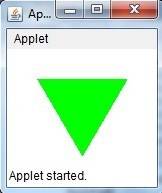
I can't understand how to display the object when the applet is full screened.
Similarly I am getting the following output when I am drawing a Green applet over the red applet

Somebody please guide me.
Zulfi.
I am getting color problems when I increase the size of applet & also when I try to superimpose one object on top of other. For instance, this triangle vanishes when I increase the size of applet to full screen.
I can't understand how to display the object when the applet is full screened.
Similarly I am getting the following output when I am drawing a Green applet over the red applet
Java:
import java.applet.Applet;
import java.awt.*;
import javax.swing.*;
import java.awt.image.*;
import javax.imageio.ImageIO;
import java.io.*;

public class TwoEqTriColor extends Applet{
int ix1=30;
int iy1=30;
int ix2=120;
int iy2=30;
int ix1r=25;
int ix2r=120;
int iy1r=69;
int iy2r=5;
int ix3=75;
int iy3=107;
Polygon poly = new Polygon();
public  void paint(Graphics g) {
        g.setColor(Color.RED);
        poly.addPoint(ix1r,iy1r);
        poly.addPoint(ix2r,iy2r);
        poly.addPoint(ix3,iy3);
        g.fillPolygon(poly);

        g.setColor(Color.GREEN);
        poly.addPoint(ix1,iy1);
        poly.addPoint(ix2,iy2);
        poly.addPoint(ix3,iy3);
        g.fillPolygon(poly);
    }
}
Somebody please guide me.
Zulfi.