AT-AT Model V2.0: Improved Design and Detailing in Blender

  • Thread starter Thread starter Janus
  • Start date Start date
  • Tags Tags
    Model
Click For Summary
SUMMARY

The discussion centers on the enhanced design and detailing of the AT-AT model version 2.0 created in Blender, showcasing significant improvements over version 1.0. Key features include the addition of a "cannon bolt" using Blender's compositing tools and the ability to pose the model for animation, which was not possible in the earlier version. The user highlights the advantages of Blender's integrated video editor, which simplifies the process of syncing audio and video, allowing for seamless scene transitions. Overall, the advancements in Blender have empowered the creator to produce more complex animations and video content efficiently.

PREREQUISITES
  • Familiarity with Blender 3D modeling software
  • Understanding of Blender's compositing features
  • Knowledge of animation techniques within Blender
  • Experience with video editing concepts and tools
NEXT STEPS
  • Explore Blender's compositing features in depth
  • Learn about character rigging and posing in Blender
  • Investigate advanced animation techniques in Blender
  • Study Blender's video editing capabilities for seamless transitions
USEFUL FOR

This discussion is beneficial for 3D artists, animators, and video editors looking to enhance their skills in Blender, particularly those interested in character modeling and animation workflows.

Janus
Staff Emeritus
Science Advisor
Homework Helper
Insights Author
Gold Member
Messages
3,752
Reaction score
1,966
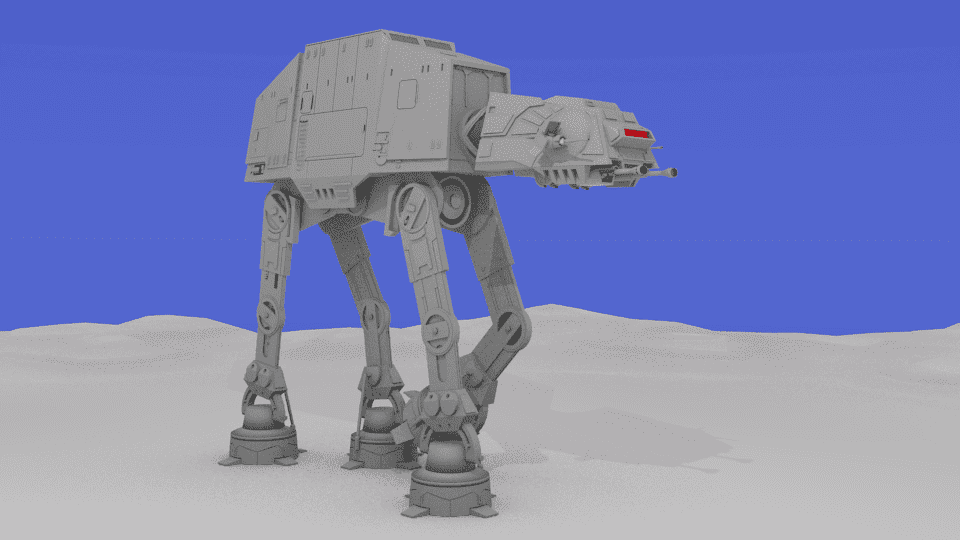
A bit over two years ago I began using Blender on a more regular basis for doing 3-D modeling.
One of the first models I did was of an AT-AT from the Star Wars movies. This is the result:
at-at2.png


In the time since, I've honed my skills some, learned a bit more about Blender, and picked up a couple of tricks. So I decided to revisit the AT-AT.

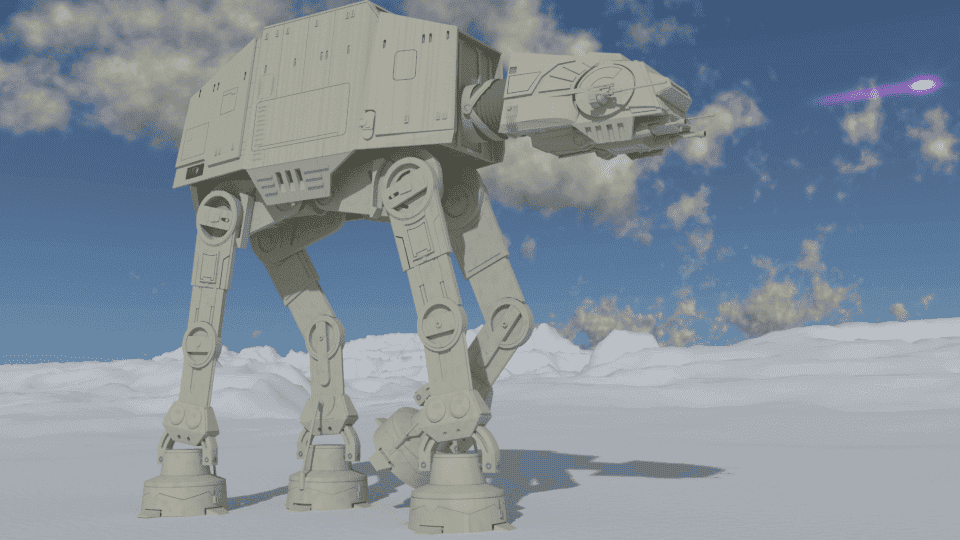
This resulted in version 2.0:
atat_cycles_1png.png

The "cannon bolt" was added with the compositing feature In Blender.

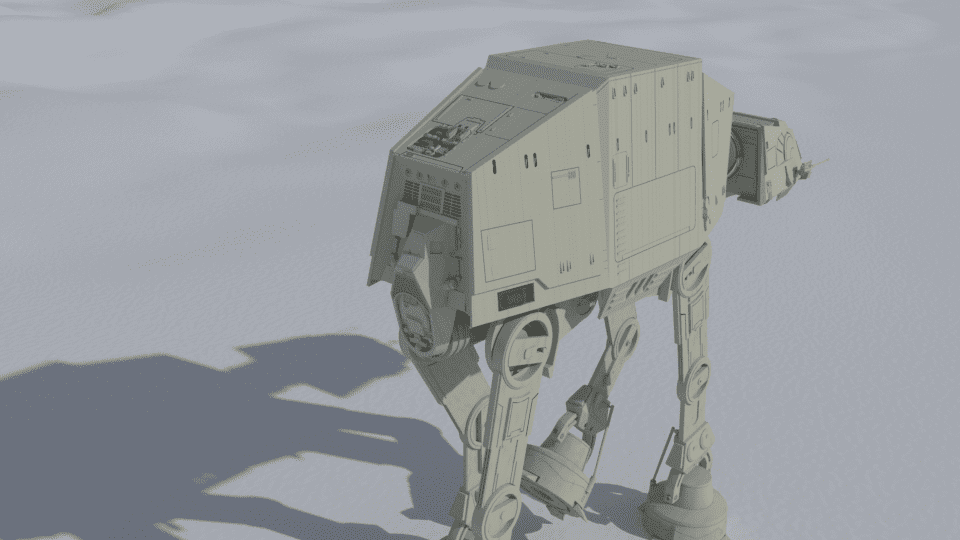
Since I also added some extra detailing to this model that is not visible in this view, I rendered a additional camera angle for the model:
atat_cycles_2.png

Now, I am obviously biased, but in my own humble opinion, version 2.0 is a marked improvement over version 1.0
 
  • Like
  • Love
Likes jim mcnamara, dlgoff, Ibix and 5 others
Science news on Phys.org
Today’s software tools are so awesome when in the hands of a master artist. Thanks for sharing your work!
 
  • Like
Likes dlgoff
One shortcoming to my original render is that the model did not lend itself to animation (When I made it, i hadn't yet delved into that aspect of Blender).
With version 2.0, I took this in mind. Thus this model can be "posed" to create animation frames, as demonstrated by this short video clip:
https://youtu.be/naaj8OC0VY0
 
  • Like
Likes Ibix
Having purchased a new, faster computer since my last post on this thread, I once again re-visited this model, focusing on the animation. The reduced frame render times made creating a longer video something I was more tempted to give a go. This particular one makes use of the same AT-AT animation set up, but simply rendered with different "camera angles". I also included some animation clips of a snow-speeder model I already had done.
Another excuse for doing this was to get a feel for the video editor that comes with Blender. Prior to this, I'd render the frames with Blender, assemble them into a AVI video file with one piece of software, then export this to another which allowed me to add a soundtrack( which I has assembled with yet another software package.) it was a bit of a hassle, particularly with getting the sound and video sync.

Blender's video editor has made this a lot easier, and makes me wish I had started using it sooner.
It allows you to set down multiple sound tracks, which can be cut, moved, etc. The volume and pitch can also be altered using the same key frame method used for animation. Thus using just one single constant sound clip for the Snow-speeder, I was able to create a fly-by effect without ever leaving Blender.

In addition, Blender allows for a more seamless scene transition effect. With the video editor I was using before, you could do a fade-in and fade-out, but it only made the transition from still frame to still frame. Blender let's you fade from scene to scene with the animation from both scenes running during the transition.

So, without further ado, here's what I came up with. Not exactly a fully fleshed-out battle for Hoth, but a start.

 
  • Like
  • Love
Likes berkeman, Keith_McClary, DennisN and 1 other person
That’s sweet!

Its only a matter of time before I die film means someone spins off a full fledged movie on his/her personal computer.
 
jedishrfu said:
That’s sweet!

Its only a matter of time before I die film means someone spins off a full fledged movie on his/her personal computer.
It wouldn't have been too long ago, that if someone had told me that someday I would be able to do something like this at home, on my own computer, with free software, I would not have believed it.
 
  • Like
Likes jedishrfu and BillTre
Teller of Penn and Teller has credited their being able to produce the movie "Tim's Vermeer" (2013) to the existence of modern video and computer video editing techniques.
It has made things faster and cheaper.
Here is a discussion of the film's making. Teller speaks!
 
  • Like
Likes jedishrfu
BillTre said:
Teller speaks!
I've spoken to Teller.
 
  • Haha
  • Love
Likes jedishrfu and BillTre
Vanadium 50 said:
I've spoken to Teller.
Did he talk back?
 
  • Love
Likes Vanadium 50
  • #10
He did. In Latin. One of the very few times I spoke it outside a classroom.
 
  • Like
Likes BillTre

Similar threads

Replies
7
Views
3K
  • · Replies 27 ·
Replies
27
Views
4K
  • · Replies 26 ·
Replies
26
Views
5K
  • · Replies 0 ·
Replies
0
Views
2K
Replies
5
Views
3K
  • · Replies 1 ·
Replies
1
Views
3K
  • · Replies 7 ·
Replies
7
Views
3K
Replies
10
Views
5K
Replies
2
Views
624
Replies
2
Views
4K