- 2,188
- 2,694
For merging columns, I generally use the
The above combination works great if there is no separator in any of the merged columns. If, however, one or more columns have separators, the code breaks.
Consider the following code snippet:
[CODE title="LaTeX"]\begin{table}[h]
\centering
\begin{tabular}{|l|c c c|c c c c|}
\hline
col1 & col2 & col3 & col4 & col5 & col6 & col7 & col8\\
\hline
row1 & j & k & l & x & y & z & aa\\
row2 & \multicolumn{7}{c|}{\multirow{3}{*}{a very long sentence that I want to type}}\\
row3 & & & & & & & \\
row4 & & & & & & & \\
row5 & q & r & s & t & u & v & bb \\
\hline
\end{tabular}
\end{table}[/CODE]
And I get the following output:
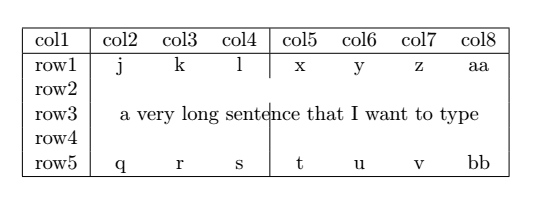
What I wanted is that the long text will be placed in the middle of rows 2 to 4, and the separator will be removed by at that point.
What ##\LaTeX## is doing instead is that
I can do this "manually" by positioning the text at the correct position myself instead of using
[CODE title="LaTeX"]\begin{table}[h]
\centering
\begin{tabular}{|l|c c c|c c c c|}
\hline
col1 & col2 & col3 & col4 & col5 & col6 & col7 & col8\\
\hline
row1 & j & k & l & x & y & z & aa \\
row2 & & & & & & & \\
row3 & \multicolumn{7}{c|}{a very long sentence that I want to type} \\
row4 & & & & & & & \\
row5 & q & r & s & t & u & v & bb \\
\hline
\end{tabular}
\end{table}[/CODE]
This gives the following table:
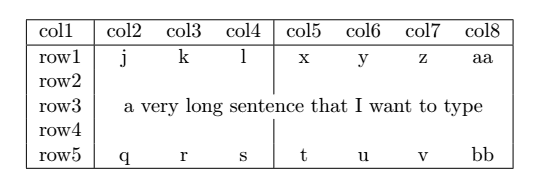 which is what I wanted.
Is there any better way of merging rows and columns in these cases?
multicolumn command, while for merging rows, I use the multirow command from the multirow package.The above combination works great if there is no separator in any of the merged columns. If, however, one or more columns have separators, the code breaks.
Consider the following code snippet:
[CODE title="LaTeX"]\begin{table}[h]
\centering
\begin{tabular}{|l|c c c|c c c c|}
\hline
col1 & col2 & col3 & col4 & col5 & col6 & col7 & col8\\
\hline
row1 & j & k & l & x & y & z & aa\\
row2 & \multicolumn{7}{c|}{\multirow{3}{*}{a very long sentence that I want to type}}\\
row3 & & & & & & & \\
row4 & & & & & & & \\
row5 & q & r & s & t & u & v & bb \\
\hline
\end{tabular}
\end{table}[/CODE]
And I get the following output:
What I wanted is that the long text will be placed in the middle of rows 2 to 4, and the separator will be removed by at that point.
What ##\LaTeX## is doing instead is that
multicolumn is merging all the columns in row2, and then multirow is positioning the text somewhere in the middle. So, the point where the separator is removed is not the place where the text is placed.I can do this "manually" by positioning the text at the correct position myself instead of using
multirow to do that:[CODE title="LaTeX"]\begin{table}[h]
\centering
\begin{tabular}{|l|c c c|c c c c|}
\hline
col1 & col2 & col3 & col4 & col5 & col6 & col7 & col8\\
\hline
row1 & j & k & l & x & y & z & aa \\
row2 & & & & & & & \\
row3 & \multicolumn{7}{c|}{a very long sentence that I want to type} \\
row4 & & & & & & & \\
row5 & q & r & s & t & u & v & bb \\
\hline
\end{tabular}
\end{table}[/CODE]
This gives the following table:
Is there any better way of merging rows and columns in these cases?