Change default MathJax renderer in Insights to Common HTML

  • Context: Complaint 
  • Thread starter Thread starter Wrichik Basu
  • Start date Start date
Join the discussion
Registration is free. Ask a follow-up in this thread, or start your own.
6 replies · 2K views
Science Advisor
Insights Author
Gold Member
Messages
2,188
Reaction score
2,694
I was reading Demystifier's recent insight post, when I found that all the inline equations were overlapping with each other and were not quite readable:

Screenshot_20190219-193336.png


While on PC it is quite easy to change the MathJax renderer, on mobile, it is not. You have to go on tapping and hope that the MathJax options come up.
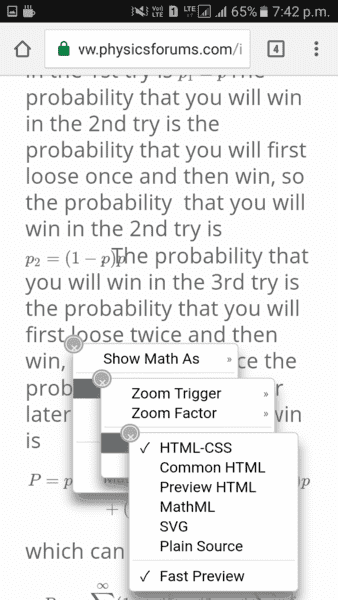
Screenshot_20190219-194211.png


Can the default MathJax renderer be changed to Common HTML, similar to what it is in the main forums?
 

Attachments

  • Screenshot_20190219-193336.png
    Screenshot_20190219-193336.png
    32.6 KB · Views: 566
  • Screenshot_20190219-194211.png
    Screenshot_20190219-194211.png
    27.6 KB · Views: 352
Physics news on Phys.org
Greg Bernhardt said:
hmmm what OS and browser are you using? In my tests it works fine. The config should be the same as the forums.
OS is Android 6.0.1, and browser is Chrome.
 
Looks OK under Android 8.0.0 (both Chrome and whatever browser S7 uses as a default one).
 
  • Like
Likes   Reactions: Greg Bernhardt
The LaTeX looks fine on my phone (Android 9, Chrome 72.0.3626.105)
2019-02-19 09.26.29.png


Maybe it has to do with the larger text size on the OP's phone.
 

Attachments

  • 2019-02-19 09.26.29.png
    2019-02-19 09.26.29.png
    28.6 KB · Views: 347
  • Like
Likes   Reactions: Greg Bernhardt
Ygggdrasil said:
Maybe it has to do with the larger text size on the OP's phone.
I changed the text scaling recently to about 150% from the previous 100%. It could be a result of that.