FFT of conjugate doesn't coincide exactly at the negative frequency

Click For Summary
SUMMARY

The discussion centers on the issue of a one-pixel shift observed in the Fast Fourier Transform (FFT) of the conjugate spectrum of a signal in MATLAB. Users identified that the combination of MATLAB's fftshift() and flip() functions leads to this discrepancy, particularly affecting the zero-frequency value's position. The original poster resolved the issue by correctly defining the frequency axis to include the zero frequency point, allowing the spectra to intersect at the expected location. This adjustment corrected the visualization of the conjugate spectrum.

PREREQUISITES
  • Understanding of FFT and its properties
  • Familiarity with MATLAB programming and its functions
  • Knowledge of signal conjugation in the frequency domain
  • Basic concepts of signal processing and spectral analysis
NEXT STEPS
  • Explore MATLAB's fftshift() function and its implications on frequency domain representations
  • Learn about the effects of signal conjugation on FFT results
  • Investigate the role of axis definitions in plotting frequency domain data
  • Examine potential rounding errors in numerical computations within MATLAB
USEFUL FOR

Signal processing engineers, MATLAB users, and researchers analyzing frequency domain characteristics of signals will benefit from this discussion.

tworitdash
Messages
104
Reaction score
25
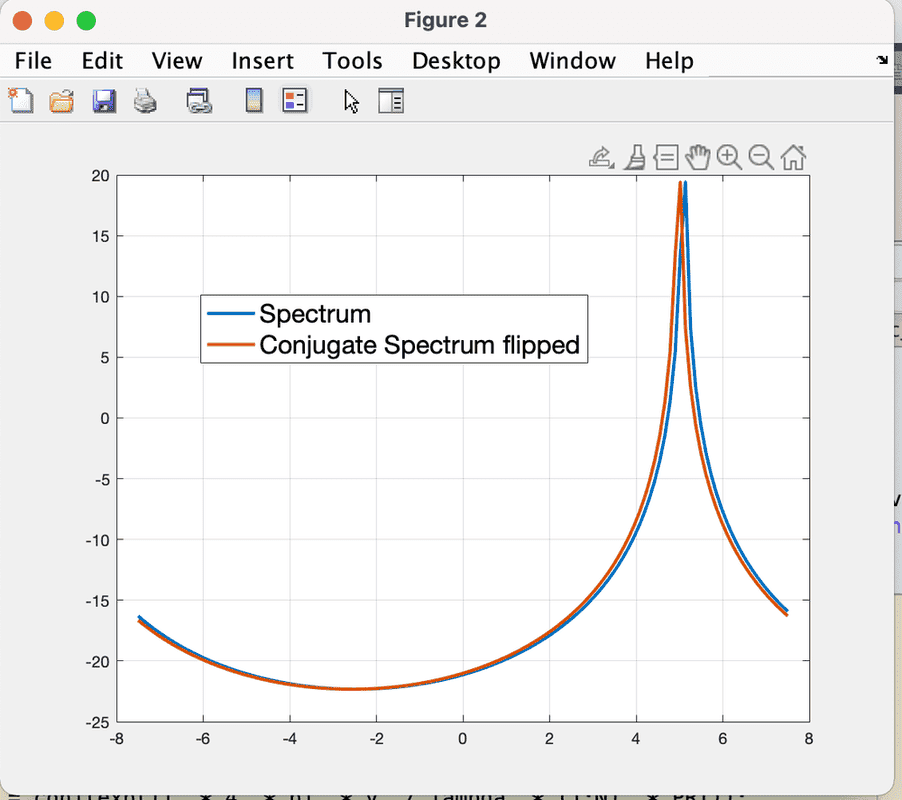
I am trying to understand why the conjugate of a signal in the time domain doesn't produce an exact flip of the frequency domain spectrum. There is always a one-pixel shift in the result.
image.png

The MATLAB code is shown below. I use a flip for the conjugate spectrum to show that it doesn't match the original spectrum and there is a delay of one resolution cell. I want to understand why this happens. It shouldn't as it is the perfect conjugate.

[CODE lang="matlab" title="MATLAB code for fft of the conjugate"][/CODE]
 
Physics news on Phys.org
Try comparing the numbers of the two curves to see if they are shifted too.

it could be a graph thing to show that there are two curves vs one curve completely overwriting the other curve.

One could also draw two sin or lines or parabolic curves and see if the graph exhibits the same one pixel shift.

upon resizing the graph is it the same one pixel shift?
 
  • Like
Likes   Reactions: tworitdash
The code looks very compact to me .. :biggrin:

##\ ##
 
  • Like
Likes   Reactions: tworitdash
jedishrfu said:
Try comparing the numbers of the two curves to see if they are shifted too.

it could be a graph thing to show that there are two curves vs one curve completely overwriting the other curve.

One could also draw two sin or lines or parabolic curves and see if the graph exhibits the same one pixel shift.

upon resizing the graph is it the same one pixel shift?
The graph has no issue at all. I have tested with Gaussian pulse in the frequency domain as well. It also has the same pixel shift. It is the issue of the conjugate. It shouldn't be like this. Probably something with the DC value which remains in the positive frequency always. I don't know. For simplicity, I used a monochromatic signal here. I usually do it with a Gaussian spectrum.
 
BvU said:
The code looks very compact to me .. :biggrin:

##\ ##
Sorry! Now I can't edit the original post now. So, pasting the code here.
Matlab:
v_max = 7.5;
v = 5;
N = 128;
PRT = 1e-3;
lambda = 0.03;
vel_axis = linspace(-v_max, v_max, N);

x = exp(1j .* 4 .* pi .* v ./ lambda .* (1:N) .* PRT);

x_conj = conj(exp(1j .* 4 .* pi .* v ./ lambda .* (1:N) .* PRT));

x_fft = 1/sqrt(N) .* fftshift(fft(x, N));
x_conj_fft = 1/sqrt(N) .* fftshift(fft(x_conj, N));
figure; plot(vel_axis, db(abs(x_fft)), 'LineWidth', 2); hold on; plot(vel_axis, flip(db(abs(x_conj_fft))), 'LineWidth', 2);grid on;
the original post. So, I am pasting the code here.
 
Last edited by a moderator:
The reason you couldn't edit your code is due to it not being pasted in the original post that's why @BvU commented on its compactness.

There is a time limit also that comes into play for post editing.
 
  • Like
Likes   Reactions: tworitdash
Did you compare the data by printing it to see if it's identical?

Rounding error could be happening too.
 
  • Like
Likes   Reactions: tworitdash
tworitdash said:
The graph has no issue at all. I have tested with Gaussian pulse in the frequency domain as well. It also has the same pixel shift. It is the issue of the conjugate. It shouldn't be like this. Probably something with the DC value which remains in the positive frequency always. I don't know. For simplicity, I used a monochromatic signal here. I usually do it with a Gaussian spectrum.

I think their point was, if you draw the same plot twice, does it graphically show them slightly offset just to be helpful.
 
  • Like
Likes   Reactions: tworitdash
Office_Shredder said:
I think their point was, if you draw the same plot twice, does it graphically show them slightly offset just to be helpful.
Thank you for clarifying. No, if I use the same plot twice, they perfectly coincide with each other. There is no shift.
 
  • #10
jedishrfu said:
Did you compare the data by printing it to see if it's identical?

Rounding error could be happening too.
In the time domain yes, they both are perfect conjugate. However, after applying FFT to the original and to the conjugate, I see different values indeed.
 
  • #11
Perhaps this is something you could ask the MATLAB folks about As it seems it may be a subtle flaw in their computational library.

When I said compare the two curves, I meant a point by point comparison to see how significantly different they are. I don’t doubt you that they should be the same but computer math is limited in subtle ways.

If it were a constant x or y difference then you could look to see what is causing it. However, if the difference varies from point to point then that seems to be some other kind of computational issue.
 
  • Like
Likes   Reactions: tworitdash
  • #12
The problem is the combination of MATLAB's flip() and fftshift() functions.

After fftshift, the zero-frequency value is position 65 in the array indexed 1:128. After you flip, the zero-frequency is in position 64.
 
  • Like
  • Wow
Likes   Reactions: tworitdash, BvU and jedishrfu
  • #14
DrGreg said:
The problem is the combination of MATLAB's flip() and fftshift() functions.

After fftshift, the zero-frequency value is position 65 in the array indexed 1:128. After you flip, the zero-frequency is in position 64.
Thank you for the answer. My problem was indeed not the flip function. I just used flip to see if they coincide and it was indeed a bad choice as you pointed out.

However, my issue was more about the conjugate spectrum. Even without flip, you can see that both the spectra don't intersect each other exactly at 0. Screenshot attached. It is exactly one pixel after 0. That is why their peaks aren't exactly symmetric. You can see the values of abscissa at the peaks in the picture.

Screen Shot 2021-04-29 at 10.55.38 PM.png


I found the fix actually. I was so dumb to use the frequency (velocity) axis wrong for the fftshift. It didn't include the zero frequency point at all. Now I define the axis like this.

[CODE lang="matlab" title="Axis for Doppler"]Axis = linspace(-N/2, N/2-1, N)/N;
vel_axis = 2 .* v_amb .* Axis; [/CODE]

Now, here you can see the modified one with this velocity axis. They cross each other now at 0 velocity point.

Screen Shot 2021-05-01 at 7.00.44 PM.png
 
  • Like
Likes   Reactions: BvU and DrGreg

Similar threads

  • · Replies 4 ·
Replies
4
Views
1K
  • · Replies 4 ·
Replies
4
Views
4K
  • · Replies 3 ·
Replies
3
Views
3K
  • · Replies 1 ·
Replies
1
Views
2K
  • · Replies 11 ·
Replies
11
Views
4K
  • · Replies 4 ·
Replies
4
Views
5K
  • · Replies 5 ·
Replies
5
Views
3K
  • · Replies 6 ·
Replies
6
Views
5K
Replies
1
Views
6K
  • · Replies 3 ·
Replies
3
Views
7K