High pass filtering FFT2 matlab

  • Context: MATLAB 
  • Thread starter Thread starter Taylor_1989
  • Start date Start date
  • Tags Tags
    Image processing Matlab
Click For Summary

Discussion Overview

The discussion revolves around implementing a high pass filter in MATLAB using the Fast Fourier Transform (FFT) to process an image. Participants are addressing issues related to code errors, image size compatibility, and the effectiveness of the filtering approach.

Discussion Character

  • Technical explanation
  • Debate/contested
  • Mathematical reasoning

Main Points Raised

  • One participant describes their approach to using a low pass filter matrix and subtracting it from the original image, but encounters size mismatch errors when attempting to use the imsubtract function.
  • Another participant suggests checking the sizes of the images involved in the subtraction and resizing one image to match the other, indicating that class types may also be an issue.
  • A later reply mentions that the images were the same size but had different classes, leading to unexpected outcomes when subtracting them, and questions the appropriateness of the kernel used.
  • Another participant proposes changing pixel values in the frequency domain to zero as a potential solution and shares their code for cropping and modifying the image.
  • One participant reflects on the mathematical aspect of the filtering process, suggesting that using the identity matrix minus the filter could yield a high-pass filter, while also questioning the effectiveness of the simple rectangle filter as a low-pass filter.

Areas of Agreement / Disagreement

Participants express differing views on the effectiveness of the filtering method and the appropriateness of the kernel used. There is no consensus on the best approach to resolve the issues presented.

Contextual Notes

Participants note limitations related to image size compatibility and class types, as well as the potential inadequacy of the chosen low-pass filter for optimal results.

Taylor_1989
Messages
400
Reaction score
14
I am having a slight issue with my code and honestly cannot understand what I am doing wrong. I am currently trying to using a high pass filter in the frequency domain to form the following image.
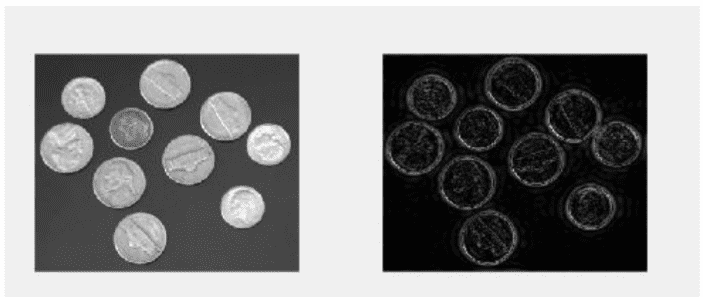
lf.png


So my approach so far after numerous of attempts which I won't list as I believe I am on the correct path, is to use a low pass filter matrix and then subtract from the original image, the issue is I cannot subtract due to the matrix of the low pass filter image being different from the original.

Code:
%reading in the image
A=imread('coins.png');
%applying fouire transform shift to zero postion and fouire transform for
%2D
D = fftshift(fft2(A));
%defing the filter, Low pass filter
h = (1/9).*[1,1,1;1,1,1;1,1,1];
%apllying filter to the frequency domain
B1=filter2(h1,D);
B1 = uint8(round(B1));
G=ifft2(B1);
imshow(log(abs(G)))

The image being produced from this code is shown below
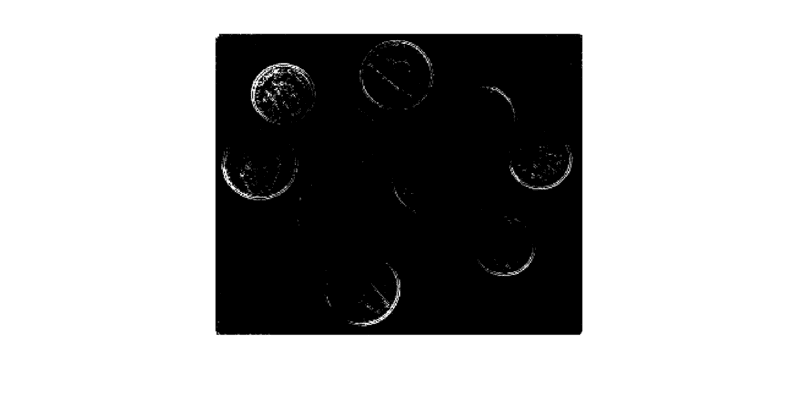
coins.png

But when I run the code to subtract the I get the error code:

Code:
%reading in the image
A=imread('coins.png');
%applying fouire transform shift to zero postion and fouire transform for
%2D
D = fftshift(fft2(A));
%defing the filter, Low pass filter
h = (1/9).*[1,1,1;1,1,1;1,1,1];
%apllying filter to the freqencey domian
B1=filter2(h1,D);
B1 = uint8(round(B1));
G=ifft2(B1);
E=imshow(log(abs(G)))
J = imresize(A,[246 300])
imsubtract(J,E)

Error code

Error using imsubtract (line 52)
X and Y must have the same size and class, or Y must be a scalar double.

Error in signla (line 84)
imsubtract(J,E)

As you can see I have tried to make the images the same size yet it still is not working and I am at a slight loss to why.
 

Attachments

  • lf.png
    lf.png
    25 KB · Views: 1,538
  • coins.png
    coins.png
    5.4 KB · Views: 1,114
Physics news on Phys.org
I don't see where you've tried to make E be 246 x 300 or guaranteed that it has that size, so I'm not sure why that's your argument in the resize.

Two suggestions:
1. Put a breakpoint just before the IMSUBTRACT. Manually check size(J) and size(E).

2. Instead of using constants for the argument on that second-to-last line, do this: J = imresize(A, size(E))
 
RPinPA said:
I don't see where you've tried to make E be 246 x 300 or guaranteed that it has that size, so I'm not sure why that's your argument in the resize.

Two suggestions:
1. Put a breakpoint just before the IMSUBTRACT. Manually check size(J) and size(E).

2. Instead of using constants for the argument on that second-to-last line, do this: J = imresize(A, size(E))

I have found that the images were of the same size but the class was not however when I subtract the images the outcome is not what is expected. So this leads me to either my method is wrong in the fact that I am using the wrong kernel or the enitre program is incorrect.

here is my code
Code:
%reading in the image
A=imread('coins.png');
%figure;imagesc(A);colormap gray;colorbar;
%applying fouire transform shift to zero postion and fouire transform for
%2D
D = fftshift(fft2(A));
%defing the filter, Low pass filter
h = (1/9).*[1,1,1;1,1,1;1,1,1]
%apllying filter to the freqencey domian
B1=filter2(h1,D);
B1 = uint8(round(B1));
G=ifft2(B1);
E=(log((abs(G))));
%figure;imagesc(E);colormap gray;colorbar
%figure;imagesc(double(A)-E);colormap gray;colorbar
I2=im2double(A);
k=imsubtract(I2,E)
imshow(k)

ignore the comment out parts I was trying something, so I am not sure where to go from here. Any suggestions?
 
Last edited:
I have come to the conclusion that what I need to do is actually come how change the pixel values in the frequency domain to 0.

Here is my code but I can seem to get the values back into the image.

Code:
%reading in the image
A=imread('coins.png');
%figure;imagesc(A);colormap gray;colorbar;
%applying fouire transform shift to zero postion and fouire transform for
%2D
D = fftshift(fft2(A));
E=log((abs(D)))
I=imagesc(E);colormap gray
%imcrop(I)
K=imcrop(E,[137.5,106.5,24,32])
imshow(K)
K(K<20)=0
imshow(K)
 
Last edited:
Unfortunately I don't have a copy of Matlab to experiment with at the moment. But here's my thought about the mathematics of what you're doing. You want to apply filter D to image A, ##DA##. And then subtract that from the original image, ##A - DA = (1 - D)A## where "1" means the identity matrix.

So maybe you might try 1 - D as your high-pass filter? Or in Matlab, eye(3) - D?

BTW, this simple rectangle filter is probably not an optimal low-pass filter anyway. The FFT is a sinc function which has long tails, meaning it will leave a lot of high frequencies.
 

Similar threads

  • · Replies 1 ·
Replies
1
Views
2K
  • · Replies 5 ·
Replies
5
Views
6K
  • · Replies 1 ·
Replies
1
Views
6K
  • · Replies 1 ·
Replies
1
Views
3K
  • · Replies 8 ·
Replies
8
Views
1K
  • · Replies 1 ·
Replies
1
Views
4K
  • · Replies 2 ·
Replies
2
Views
26K
  • · Replies 8 ·
Replies
8
Views
3K
  • · Replies 1 ·
Replies
1
Views
3K
  • · Replies 11 ·
Replies
11
Views
3K