My Solution Explorer Changed Again - What Did I Do?

  • Thread starter Thread starter yungman
  • Start date Start date
Click For Summary
The user experienced an issue where their Solution Explorer displayed "Inventory (unloaded)" and lost visibility of files in the project. Despite the files being present in the project structure, the compiler could not locate Inventory.h. After experimenting, the user moved Inventory.h from the Header Files folder to the Source Files folder, which resolved the missing file error but still left other errors present. The discussion highlights confusion regarding file organization in Visual Studio and the implications of file placement on compilation. Ultimately, the user seeks clarity on whether relocating the header file is appropriate.
yungman
Messages
5,741
Reaction score
294
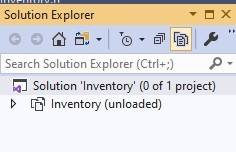
I was working on a program and for whatever reason my Solution Explorer change again. Now when I toggle to Inventory.sln, this is what I have:
Solution Explorer sln.jpg
It said Inventory(unloaded). I had Header Files and Source Files with all the files in them, now it's gone.

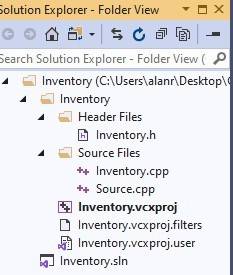
When I toggle to the other view, the files are still there:
Solution Explorer other.jpg


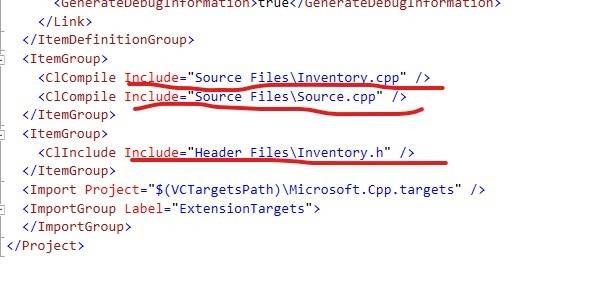
I don't know what I did to make it like this and I don't know how to get it back. Please help.Also I created the project Inventory, I use Add-->New to add Inventory.h, Inventory.cpp and source.cpp. But it still it complains it cannot fine Inventory.h. Here is the printout of part of the Inventory.vcxproj that show they are all there:
Inventory.vcxproj.jpg

Please advice.

Thanks
 
Technology news on Phys.org
I have been experiment and reading, I have not seen any objection to put the header file Inventory.h in Source Files folder instead of Header Files folder. So I deleted the Inventory.h from the Header Files folder and Add-->New to create Inventory.h into Source Files folder. It seem to work ( of cause I still have errors, but it doesn't complain not finding the Inventory.h anymore).

Anything wrong with this? I have no idea why the compiler cannot find Inventory.h when it was in Header Files folder.

Thanks
 
I tried a web search "the loss of programming ", and found an article saying that all aspects of writing, developing, and testing software programs will one day all be handled through artificial intelligence. One must wonder then, who is responsible. WHO is responsible for any problems, bugs, deficiencies, or whatever malfunctions which the programs make their users endure? Things may work wrong however the "wrong" happens. AI needs to fix the problems for the users. Any way to...

Similar threads

Replies
10
Views
2K
  • · Replies 10 ·
Replies
10
Views
2K
  • · Replies 9 ·
Replies
9
Views
1K
Replies
6
Views
697
  • · Replies 54 ·
2
Replies
54
Views
5K
Replies
7
Views
2K
Replies
12
Views
4K
Replies
1
Views
4K
  • · Replies 4 ·
Replies
4
Views
3K
  • · Replies 9 ·
Replies
9
Views
2K