How to compute the following set of ODEs with ICs

  • Context: MATLAB 
  • Thread starter Thread starter JD_PM
  • Start date Start date
  • Tags Tags
    Odes Set
Click For Summary

Discussion Overview

The discussion revolves around solving a set of five first-order ordinary differential equations (ODEs) with specified initial conditions (ICs). Participants are exploring the formulation of the problem, the clarity of notation, and the implementation of the solution in MATLAB, including potential issues with the initial conditions.

Discussion Character

  • Technical explanation
  • Debate/contested
  • Mathematical reasoning
  • Homework-related

Main Points Raised

  • One participant expresses confusion regarding the notation used for the variables and questions the clarity of the initial conditions.
  • Another participant suggests that the initial conditions might only be valid at t=0 and asks for clarification on how they were specified in the code.
  • A suggestion is made to eliminate one variable by using the first two equations to simplify the system.
  • Concerns are raised about the consistency of the initial conditions, with one participant proposing to apply them one at a time to identify potential issues.
  • One participant indicates a possible sign error in one of the ODEs and questions the use of the same symbol for different variables in the last equation.
  • A later reply mentions the need for a numerical solution approach, suggesting the use of MATLAB's ode45 function instead of seeking an analytical solution.

Areas of Agreement / Disagreement

Participants express varying levels of understanding regarding the notation and initial conditions, with no consensus on the correctness of the initial conditions or the formulation of the ODEs. Multiple competing views on how to approach the problem remain present.

Contextual Notes

There are unresolved questions about the validity of the initial conditions, the clarity of variable notation, and the potential for errors in the ODEs. The discussion also highlights the transition from seeking an analytical solution to considering numerical methods.
JD_PM
Messages
1,125
Reaction score
156
TL;DR
I am trying to solve the following set of 5 first order ODEs with ICs but I get an error output "invalid ICs". What am I missing?
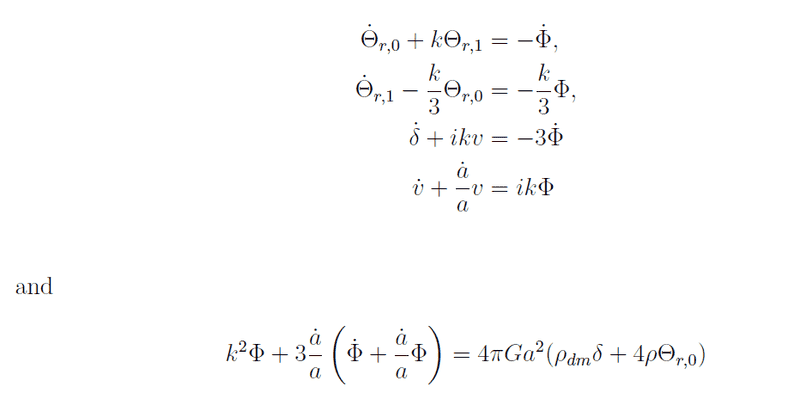
I am trying to solve the following set of 5 first order ODEs

_4273638764614964716431694138.png


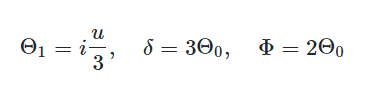
Where the variables are ##\Theta_0, \Theta_1, \Phi, \delta## and ##v##. The initial conditions (ICs) are

InitialConditions.png


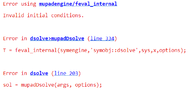
(Note that there is a typo in the above ICs; it is ##v## instead of ##u##). I am following this solved sample, following the exact same steps. However I get an error

jhhfuisqhdfhuiqhdsipdqshfuqds.png

Are these 3 ICs not enough?

Thank you! :biggrin:
 

Attachments

  • jhhfuisqhdfhuiqhdsipdqshfuqds.png
    jhhfuisqhdfhuiqhdsipdqshfuqds.png
    6.5 KB · Views: 237
Physics news on Phys.org
Your notation isn't clear, at least not to me. If \Theta_{0} and \Theta_{1} are the variables, what are \Theta_{r,0} and \Theta_{r,1}? Also, isn't a a variable as well? There is an \dot{a} term.
 
  • Like
Likes   Reactions: JD_PM
Sorry, let me clarify

phyzguy said:
Your notation isn't clear, at least not to me. If \Theta_{0} and \Theta_{1} are the variables, what are \Theta_{r,0} and \Theta_{r,1}?

I dropped the subscript ##r##. For our purpose, we can simply work with ##\Theta_{0}## and ##\Theta_{1}##.

phyzguy said:
Also, isn't a a variable as well? There is an \dot{a} term.

Right but let us assume that the ##a## function barely changes w.r.t. time, so that ##\dot a## is a constant
 
OK. Then I have one question and one suggestion. Your initial conditions are written as though they are true for all values of t (I'm assuming the independent variable is t). Is this right, or are they only true at t=0? If they are only true at t=0, did you specify it this way when you entered it into the code? It would be easier for us to understand if you share the code you entered. As for the suggestion, why not use the first two equations to eliminate \Phi as a variable and get down to just four variables?
 
  • Like
Likes   Reactions: JD_PM
phyzguy said:
OK. Then I have one question and one suggestion. Your initial conditions are written as though they are true for all values of t (I'm assuming the independent variable is t). Is this right, or are they only true at t=0? If they are only true at t=0, did you specify it this way when you entered it into the code? It would be easier for us to understand if you share the code you entered.

I worked with ICs at ##t=0##. Let me share the code

Matlab:
syms u(t) v(t) w(t) x(t) y(t) a b d G k %Note that u corresponds to the variable v (see #1), v to \delta, w to \Theta_0, x to \Theta_1, y to \Phi and b to \dot a%

ode1 = diff(w) + diff(y) == -k*x;
ode2 = diff(x) == (k*w)/3 - (k*y)/3;
ode3 = diff(v) + 3*diff(y) == i*k*u;
ode4 = diff(u) == i*k*y - (b*u)/a;
ode5 = (3*b*(diff(y) + (b*y)/a))/a == 4*G*a^2*d*pi*v - k^2*y + 16*G*a^2*d*pi*w;
odes = [ode1; ode2; ode3; ode4; ode5]
[uSol(t), vSol(t), wSol(t), xSol(t), ySol(t)] = dsolve(odes) %Code works, yielding quite "ugly" answers. Next we introduce ICs%

cond1 = x(0) - i*(u(0))/3 == 0;
cond2 = v(0) - 3*w(0) == 0;
cond3 = y(0) - 2*w(0) == 0;
conds = [cond1; cond2; cond3];
[uSol(t), vSol(t), wSol(t), xSol(t), ySol(t)] = dsolve(odes,conds) %Code breaks down, giving the output "Invalid initial conditions"%
 
Hmm, I'm not sure, but I do notice two things:
(1) I think your ode3 should be diff(v) + 3*diff(y) == - i*k*u;, no? You have the sign wrong.
(2) You have used the symbol d for both \rho_{DM} and \rho in the last equation. Is that your untent?

I think the code is telling you that you initial conditions are inconsistent. What if you try taking the "ugly" solution you got without the initial conditions and apply the initial conditions one at a time?
 
Thanks @phyzguy for the help, I am going to look for more material to read, understand the problem further and then come back.
 
I'm stuggling with a similar problem! Any updates on this thread @JD_PM? or @phyzguy? I've also posted my version of this question on ths forum.

I already found that the above method won't work, because this supposes an analytical solution can be found in Matlab. We'll need to implement a numerical solution, and we'll have to use the ode45 function or similar in Matlab.
 
Last edited:

Similar threads

  • · Replies 5 ·
Replies
5
Views
2K
  • · Replies 4 ·
Replies
4
Views
2K
  • · Replies 3 ·
Replies
3
Views
3K
  • · Replies 2 ·
Replies
2
Views
2K
  • · Replies 1 ·
Replies
1
Views
3K
Replies
3
Views
2K
  • · Replies 2 ·
Replies
2
Views
5K
  • · Replies 3 ·
Replies
3
Views
4K
  • · Replies 2 ·
Replies
2
Views
3K
  • · Replies 9 ·
Replies
9
Views
2K