How to Fix Microsoft Word's Small Document Display Issue?

  • Thread starter Thread starter WWGD
  • Start date Start date
Click For Summary
SUMMARY

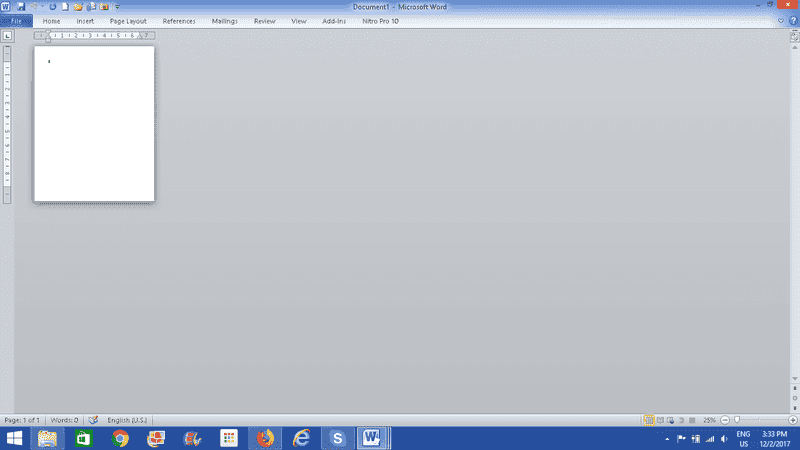
The discussion addresses the issue of Microsoft Word displaying documents in a small format after receiving a file from an Android device. Users can resolve this by adjusting the zoom settings located at the lower right corner of the Word interface, where a slider indicates the zoom level, with a specific mark for 100%. Additionally, keyboard shortcuts such as CTRL + minus sign and CTRL + plus sign can be utilized to modify the zoom level effectively.

PREREQUISITES
  • Familiarity with Microsoft Word interface
  • Understanding of zoom functionality in document editing software
  • Knowledge of keyboard shortcuts for Microsoft Word
  • Basic troubleshooting skills for software issues
NEXT STEPS
  • Research Microsoft Word zoom settings and adjustments
  • Explore keyboard shortcuts for Microsoft Office applications
  • Learn about document formatting issues in Microsoft Word
  • Investigate compatibility issues between Android files and Microsoft Word
USEFUL FOR

This discussion is beneficial for Microsoft Word users, particularly those encountering display issues after receiving documents from mobile devices, as well as anyone looking to enhance their document editing skills.

WWGD
Science Advisor
Homework Helper
Messages
7,806
Reaction score
13,125
Hi all,
This sounds like a joke, unfortunately it is not:
Word was working OK until I received a Word file from a phone , Android , I think. Then
somehow it ended up like this :
upload_2017-12-2_15-34-21.png


i.e., ocupying just a small subset of the total usual space.
Any ideas on how to get it back to full-page format?
Thanks.
 

Attachments

  • upload_2017-12-2_15-34-21.png
    upload_2017-12-2_15-34-21.png
    13.3 KB · Views: 1,021
Computer science news on Phys.org
At the lower right, just above the 3:34 PM time, there is a slider that controls zoom. There is a tic mark on the slider for 100%.

There are also drop down menus and shortcut keys to control zoom. If I remember right CTRL-minus sign and CTRL=-plus sign.
 
  • Like
Likes   Reactions: Asymptotic, jedishrfu and WWGD
anorlunda said:
At the lower right, just above the 3:34 PM time, there is a slider that controls zoom. There is a tic mark on the slider for 100%.

There are also drop down menus and shortcut keys to control zoom. If I remember right CTRL-minus sign and CTRL=-plus sign.

Thanks so much, Anorlunda.
 

Similar threads

  • · Replies 14 ·
Replies
14
Views
4K
  • · Replies 3 ·
Replies
3
Views
1K
Replies
1
Views
2K
  • · Replies 4 ·
Replies
4
Views
2K
Replies
3
Views
5K
  • · Replies 3 ·
Replies
3
Views
750
  • · Replies 24 ·
Replies
24
Views
7K
  • · Replies 31 ·
2
Replies
31
Views
5K
  • · Replies 3 ·
Replies
3
Views
13K
  • · Replies 12 ·
Replies
12
Views
5K