How to Troubleshoot SSL Certificate Problems When Upgrading to Windows 8.1?

  • Thread starter Thread starter AliGh
  • Start date Start date
Click For Summary
SUMMARY

The discussion focuses on troubleshooting SSL certificate problems encountered after upgrading to Windows 8.1. Users report issues connecting to a VPN server due to SSL errors, despite having the correct system time and disabling the firewall. The primary recommendation is to either disable SSL requests on the client side or to ensure that the VPN server supports SSL by having the server administrator enable it.

PREREQUISITES
  • Understanding of SSL (Secure Socket Layer) protocols
  • Familiarity with VPN (Virtual Private Network) configurations
  • Basic knowledge of Windows 8.1 network settings
  • Experience with firewall settings and configurations
NEXT STEPS
  • Investigate how to disable SSL requests in Windows 8.1 VPN settings
  • Learn how to configure SSL support on VPN servers
  • Research common SSL error codes and their resolutions
  • Explore Windows 8.1 network troubleshooting tools
USEFUL FOR

Network administrators, IT support professionals, and users experiencing VPN connectivity issues after upgrading to Windows 8.1.

AliGh
Messages
64
Reaction score
1
Hi
I recently upgraded to windows 8.1 from widows 7
I have a program which connects to a VPN server . Since upgrading to windows 8.1 it doesn't connect any more it gives ssl error
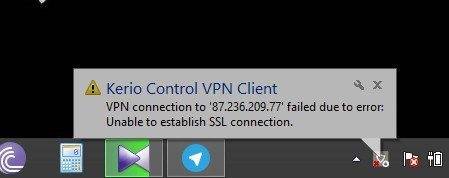
2015-11-05_151217.jpg

The time is correct and i have tried turning firewall off but it doesn't seem to work
The server I'm connecting to is my friends so its trustable
 
Computer science news on Phys.org
The most probable scenario is that the server you are trying to connect to does not support SSL (Secure Socket Layer). Either turn the SSL request off at your end or ask your friend to enable (or add) SSL.
 

Similar threads

  • · Replies 6 ·
Replies
6
Views
3K
  • · Replies 5 ·
Replies
5
Views
3K
  • · Replies 3 ·
Replies
3
Views
1K
  • · Replies 8 ·
Replies
8
Views
11K
  • · Replies 6 ·
Replies
6
Views
4K
  • · Replies 2 ·
Replies
2
Views
6K
  • · Replies 1 ·
Replies
1
Views
8K
Replies
1
Views
3K
Replies
4
Views
5K
Replies
12
Views
5K