henrybrent
- 57
- 0
I'm trying to generate contours that plot with the animation using contour(X,Y) but it's not quite working. I only need it to be in the x-y plane at 0km depth (see picture for greater clarification)
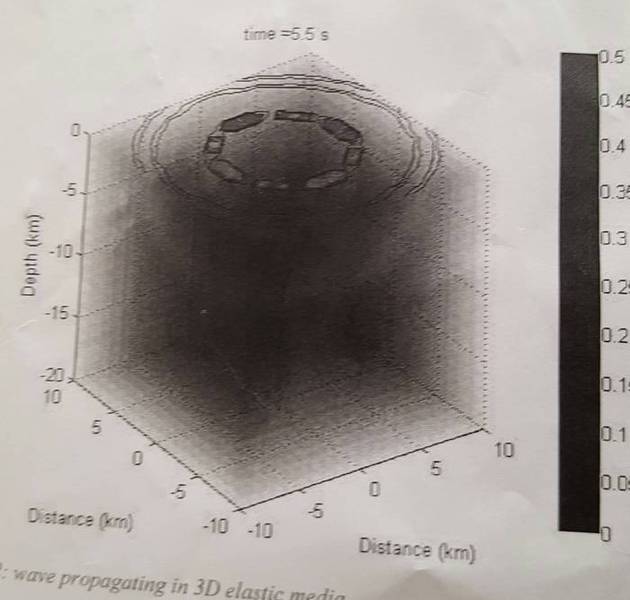
Matlab:
% A script to plot two 3D waves.

clear
%Define the total time for simulation
T_total=10;
%Set the computation increment
dt=0.1;
%calculate the number of steps
ntstep=T_total/dt+1;
%Define Input Waves
alphaa=1;  %velocity of wave a
alphab=2;  %velocity of wave a

fa=1;       %frequency of wave a
fb=0.5;       %frequency of wave b
ampa=6;     %amplitude of wave a in cm
ampb=3;     %amplitude of wave b in cm

%set the source depth
depth=1;

%Calc wave parameters using input
Ta=1/fa;    %period of wave a
Tb=1/fb;    %period of wave a
wa=2*pi*fa; %angular frequency of wave a
wb=2*pi*fb; %angular frequency of wave b
la=Ta*alphaa;%wavelength of wave a
lb=Tb*alphab;%wavelength of wave b
ka=2*pi/la; %wavenumber of wave a
kb=2*pi/lb; %wavenumber of wave b

x=(-10:1:10);        %x
y=(-10:1:10);        %y
z=(-20:1:0);        %z
t=zeros(length(x),length(y), length(z));        %start time
% setup the figure
figure(1);

%label axes
xlabel('Distance (m)');
ylabel('Distance (m)');
zlabel('Depth (m)');
hold on
[X,Y,Z]=meshgrid(x,y,z);
R=sqrt(X.^2+Y.^2+(Z+depth).^2);
contour3(X,Y,R);
%loop over nsamp
for n=1:ntstep
    t=t+dt; %time
    arga=wa*t-ka*R; %argument of wave a
    argb=wb*t-kb*R; %argument of wave b
    a=ampa*sin(arga)./max(1,R);
    a(R>t.*alphaa)=0; % causality condition
    a(R<t.*alphaa-la/2)=0; % limit length of input wave to one half cycle
    b=ampb*sin(argb)./max(1,R);
    b(R>t.*alphab)=0; % causality condition
    b(R<t.*alphab-lb/2)=0; % limit length of input wave to one half cycle

    figure(1);
    hold off;

    wf=a+b;
    slice(X,Y,Z,wf,x,y,z);
    axis square;
    shading INTERP
    caxis([0,1]);
    colormap([[0:0.1:1]',zeros(length([0:0.1:1]'),1),zeros(length([0:0.1:1]'),1)]);
    col=colorbar;
    alpha(0.05);
    hold on;
    %label axes
    xlabel('Distance (km)');
    ylabel('Distance (km)');
    zlabel ('Depth (km)');
    ylabel(col,'Amplitude (cm)'); % label the colour bar


    title(strcat('time = ', num2str(t(1)), ' s'));
    pause (dt);

end