Mystery Phone Gadget - Can You Identify It?

  • Thread starter Thread starter EnumaElish
  • Start date Start date
  • Tags Tags
    Mystery
Click For Summary

Discussion Overview

The discussion centers around identifying a mysterious phone or PC accessory that resembles a mini domed-camera or glass bead, which connects to an iPhone's earphone port. Participants explore various hypotheses regarding its function and application, including potential uses in audio recording and temperature sensing.

Discussion Character

  • Exploratory
  • Debate/contested
  • Technical explanation

Main Points Raised

  • The original poster (OP) describes the accessory and its mounting mechanism, noting a peel-off sticker and a cord that connects to an iPhone's earphone port.
  • Some participants propose that it could be a telephone handset pickup microphone for recording phone conversations.
  • One participant questions how such a microphone would be mounted, suggesting it might need to be stuck to the back of the phone.
  • Another participant recalls a similar device used with acoustic modems to capture modem sounds.
  • There is a suggestion that the device might be a temperature sensor, depending on its physical characteristics, such as the presence of a hole.
  • A participant notes the presence of a 1/8 inch stereo plug, arguing that this could indicate it is an audio device, possibly a microphone, and suggests testing it with a computer's audio input.
  • One participant identifies it as an infrared receiver, providing a link to a similar product.
  • Another participant acknowledges the previous suggestion about the audio jack, reinforcing the idea of it being an old phone microphone.
  • There is a correction regarding the type of plug, clarifying that the telephone pickup coil has a mono, TS plug rather than a stereo, TRS plug.

Areas of Agreement / Disagreement

Participants express multiple competing views regarding the identity and function of the accessory, with no consensus reached on its true purpose.

Contextual Notes

Some assumptions about the device's function depend on its physical characteristics, which are not clearly visible in the provided images. The discussion also reflects uncertainty regarding the correct classification of the plug type.

EnumaElish
Science Advisor
Messages
2,348
Reaction score
124
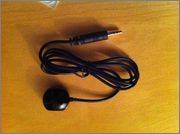
Does anyone happen to recognize the phone or pc accessory displayed in the attached pics? It looks like a mini domed-camera or a glass bead, tethered to a cord. On its flat side there's a peel-off sticker, like a piece of two-sided tape, to mount the thing on a flat surface. The cord plugs into an iphone's earphone port, but I don't know what it does, if anything. Thanks for any & all responses.
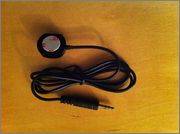
image.jpg

image.jpg

P.S. Yes, I am alive. Glad you are, too, old timers :)
 
  • Like
Likes   Reactions: Greg Bernhardt
Computer science news on Phys.org
telephone handset pickup mic to record phone conversations.
 
jedishrfu said:
telephone handset pickup mic to record phone conversations.
How would you mount that though? Stick it to the back of the phone?
 
Decades ago, a device like that could be also be stuck on a specific spot on an acoustic modem that didn't have a speaker, in order to be able to hear the modem sounds.
 
Are you sure it is a PC/phone accessory? Looks like a temperature sensor to me. It's a bad pic, so I don't see if it has a hole in it (without one would preclude it from being a mic).

61aGThS0vwL._SL1200_.jpg
 
Last edited:
The OP picture looks to have what looks like a 1/8 inch stereo plug. The fact that it's stereo is evidence that it might be an audio device, such as some sort of microphone, as others have suggested (even if it is effectively a mono source, it might have a stereo plug to be compatible with stereo, audio jacks).

You might be able to test this out with your computer's Mic-in or Audio-in jacks. Plug it in, enable the input (this might require opening up your computer's sound control and choosing what to use for audio input*), speak or blow into the thing and see if you get a signal.

*(For MS Windows, this is usually something like Control Panel / Hardware and Sound / Sound, then select your default recording device.)
 
  • Like
Likes   Reactions: EnumaElish
You know I saw that before but I couldn't recall where and then the audio jack kept me thinking old phone mic.

That make sense now. Good catch.