MATLAB Problem with Generating Barnsley Fern Fractal in MATLAB

  • Thread starter Thread starter Euler2718
  • Start date Start date
  • Tags Tags
    Fractal Matlab
Click For Summary
The discussion revolves around a MATLAB implementation of the Barnsley fern algorithm, with a user expressing frustration over the code not functioning as expected. Key points include the structure of the iterative process, where random values determine which transformation to apply to generate points for the fern. The user seeks assistance, noting that their output does not match the expected result. Suggestions are made to compare the code with the algorithm outlined on Wikipedia and examples from Rosetta Code to identify discrepancies. Additionally, there are technical issues related to copying the code into MATLAB, with advice given to use a text editor that properly handles newline characters to avoid formatting problems when transferring code between different operating systems.
Euler2718
Messages
90
Reaction score
3
The code is as followed:

Matlab:
function fern()

AI = [0  0 ; 0 0.16];
  
AII = [ 0.85  0.04 ; -0.04 -0.85 ] ;
  
AIII = [ 0.2  -0.26 ; 0.23 0.22 ] ;
  
AIV = [-0.15  0.28 ; 0.26 0.24 ];BI = [ 0 ; 0];
BII = [ 0 ; 1.6];
BIII = [ 0 ; 1.6];
BIV = [0 ; 0.44];

N = 10000;
I = 50;

H = zeros(N,2);

for n=1 : N
  
    x = rand;
    y = rand;
    T = [x;y];
 
  
    for i=1 : I
      
        p = rand;
      
        if p < 0.01
            %disp('Scheme 1')
            S1x = AI*T + BI;
            S1y = AI*T + BI;
            x = S1x(1);
            y = S1y(2);
        elseif p < 0.08
            %disp('Scheme 2')
            S2x = AII*T + BII;
            S2y = AII*T + BII;
            x = S2x(1);
            y = S2y(2);
        elseif p < 0.15
            %disp('Scheme 3')
            S3x = AIII*T + BII;
            S3y = AIII*T + BII;
            x = S3x(1);
            y = S3y(2);
        else
            %disp('Scheme 4')
            S4x = AIV*T + BIV;
            S4y = AIV*T + BIV;
            x = S4x(1);
            y = S4y(2);
        end
        H(n,1) = x;
        H(n,2) = y;
    end
end

X = H(:,1);
Y = H(:,2);
plot(X,Y,'.')

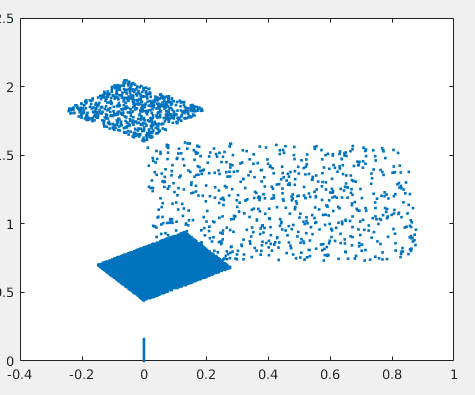
I have no idea why it isn't working. Is not the iterative process correct? I ran it once and got the picture below. I'm at the end of the road here, and on a deadline, any help would be appreciated.
Screenshot_2016-09-21_20-49-37.png
 
Last edited by a moderator:
Physics news on Phys.org
How can I copy your code to MATLAB? When I simply copied and pasted, it put your whole program as one single line in MATLAB, then added a URL reference link below it.
 
Image Analyst said:
How can I copy your code to MATLAB? When I simply copied and pasted, it put your whole program as one single line in MATLAB, then added a URL reference link below it.

Try copying to another editor that recognizes newline chars as line separators and will then save to the windows crlf format (carriage return/linefeed line terminator).

This is a common problem when moving text from unix to windows and vice versa (in which case you'll see every other line as a blank line)
 

Similar threads

  • · Replies 4 ·
Replies
4
Views
1K
Replies
2
Views
2K
  • · Replies 8 ·
Replies
8
Views
3K
  • · Replies 4 ·
Replies
4
Views
2K
  • · Replies 2 ·
Replies
2
Views
2K
  • · Replies 7 ·
Replies
7
Views
2K
  • · Replies 1 ·
Replies
1
Views
4K
  • · Replies 1 ·
Replies
1
Views
3K
  • · Replies 1 ·
Replies
1
Views
4K
  • · Replies 1 ·
Replies
1
Views
3K