Profile Covers for Gold Members and Advisors

  • Context: Announcement 
  • Thread starter Thread starter Greg Bernhardt
  • Start date Start date
Messages
19,865
Reaction score
10,861
Profile and member popup covers are now available to Gold Members and Advisors

To add a new cover see the image below. The option is at the bottom of your "My PF" top nav menu.
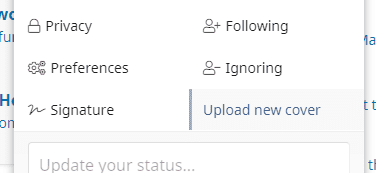
243112


To manage the cover, there is a gear menu at the top right of your cover image in your profile. FYI, so we're not loading tons of large images, covers must be a max of 1MB. You can usually resize and optimize cover images to meet this requirement quite easily in a graphics program or online tool.

243113


If you are not a Gold Member and want to be, please https://www.physicsforums.com/account/upgrades.
 
Last edited:
  • Like
  • Love
Likes   Reactions: Jody, Wrichik Basu, Drakkith and 4 others
Physics news on Phys.org
cool
:smile:
 
I thought I saw that you had recommended a size of 1325 x 315 but it's gone now. The ACTUAL aspect ratio if you use a width of 1325 dictates the use of a height of 185. If you use 315 most of the top of the cover just gets cut off.

EDIT: I see that what I just said is correct for the mouseover but it has a bigger height in the actual user info page. Still, I would think the mouseover version would be what people would see the most.
 
I seem to always get around half a McCandless in the mouseover no matter how small I make my image height. My source image is 900 pixels wide and I have tried many heights from 270-ish to down to now 140 pixels still getting clipping (luckily my source image with pitch black background allows for easy recomposition of the interesting elements :).

I can see my latest 900x140 uploaded image gets rescaled without clipping to an 1200x187 image in the mouseover frame, but somehow its still getting clipped by the layout.
 
Filip Larsen said:
I seem to always get around half a McCandless in the mouseover no matter how small I make my image height.
Yeah, this whole thing is a good idea with a weird implementation.
 
Filip Larsen said:
I can see my latest 900x140 uploaded image gets rescaled without clipping to an 1200x187 image in the mouseover frame, but somehow its still getting clipped by the layout.
It's best not to try and make the size perfect. Just upload an image with larger width and height than necessary and re-position to get approximately the view you want. Don't over think it.
 
Greg Bernhardt said:
It's best not to try and make the size perfect. Just upload an image with larger width and height than necessary and re-position to get approximately the view you want. Don't over think it.
Hey, I overthink EVERYTHING !
 
  • Haha
Likes   Reactions: Greg Bernhardt
I upped the limit to 2MB and set the max dimensions to 1920x1080
 
Greg Bernhardt said:
It's best not to try and make the size perfect. Just upload an image with larger width and height than necessary and re-position to get approximately the view you want.

My initial taller images could be repositioned slightly up/down, but as far as I could tell all positions resulted in clipping. On my current cover (well, until just now), reposition itself do nothing (there is no "slack"), but clipping still persist.

I have now tried again by rescaling to 1200x187 before uploading, but now the image in mouseover just show up blank. Perhaps that is some caching issue or similar, but that means I can't tell if the clipping is still there or not. Perhaps one of you guys could confirm whether or not you see a clipped astronaut in my cover image if you hover over my name above?
 
  • #10
Filip Larsen said:
My initial taller images could be repositioned slightly up/down, but as far as I could tell all positions resulted in clipping. On my current cover (well, until just now), reposition itself do nothing (there is no "slack"), but clipping still persist.

I have now tried again by rescaling to 1200x187 before uploading, but now the image in mouseover just show up blank. Perhaps that is some caching issue or similar, but that means I can't tell if the clipping is still there or not. Perhaps one of you guys could confirm whether or not you see a clipped astronaut in my cover image if you hover over my name above?
Your full profile page shows a full image w/ astronaut and the mouse-over on your icon on this pages shows nothing. As I said earlier, it's a good idea but with a weird (I'm being polite) implementation.
 
  • #11
Filip Larsen said:
I have now tried again by rescaling to 1200x187 before uploading, but now the image in mouseover just show up blank. Perhaps that is some caching issue or similar, but that means I can't tell if the clipping is still there or not. Perhaps one of you guys could confirm whether or not you see a clipped astronaut in my cover image if you hover over my name above?
You don't need to rescale anything, try it again or send me the image in a conversation and I can do it for you.
 
  • #12
phinds said:
Your full profile page shows a full image w/ astronaut and the mouse-over on your icon on this pages shows nothing.
Same result(?) here.

Edit/p.s. ...and the icon for the "Thread Starter" is no longer an icon, it just shows as an unavailable character of f4ff. It worked a couple days ago.
 
  • #13
Thanks for the feed-back.

I seem to have gotten my hover box cover image to look OK for now by using a work-around of adding 60 lines of black on the top of my 1200 x 315 image before upload (making the uploaded image 1200 x 375) and then use reposition so the extra black don't show in other places.
 
  • #14
phinds said:
mouse-over on your icon on this pages shows nothing.
Lol. . . well, just a tiny bit more than nothing. . . .:oldeyes:

243327
phinds said:
As I said earlier, it's a good idea but with a weird (I'm being polite) implementation.
I actually always thought that was probably possible. . . . :DD . :-p

.
 
  • #15
OCR said:
Lol. . . well, just a tiny bit more than nothing. . . .:oldeyes:
I can only quote Paul Bunyan's reply to a bartender who scoffed at Paul's claim to have cut down every tree in the Great Sahara Forest. The bartender said, are you kidding, the Sahara's a DESERT and Paul said "Well, yeah, NOW it is"
 
  • Haha
  • Like
Likes   Reactions: Ibix and OCR

Similar threads

  • · Replies 6 ·
Replies
6
Views
3K
  • · Replies 13 ·
Replies
13
Views
3K
  • Sticky
  • · Replies 2 ·
Replies
2
Views
504K
  • · Replies 4 ·
Replies
4
Views
3K