Resolving LaTeX Math Rendering Issues

  • Context: LaTeX 
  • Thread starter Thread starter Borek
  • Start date Start date
  • Tags Tags
    Issues Latex
Click For Summary

Discussion Overview

The discussion revolves around issues related to LaTeX math rendering, specifically focusing on how spaces in LaTeX code affect the output in different web browsers. Participants explore whether the rendering problem is due to a bug in the MathJax rendering engine or if it stems from user error in the LaTeX syntax.

Discussion Character

  • Technical explanation
  • Debate/contested

Main Points Raised

  • One participant questions if the rendering issue is a bug or a misunderstanding of LaTeX syntax.
  • Another participant suggests that the LaTeX code appears correct but notes the importance of spacing after the \frac command.
  • A different participant points out that spaces in LaTeX should generally not be significant, except in specific contexts, and suggests it may be a bug in MathJax.
  • There is a mention of a thin space being present in the code, which could affect rendering, although the participant is unsure how it was introduced.
  • One participant speculates that copying and pasting from word processors may introduce formatting issues that affect LaTeX rendering.
  • A participant recounts their experience of copying LaTeX from Wikipedia, which may have included unintended formatting characters.

Areas of Agreement / Disagreement

Participants express differing views on whether the issue is a bug in the rendering engine or a result of user error, indicating that the discussion remains unresolved.

Contextual Notes

There are unresolved questions regarding the significance of spaces in LaTeX and how different rendering engines handle them. The discussion highlights potential pitfalls when copying LaTeX code from formatted documents.

Borek
Mentor
Messages
29,204
Reaction score
4,626
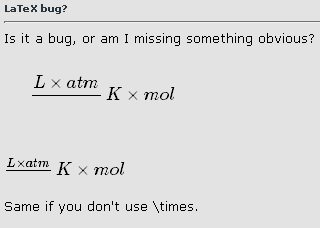
Is it a bug, or am I missing something obvious?

[tex]\frac {L\times atm} {K\times mol}[/tex]

[itex]\frac {L\times atm} {K\times mol}[/itex]

Same if you don't use \times, on my computer it is rendered the same wrong way under Opera and under Chrome.

This is image, not part of the text:

------------
attachment.php?attachmentid=48164&stc=1&d=1339225540.png

------------
 

Attachments

  • Untitled-1.png
    Untitled-1.png
    1.4 KB · Views: 594
Physics news on Phys.org
[itex]\frac{ L \times \mathrm{atm}}{K \times \mathrm{mol}}[/itex]

Code:
\frac{ L \times \mathrm{atm}}{K \times \mathrm{mol}}
 
OK, thanks, that's a way of getting it rendered correctly.

But it doesn't answer my question - was my LaTeX wrong, or was it rendered wrong?
 
Can't really see anything wrong with your LaTeX. I never leave a space after the \frac, don't know if that makes a difference...
 
Hi Borek! :smile:

You left a space between the two brackets, so I think it assumed you wanted that space under the line! :wink:

[tex]\frac {L\times atm} {K\times mol}[/tex]

[tex]\frac {L\times atm}{K\times mol}[/tex]
 
Thanks, that explains it :smile:

I have a feeling it wasn't this way before, I find it hard to believe this is the first time I put the space between the brackets, I tend to add spaces to my code to make it less crowded and easier to read (be it LaTeX or C++ or anything). But I am not going to browse all my posts to check it.
 
Looks to me that you found a bug in MathJax! :eek:.Spaces are not supposed to be significant in Latex.
They are only required to separate operators from operands if necessary, like \sin x, which is different from \sinx (which is an error:##\sinx##).
I googled for confirmation, but could not quickly find it.

Even letters with spaces between them are rendered as if the spaces were not there.
And operations on text without spaces, treat the letters as if they are separate,
like \frac ab versus \frac a b (both rendered as ##\frac ab## respectively ##\frac a b##).

Afaik the only other time when white space should be significant is within a \text environment.
Note that some latex engines have difficulty rendering long formulas without spaces (a bug).So I believe it's a bug in MathJax that your fraction does not render correctly.
A quick check shows that it is rendered correctly by another engine.
If the space were supposed to be significant, it should have been escaped.
 
Don't leave spaces between the numerator and denominator braces.
 
Looks like it is not a space between brackets, but a thin space, & # 8201; , so no wonder it was treated differently. But I have no idea what happened [PLAIN]http://www.bpp.com.pl/IMG/grumpy_borek.png. For sure I have not inserted it purposely, I have no idea how to do it even if I would like to.
 
Last edited by a moderator:
  • #10
Oh.
So it's not a bug.

Did you copy and paste the formula from elsewhere?
I know that for instance Microsoft Word and Excel automatically change what you type (to be supposedly more aesthetically pleasing).
Copying and pasting from any word processor that supports formatting is a risk.
 
  • #11
OK, I think I know what have happened.

I was answering question about ideal gas constant value and units, I went to wikipedia, marked units there, copied and pasted them to the edit field, but they looked like L atm K−1 mol−1 - so I wanted to latexize them to look better. I added \frac and brackets and never noticed there is a thin space instead of normal space.

Sigh. If not for the fact I tried to report problems at Google groups and CC mail that came to me displayed small square between brackets I would never found what the problem was.
 

Similar threads

  • · Replies 12 ·
Replies
12
Views
4K
  • · Replies 16 ·
Replies
16
Views
3K
  • · Replies 32 ·
2
Replies
32
Views
8K
  • · Replies 4 ·
Replies
4
Views
4K
  • · Replies 3 ·
Replies
3
Views
2K
  • · Replies 15 ·
Replies
15
Views
3K
  • · Replies 2 ·
Replies
2
Views
6K
  • · Replies 7 ·
Replies
7
Views
5K
  • · Replies 2 ·
Replies
2
Views
2K
  • · Replies 3 ·
Replies
3
Views
3K