Calculators TI-89 won't graph whole function?

Click For Summary
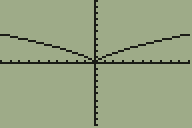
The issue of the TI-89 graphing only the positive half of the function x^(2/3) while the TI-84 displays the entire graph is likely related to the calculator's settings. To resolve this, users should access the "Mode" menu on the TI-89 and change the "Complex Format" type to "Real." This adjustment should allow the TI-89 to graph the complete function, similar to the TI-84.
amantonas
Messages
2
Reaction score
0
When I try and graph x^(2/3) in my TI-89, it only graphs the half of the graph where x>0.
My TI-84 gives me this:
abthqd.gif

But my TI-89 only gives me the right half. Is one of my settings wrong?
 
Computer science news on Phys.org
I believe that you can get the same graph given by the TI-84 by going into the "Mode" menu and selecting "Real" as the "Complex Format" type.
 
Last edited:
Thread 'ChatGPT Examples, Good and Bad'
I've been experimenting with ChatGPT. Some results are good, some very very bad. I think examples can help expose the properties of this AI. Maybe you can post some of your favorite examples and tell us what they reveal about the properties of this AI. (I had problems with copy/paste of text and formatting, so I'm posting my examples as screen shots. That is a promising start. :smile: But then I provided values V=1, R1=1, R2=2, R3=3 and asked for the value of I. At first, it said...

Similar threads

Replies
4
Views
3K
Replies
1
Views
2K
  • · Replies 6 ·
Replies
6
Views
6K
  • · Replies 1 ·
Replies
1
Views
4K
  • · Replies 8 ·
Replies
8
Views
29K
  • · Replies 5 ·
Replies
5
Views
7K
  • · Replies 5 ·
Replies
5
Views
5K
Replies
1
Views
2K
  • · Replies 15 ·
Replies
15
Views
9K
  • · Replies 1 ·
Replies
1
Views
10K