TikZ: Clebsch-Gordon Table Generator

  • Thread starter Thread starter topsquark
  • Start date Start date
  • Tags Tags
    Generator Table
Click For Summary
SUMMARY

The discussion centers on a Clebsch-Gordon table generator created using TikZ, specifically addressing the addition of quantum angular momenta. The author, Dan, highlights challenges faced with TikZ's limitations, such as the inability to perform certain calculations and the lack of looping constructs. A proposed solution for converting decimals to fractions is shared, but it is limited to denominators up to 20. The conversation also touches on the need for improvements in table formatting and the potential educational benefits of the program for understanding quantum mechanics.

PREREQUISITES
  • Familiarity with TikZ version 3.0 or higher for LaTeX.
  • Understanding of quantum mechanics, particularly angular momentum addition.
  • Basic programming concepts, including loops and conditional statements.
  • Knowledge of mathematical functions and their implementation in programming.
NEXT STEPS
  • Explore advanced TikZ features for improved table formatting and multi-page outputs.
  • Research quantum mechanics textbooks, specifically Sakurai's "Modern Quantum Mechanics," for deeper theoretical insights.
  • Learn about alternative programming languages or tools that handle mathematical computations more efficiently, such as Python with NumPy.
  • Investigate methods for converting decimals to fractions in programming, focusing on algorithms that can handle larger denominators.
USEFUL FOR

Quantum physicists, educators in quantum mechanics, and developers interested in LaTeX and TikZ for scientific visualization will benefit from this discussion.

topsquark
Science Advisor
Homework Helper
Insights Author
MHB
Messages
2,020
Reaction score
843
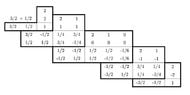
I did this for some work I'm doing and I thought I'd offer the program in case anyone might want it. (And one little question.)

It's a Clebsch-Gordon table generator for addition of quantum angular momentums. The TikZ coding is fairly basic, but it's probably my best TikZ work so far, not because it was so difficult to program, but because of the limitations of the TikZ Mathematics engine. (Apparently, you can't calculate (-1)^n, even if you declare n to be an integer variable, because TikZ uses a logarithm to calculate it.) I had to be innovative in a couple of cases!

My question: One of the headaches I had was converting a decimal to a fraction. Now, it's a simple process, but I found out that TikZ does not automatically use a fixed point system, and TikZ does not allow for a while loop.

That's my question. In order to convert a decimal to a fraction my plan was to start with a possible denominator of 2, multiply the number by 2, and see if I got an integer. If so, I'm done. If not, add 1 to the denominator and loop around to do it again.

I did this all the way back in 11th grade when Apple IIs were still a thing. It's not hard. BUT in BASIC I could just simply use GOTO statements to do the loop, and when I took FORTRAN we used a WHILE loop. In TikZ I had to use a FOR loop and you have to set an upper limit on size of the denominator you want to use.
Say we have num = 0.25.

10 d = 2
20 If int(num*d) <> num*dd then d = d + 1; GOTO 20
30 end

or

d = 2
do while int(num*d) <> num*d
d = d + 1
end do

Both give d = 4.

My only solution was to do this:

stop = 0
for x = 2 to 20
if stop = 0 then
if int(num*x) = num*d then d = x; stop = 1
end if
end for

Again, I get d = 4, but if the denominator needs to be bigger than 20 it won't work.

Does anyone have a better solution?

One flaw in the program is that it doesn't print the table in landscape on the output so the table size is limited. I didn't need any large tables so I didn't bother to fix that. And I haven't a clue how to spread this to more than a single page.

Spin inputs are at the top of the "Defined Variables" box.

The TikZ code is in the next post.

-Dan
 
  • Like
Likes   Reactions: PhDeezNutz
Physics news on Phys.org
(Reply to the post to see the code spacing properly.)
Moderator's note: I have added code tags. Please use them (it also conserves the spacing).

Code:
\usepackage{tikz,fp}
\usetikzlibrary{math,fixedpointarithmetic}
\begin{tikzpicture}[fixed point arithmetic]
% Variables
%    j1, m1, j2, m2: Input spin vectors
%    jtot, mtot: Total spin vector
%    jttot, mttot, mt1, mt2: Temporary spin vector values for the coeff function
%    blocks: Number of coefficient boxes
%    dw, dh: Number of cells per per box
%    aoldx, aoldy: Coordinates of the top right of the last coeefficient grid
%    anewx, anewy: Coordinates of the top right of the new coefficient grid
%    num: Number to be converted to fraction
%    r: Returned fraction
%    w, h: Width and height of one cell
%    max: Largest value of ki in the coefficient calculation
%===============================================================
% Program Block
%===============================================================
     \tikzmath {
%===============================================================
% Defined Variables
%===============================================================
          \j1=3/2; \j2=1/2;
          \w=1.2; \h=0.6;
          \m1=\j1; \m2=\j2;
          \jtot=\j1+\j2; \mtot=\jtot;
          \blocks=2*(\j1+\j2)+1;
%===============================================================
% Convert A Decimal To A Fraction
%===============================================================
          function f(\num) {
               integer \n, \d;
               \stop=0;
               for \k in {1,...,20} {
                    \a=round(10*round(1000*(\k*\num+0.001))/1000)/10;
                    if \stop==0 then {
                         if int(abs(\a))==abs(\a) then {
                              if \k==1 then {\n=\a; let \r="\n"; \stop=1; }
                                   else {\n=\a; \d=\k; let \r="\n/\d"; \stop=1; };
                         };
                    };
               };
               return \r;
          };
%===============================================================
% Calculate Coefficients
%===============================================================
          function coeff(\jttot,\mttot,\mt1,\mt2) {
               \b1=0; \b2=0; \b3=0; \b4=0; \b5=0;
               \e1=0; \e2=0; \e3=0; \e4=0; \e5=0;
               \stop1=0; \stop2=0; \stop3=0; \stop4=0; \stop5=0;
               for \g in {0,...,10} {
%===============================================================
%      Lower Summation Limit
%===============================================================
                    if \stop1==0 then {
                         if \j1+\j2-\jttot-\g>=0 then {\e1=\g; \stop1=1; };
                    };
                    if \stop2==0 then {
                         if \j1-\mt1-\g>=0 then {\e2=\g; \stop2=1; };
                    };
                    if \stop3==0 then {
                         if \j2+\mt2-\g>=0 then {\e3=\g; \stop3=1; };
                    };
                    if \stop4==0 then {
                         if \jttot-\j2+\mt1+\g>=0 then {\e4=\g; \stop4=1; };
                    };
                    if \stop5==0 then {
                         if \jttot-\j1-\mt2+\g>=0 then {\e5=\g; \stop5=1; };
                    };
                    if \e1>\e2 then {\v=\e1; } else {\v=\e2; };
                    if \v<\e3 then {\v=\e3; };
                    if \v<\e4 then {\v=\e4; };
                    if \v<\e5 then {\v=\e5; };
%===============================================================
%      Upper Summation Limit
%===============================================================
                    if \j1+\j2-\jttot-\g>=0 then {\b1=\g; };
                    if \j1-\mt1-\g>=0 then {\b2=\g; };
                    if \j2+\mt2-\g>=0 then {\b3=\g; };
                    if \jttot-\j2+\mt1+\g>=0 then {\b4=\g; };
                    if \jttot-\j1-\mt2+\g>=0 then {\b5=\g; };
                    if \b1<\b2 then {\p=\b1; } else {\p=\b2; };
                    if \p>=\b3 then {\p=\b3; };
                    if \p>=\b4 then {\p=\b4; };
                    if \p>=\b5 then {\p=\b5; };
               };
               \s=0;
               for \b in {\v,...,\p} {
                    \z=-1;
                    for \c1 in {0,...,\b} {
                         \z=\z*(-1);
                    };
                    \s=\s+\z/((\b)!*(\j1+\j2-\jttot-\b)!*(\j1-\mt1-\b)!*(\j2+\mt2-\b)!*(\jttot-\j2+\mt1+\b)!*(\jttot-\j1-\mt2+\b)!);
                    \z=\z*(-1);
               };
               \c=sqrt((2*\jttot+1)*(\jttot+\j1-\j2)!*(\jttot-\j1+\j2)!*(\j1+\j2-\jttot)!/(\j1+\j2+\jttot+1)!);
               \c=\c*sqrt((\jttot+\mttot)!*(\jttot-\mttot)!*(\j1-\mt1)!*(\j1+\mt1)!*(\j2-\mt2)!*(\j2+\mt2)!);
               \c=\c*\s;
               return \c;
          };
%===============================================================
% Spin Title
%===============================================================
          \aoldx=0; \aoldy=0;
          \p=f(\j1); \q=f(\j2); let \r = \p \, + \q; {\node at ({\aoldx-\w},{\aoldy+\h/2}) {\r}; };
%===============================================================
% Box Loop
%===============================================================
          for \i in {1,...,\blocks} {
%===============================================================
%      J Block Settings
%===============================================================
               \wjtot=\jtot; \c=0; \stop=0;
               for \x in {0,...,2*\jtot} {
                    if \stop==0 then {
                         if \wjtot>=\mtot then {\c=\c+1; };
                         if \wjtot<=-\mtot then {\stop=1; };
                         \wjtot=\wjtot-1;
                    };
               };
               \dw=\c;
%===============================================================
%      m1, m2 Block Settings
%===============================================================
               \hm1=\m1; \c=0;
               for \x in {0,...,2*\m1} {
                    if -\m2>\mtot-(\m1-\x) then {\hm1=\hm1-1; };
                    if \m2<\mtot-(\m1-\x) then {\c=\c+1; };
               };
               \dh=(2*\m1+1)-(\m1-\hm1)-\c;
               if \i==1 then {\dw=1; \dh=1; \hm1=\m1; };
               if \i==\blocks then {\dw=1; \dh=1; \hm1=-\m1; };
%===============================================================
%      Boxes and Spin States
%===============================================================
               \anewx=\aoldx+\dw*\w; \anewy=\aoldy-\dh*\h;
               {\draw (\aoldx,\aoldy) rectangle (\anewx,\anewy); };
               {\draw[line width=2pt] (\aoldx,\aoldy) -- ++ ({-2*\w},0) -- ++(0,-\dh*\h) -- ++ ({2*\w+\dw*\w},0) -- ++(0,{2*\h+\dh*\h}) -- ++(-\dw*\w,0) -- cycle; };
               for \t in {0,...,\dw-1} {
                    for \k in {0,...,\dh-1} {
                         \p=f(\jtot-\t); \q=f(\mtot); {\node at ({\aoldx+\w/2+\t*\w},{\aoldy+3*\h/2}) {\p}; \node at ({\aoldx+\w/2+\t*\w},{\aoldy+\h/2}) {\q}; };
                         \p=f(\hm1-\k); \q=f(\mtot-(\hm1-\k)); {\node at ({\aoldx-3*\w/2},{\aoldy-\h/2-\k*\h}) {\p}; \node at ({\aoldx-\w/2},{\aoldy-\h/2-\k*\h}) {\q}; };
                         \p=coeff(\jtot-\t,\mtot,\hm1-\k,\mtot-(\hm1-\k));
                         \x=1; if \p<0 then {\x=-1; };
                         \q=f(\x*(round(10000*(\p*\p))/10000)); { \node at ({\aoldx+\w/2+\t*\w},{\aoldy-\h/2-\k*\h}) {\q}; };
                    };
               };
               \mtot=\mtot-1;
               \aoldx=\anewx; \aoldy=\anewy;           
          };
    };
%===============================================================
\end{tikzpicture}

-Dan
page1_1.jpg
 
Last edited by a moderator:
  • Like
Likes   Reactions: PhDeezNutz
I can’t offer any substantive feedback but I very much appreciate your efforts. Angular momentum addition in QM (especially various kinds of Spin and Orbit) has always been a stumbling block for me. Perhaps with your program I’ll be able to see the underlying structure of CG tables.

Again, I appreciate it very much.
 
PhDeezNutz said:
I can’t offer any substantive feedback but I very much appreciate your efforts. Angular momentum addition in QM (especially various kinds of Spin and Orbit) has always been a stumbling block for me. Perhaps with your program I’ll be able to see the underlying structure of CG tables.

Again, I appreciate it very much.
You are welcome.

Actually, I don't think this will help you that much, except to generate some solutions for you to check. I used a general formula to get the coefficients rather than a method and the formula really doesn't tell you all that much.

I'd recommend this video. It should give you a reasonable review of what you need to fill in the tables. For the general theory I'd recommend something on the order of Sakuri's QM textbook.

-Dan
 

Similar threads

  • · Replies 0 ·
Replies
0
Views
6K
  • · Replies 16 ·
Replies
16
Views
2K
  • · Replies 1 ·
Replies
1
Views
2K
  • · Replies 3 ·
Replies
3
Views
2K
  • · Replies 1 ·
Replies
1
Views
2K
  • · Replies 2 ·
Replies
2
Views
2K
  • · Replies 80 ·
3
Replies
80
Views
10K
  • · Replies 28 ·
Replies
28
Views
4K
  • · Replies 7 ·
Replies
7
Views
3K
Replies
3
Views
3K