Trouble with Buffered Reader and Exceptions in Java?

  • Context: Java 
  • Thread starter Thread starter smilesofmiles
  • Start date Start date
  • Tags Tags
    Java
Click For Summary
SUMMARY

The forum discussion centers on issues encountered while using Java's BufferedReader and FileWriter to read from a data file and calculate a weighted average. The user implemented a try-with-resources statement but faced exceptions, particularly related to file existence and data parsing. Key points include the need to ensure the data.txt file is correctly placed and not empty, as well as the importance of handling exceptions properly to avoid runtime errors when accessing array elements.

PREREQUISITES
  • Java programming knowledge, specifically with BufferedReader and FileWriter
  • Understanding of exception handling in Java, including IOException and FileNotFoundException
  • Familiarity with ArrayList and basic data manipulation in Java
  • Knowledge of file I/O operations in Java
NEXT STEPS
  • Review Java's BufferedReader documentation for best practices in file reading
  • Learn about exception handling in Java, focusing on try-with-resources
  • Explore Java's ArrayList methods for effective data manipulation
  • Investigate common file I/O pitfalls and how to debug them in Java
USEFUL FOR

Java developers, particularly those working on file I/O operations and exception handling, as well as students learning about data processing in Java.

smilesofmiles
Messages
18
Reaction score
0
Hello mathhelpboards community! I can't figure out how to get my code to execute while using buffered reader and try with resources. :-( I created a data.txt file correctly and it contains the numbers "0.5 3 10 70 90 80 20" without quotes. I added a catch IO Exception utilizing the printStackTrace function believing this would allow my program to run. I tried redoing the way I added the elements into my arrays thinking that I wasn't using buffered reader correctly. Frustration led me to google and youtube but I wasn't able to find buffered reader being used to add elements to an array. This was also my first time implementing FileWriter. I believe that portion is done correctly?

Any help, hints or points to the right direction will be greatly appreciated!

Code:
package calcweightedavgwithexceptions2;

import java.io.BufferedReader;
import java.io.File;
import java.io.FileNotFoundException;
import java.io.FileReader;
import java.io.FileWriter;
import java.io.IOException;
import java.util.ArrayList;
import java.util.Collections;
import java.util.Scanner;public class CalcWeightedAvgWithExceptions2 {

    public static void main(String[] args) throws IOException {
         
        ArrayList<Double> inputValues = getData();
        double weightedAvg = calcWeightedAvg(inputValues);
        printResults(inputValues, weightedAvg);
              
    }
    
   public static ArrayList<Double> getData() throws IOException {
       File file = new File("data.txt"); //Hard code input file

       ArrayList<Double> userNumbers = new ArrayList<Double>();
       ArrayList<Double> userCopy = new ArrayList<>(userNumbers);
       
       if(file.exists()){
       try(BufferedReader buffy = new BufferedReader(new FileReader(file))) {
           /*First attempt at fixing. I tried to redo how I used buffered reader to add elements to the array.*/
           String strLine;
           String values[] = null;
           while ((strLine = buffy.readLine()) != null) {
               values = strLine.split(" ");
           }
           
           for(int i = 0; i < values.length; i++){
               userNumbers.add(Double.parseDouble(values[i]));
           }
           for (int j = 0; j < values.length; j++){
               userCopy.add(Double.parseDouble(values[j]));
           }

/* Second attempt. I kept thinking there must be something wrong with how I'm adding values to my arrays */
           /*String in;  
        
           while ((in = buffy.readLine()) != null) {
                userNumbers.add(Double.parseDouble(in));
           }
           while ((in = buffy.readLine()) != null) {
                userCopy.add(Double.parseDouble(in));
           }
          buffy.close();
*/
       }catch(FileNotFoundException fne){
            String errorString = fne.getMessage();
            System.out.println(errorString);
       }catch(IOException e){ /*I added catch IO Exception but am not sure if I'm using it properly.*/
           e.printStackTrace();
       }
       }
      
       return userNumbers;
   }
     
   public static double calcWeightedAvg( final ArrayList<Double> userNumbers){
   
       ArrayList<Double> userCopy = new ArrayList<>(userNumbers);
       int n = (int) Double.parseDouble(userCopy.get(1).toString());
       double sum = 0;
       double weight = (double) userCopy.get(0);
       userCopy.remove(0);
       userCopy.remove(1);
       
       Collections.sort(userCopy, Collections.reverseOrder());
       
       for(int i = 0 ; i < userCopy.size() - n; i++){
           sum = sum + Double.parseDouble(userCopy.get(i).toString()) * weight;
        }
       
       double avg = sum /(userCopy.size() - n); 
           
       return avg;
   }
   
   public static void printResults(ArrayList<Double> userNumbers, double weight) throws IOException{
    
       int n = (int) Double.parseDouble(userNumbers.get(1).toString());
       Scanner console = new Scanner(System.in);
       System.out.print("Please name the output file: ");
       String outputFileName = console.next();
     
       System.out.println("Your output was placed in the file " + outputFileName);
       
        try (FileWriter fw = new FileWriter(new File(outputFileName))){
            
            fw.write("The weighted average of the numbers is " + weight + ", when using the data ");
      
            for (int i = n; i < userNumbers.size(); i++) { 
                fw.write(userNumbers.get(i) + ", ");
            }
            fw.write("\nwhere " + userNumbers.get(0) + " is the weight used, ");
            
            fw.write("and the average is computed after dropping the lowest " + n + " values.\n");
            fw.flush();
            fw.close();
       }catch(FileNotFoundException fne){
            String errorString = fne.getMessage();
            System.out.println(errorString);
       }catch(IOException e){
           e.printStackTrace();
       }
    }
}
:confused:
 
Technology news on Phys.org
smilesofmiles said:
Hello mathhelpboards community! I can't figure out how to get my code to execute while using buffered reader and try with resources. :-( I created a data.txt file correctly and it contains the numbers "0.5 3 10 70 90 80 20" without quotes. I added a catch IO Exception utilizing the printStackTrace function believing this would allow my program to run. I tried redoing the way I added the elements into my arrays thinking that I wasn't using buffered reader correctly. Frustration led me to google and youtube but I wasn't able to find buffered reader being used to add elements to an array. This was also my first time implementing FileWriter. I believe that portion is done correctly?

Any help, hints or points to the right direction will be greatly appreciated!

Code:
package calcweightedavgwithexceptions2;

import java.io.BufferedReader;
import java.io.File;
import java.io.FileNotFoundException;
import java.io.FileReader;
import java.io.FileWriter;
import java.io.IOException;
import java.util.ArrayList;
import java.util.Collections;
import java.util.Scanner;public class CalcWeightedAvgWithExceptions2 {

    public static void main(String[] args) throws IOException {
         
        ArrayList<Double> inputValues = getData();
        double weightedAvg = calcWeightedAvg(inputValues);
        printResults(inputValues, weightedAvg);
              
    }
    
   public static ArrayList<Double> getData() throws IOException {
       File file = new File("data.txt"); //Hard code input file

       ArrayList<Double> userNumbers = new ArrayList<Double>();
       ArrayList<Double> userCopy = new ArrayList<>(userNumbers);
       
       if(file.exists()){
       try(BufferedReader buffy = new BufferedReader(new FileReader(file))) {
           /*First attempt at fixing. I tried to redo how I used buffered reader to add elements to the array.*/
           String strLine;
           String values[] = null;
           while ((strLine = buffy.readLine()) != null) {
               values = strLine.split(" ");
           }
           
           for(int i = 0; i < values.length; i++){
               userNumbers.add(Double.parseDouble(values[i]));
           }
           for (int j = 0; j < values.length; j++){
               userCopy.add(Double.parseDouble(values[j]));
           }

/* Second attempt. I kept thinking there must be something wrong with how I'm adding values to my arrays */
           /*String in;  
        
           while ((in = buffy.readLine()) != null) {
                userNumbers.add(Double.parseDouble(in));
           }
           while ((in = buffy.readLine()) != null) {
                userCopy.add(Double.parseDouble(in));
           }
          buffy.close();
*/
       }catch(FileNotFoundException fne){
            String errorString = fne.getMessage();
            System.out.println(errorString);
       }catch(IOException e){ /*I added catch IO Exception but am not sure if I'm using it properly.*/
           e.printStackTrace();
       }
       }
      
       return userNumbers;
   }
     
   public static double calcWeightedAvg( final ArrayList<Double> userNumbers){
   
       ArrayList<Double> userCopy = new ArrayList<>(userNumbers);
       int n = (int) Double.parseDouble(userCopy.get(1).toString());
       double sum = 0;
       double weight = (double) userCopy.get(0);
       userCopy.remove(0);
       userCopy.remove(1);
       
       Collections.sort(userCopy, Collections.reverseOrder());
       
       for(int i = 0 ; i < userCopy.size() - n; i++){
           sum = sum + Double.parseDouble(userCopy.get(i).toString()) * weight;
        }
       
       double avg = sum /(userCopy.size() - n); 
           
       return avg;
   }
   
   public static void printResults(ArrayList<Double> userNumbers, double weight) throws IOException{
    
       int n = (int) Double.parseDouble(userNumbers.get(1).toString());
       Scanner console = new Scanner(System.in);
       System.out.print("Please name the output file: ");
       String outputFileName = console.next();
     
       System.out.println("Your output was placed in the file " + outputFileName);
       
        try (FileWriter fw = new FileWriter(new File(outputFileName))){
            
            fw.write("The weighted average of the numbers is " + weight + ", when using the data ");
      
            for (int i = n; i < userNumbers.size(); i++) { 
                fw.write(userNumbers.get(i) + ", ");
            }
            fw.write("\nwhere " + userNumbers.get(0) + " is the weight used, ");
            
            fw.write("and the average is computed after dropping the lowest " + n + " values.\n");
            fw.flush();
            fw.close();
       }catch(FileNotFoundException fne){
            String errorString = fne.getMessage();
            System.out.println(errorString);
       }catch(IOException e){
           e.printStackTrace();
       }
    }
}
:confused:

Hey smilesofmiles! ;)

Your code seems to run fine.
What is the problem?
 
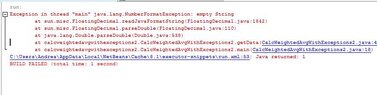
Hello I like Serena! When I run my program it fails. I keep encountering this message. The last program I made with exceptions didn't have any error messages. Thank you for answering me! :-) View attachment 5797
 

Attachments

  • Error.JPG
    Error.JPG
    32.6 KB · Views: 108
smilesofmiles said:
Hello I like Serena! When I run my program it fails. I keep encountering this message. The last program I made with exceptions didn't have any error messages. Thank you for answering me! :-)

That would happen if the data.txt file is not there, or it's in the wrong location, or if it's empty.
You may want to remove the [m]if(file.exists())[/m], so that a missing file gets reported.

Note that the exception is only later in the code when it tries to access the 2nd number that is simply not there.
 

Similar threads

Replies
4
Views
2K
  • · Replies 2 ·
Replies
2
Views
2K
  • · Replies 2 ·
Replies
2
Views
2K
  • · Replies 1 ·
Replies
1
Views
3K
  • · Replies 4 ·
Replies
4
Views
2K
  • · Replies 1 ·
Replies
1
Views
2K
  • · Replies 5 ·
Replies
5
Views
2K
  • · Replies 1 ·
Replies
1
Views
3K
  • · Replies 6 ·
Replies
6
Views
3K
  • · Replies 28 ·
Replies
28
Views
3K