What is a multi selection panel and how is it used in GUI design?

  • Context:
  • Thread starter Thread starter MartinJH
  • Start date Start date
  • Tags Tags
    Control
Click For Summary

Discussion Overview

The discussion revolves around the concept of a multi-selection panel in GUI design, particularly in the context of C# application development. Participants explore how users can select items from a list, the terminology associated with this functionality, and potential implementations.

Discussion Character

  • Exploratory
  • Technical explanation
  • Debate/contested

Main Points Raised

  • One participant describes a need for a control that allows users to move items between two lists, questioning if such a control exists in C#.
  • Another participant asserts that the language does not dictate the availability of controls and explains that moving items between lists must be coded manually, emphasizing the simplicity of this task.
  • A suggestion is made to use a single ListView with checkboxes for persistent selections, noting that this could be implemented in both Windows Forms and WPF.
  • One participant mentions the term "multi-selection panel" and discusses its advantages over checkboxes, particularly in scenarios where the source list is large and requires scrolling.
  • It is noted that creating a multi-selection panel may require custom coding with listboxes and buttons, as it is not a standard GUI control.

Areas of Agreement / Disagreement

Participants express differing views on the terminology and implementation of multi-selection panels, with no consensus reached on a standard definition or approach.

Contextual Notes

Some limitations include the lack of established terminology for the discussed control, the need for custom coding, and the potential for user interface challenges when dealing with large lists.

MartinJH
Messages
72
Reaction score
2
Hi,
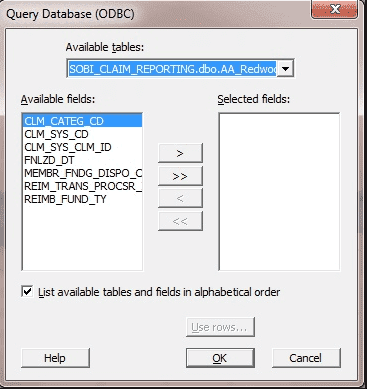
I'm developing an application and I allow a user to select 'things' they want enabled and others they do not. I had a solution coded but discovered a new solution. While I can 'hard' code this new solution, featured below, I was wondering if C# (the language I'm using) has the following control available;
(essentially moving one 'thing' from the left hand column to the right with provided buttons)
Capture.png

Indeed, failing that, and the purpose of this question, does this method of allowing a user to select certain 'thing' from a list have a name?
(please ignore the title of the window and other text, this is just an image I found to help explain my question)

Many thanks
 
Technology news on Phys.org
As far as I know, the language used is irrelevant. The controls come from system calls that can be made from any language. There is no control that inherently moves an item from one list box (or text box if that's what you have) to another. You have to code that, but it's awfully simple.

Since you are using the C# language, you must be using C#.NET as your IDE, in which case the selection of an item is called "item select". There are numerous system calls associated with items, such as adding an item, geting the index of a selected item, getting a selected item, setting the selection index in an item list, etc.
 
If you are looking for a more compact design of allowing a user to view and make "persistent" selections in a list, then you may consider using only a single ListView and then associate a checkbox with each item in the list. I believe that should be possible in Windows Forms by using the ListView.CheckBoxes property [1] and in WPF by using a template with a checkbox [2] or similar.

If the selection is very short term (e.g. the selection is cleared each time the user is presented with the dialog) then Forms ListView.MultiSelect [3] or WPF ListView.SelectionMode [4] may be suitable instead, but since multiselection is not indicated the capability may easily remain undiscovered by the user.

[1] https://msdn.microsoft.com/en-us/library/system.windows.forms.listview.checkboxes(v=vs.110).aspx
[2] https://msdn.microsoft.com/en-us/library/ms754143(v=vs.110).aspx
[3] https://msdn.microsoft.com/en-us/library/system.windows.forms.listview.multiselect(v=vs.110).aspx
[4] https://msdn.microsoft.com/en-us/li...controls.listbox.selectionmode(v=vs.110).aspx
 
  • Like
Likes   Reactions: Pepper Mint

Similar threads

Replies
7
Views
3K
Replies
11
Views
2K
  • · Replies 15 ·
Replies
15
Views
3K
  • · Replies 4 ·
Replies
4
Views
2K
  • · Replies 4 ·
Replies
4
Views
3K
  • · Replies 10 ·
Replies
10
Views
4K
  • · Replies 2 ·
Replies
2
Views
2K
  • · Replies 9 ·
Replies
9
Views
4K
  • · Replies 1 ·
Replies
1
Views
2K
  • · Replies 2 ·
Replies
2
Views
3K