What is the NWJS virus and how can I protect my computer from it?

  • Thread starter Thread starter DaveC426913
  • Start date Start date
  • Tags Tags
    Computer Virus
Click For Summary

Discussion Overview

The discussion revolves around the nwjs virus, its identification, and protective measures for computers. Participants share experiences with malware detection, antivirus software, and potential associations of nwjs with legitimate applications.

Discussion Character

  • Exploratory
  • Technical explanation
  • Debate/contested

Main Points Raised

  • One participant reports a popup related to nwjs on their wife's computer, noting that it is not running McAfee but has BitDefender and Windows Firewall enabled.
  • Another participant mentions that nwjs may be linked to a legitimate application (PCAppStore/cvs.exe) but can be exploited, and they have quarantined it.
  • Suggestions are made to install Malwarebytes for additional scanning, with one participant suggesting it is likely an adware issue.
  • Some participants discuss their experiences with Linux, noting they have not encountered viruses and question the necessity of antivirus software.
  • There is a query about whether nwjs is a virus or a benign JavaScript module, highlighting the potential for misidentification.
  • One participant suggests using Process Monitor and Process Explorer to investigate the nwjs process further.
  • Another participant notes that nwjs seems to be associated with launching Zoom, but this could be coincidental.
  • There are discussions about the limitations of hardware when using certain software, particularly in relation to Java and Android Studio.

Areas of Agreement / Disagreement

Participants express differing views on the nature of nwjs, with some considering it potentially benign while others suspect it may be malicious. There is no consensus on the best approach to handle the situation, and multiple competing views remain regarding the necessity and effectiveness of various antivirus solutions.

Contextual Notes

Participants mention various antivirus software and their experiences, but there are unresolved questions about the legitimacy of the nwjs process and its association with other applications. Some discussions also touch on the effectiveness of different operating systems in preventing malware.

DaveC426913
Gold Member
2025 Award
Messages
24,292
Reaction score
8,445
TL;DR
I am getting this McAfee virus popup. How can I remove it?
This is on my wife's computer, which we bought many months ago but has not been used (much).

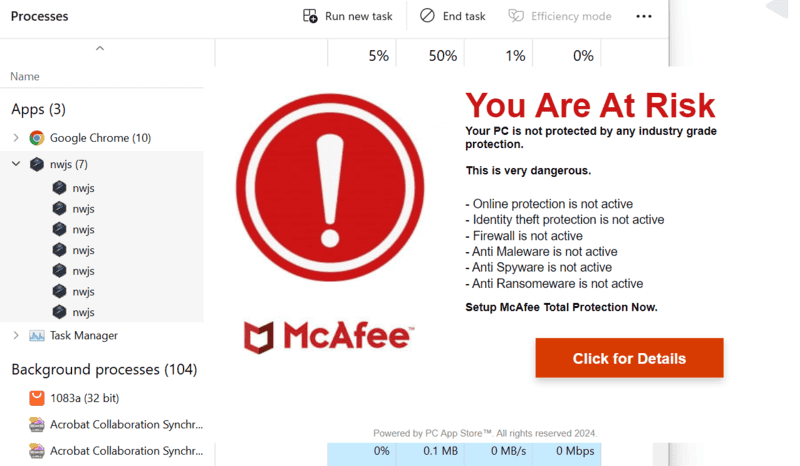
I am getting this popup.
1707440129883.png


The computer is not running McAfee; it is running BitDefender and Windows Firewall. Task Manager tells me this is Malware nwjs (see background in screenshot). When I ended that task, it went away.

I checked the security settings and found that browsing protection was not turned on, so I've turned it on. I ran a quick scan which turned up nothing.

I also checked that there are no suspicious browser extensions (at least in Chrome, I guess I should check Edge too)

Is there anything else I can or should do?
 
Computer science news on Phys.org
A little bit more research leads me to PCAppStore/cvs.exe which is apparently a legit org and a legit app but can be exploited it seems. It appears to have been quarantined sometime today. I have now removed it. We'll see if the message comes back. (It has appeared twice in two hours.)

Despite the fact that this computer has been pretty much idle for months, it does not appear to have its security files out-of-date. Or, at least, they are up-to-date as of two hours ago...
 
Try installing Malwarebytes (it can safely stay with another antivirus software), and conduct a system scan using that.

Most likely, this is an adware issue.
 
  • Like
Likes   Reactions: WWGD, russ_watters and DaveC426913
DaveC426913 said:
Is there anything else I can or should do?
If you have McAfee Free, then you may consider to replace it with something else what does not include unkillable FUD popups as advertising strategy.

Ps.: I had AVG Free. Was the same. Got replaced. Now, I has PEACE 😇
 
Don't have any McAfee s/w.
 
I've been running Linux for years. Never had a virus scanner installed and I've never been inconvenienced by any virus. If I have one it's being very discreet. :)
 
  • Like
Likes   Reactions: jack action and strangerep
sbrothy said:
I've been running Linux for years. Never had a virus scanner installed and I've never been inconvenienced by any virus. If I have one it's being very discreet. :)
To be fair I check port traffic from time to time just to be sure but I've never seen anything out of the ordinary.

just to be sure I'm not paticipating in a DDOS attack without my knowlegde.

But I think there is a virus scanner. It's called "clam" right?
 
Getting serious for a second... Does this executable(?) present itself as "NWJS" or "NW.js" (or similar)?

I'm asking because "nw.js" isn't actually a virus but a Javascript module which might conceivable set off a virus scanner because it handles a bunch of stuff:

https://github.com/nwjs/nw.js/wiki/_pages

I'm just pointing this out because it would be a right mess to start a war against something benign.
 
Last edited:
  • Like
Likes   Reactions: phinds
DaveC426913 said:
Don't have any McAfee s/w.
Sorry, then: the first post suggested otherwise.

sbrothy said:
I've been running Linux for years.
Me too. As the 'main' PC. But for the sake of numerous other SW, I'm keeping some W machines too.
Linux is great, but sadly it's still not the absolute and easy solution for every problem / for everybody :confused:
 
  • Like
Likes   Reactions: sbrothy
  • #10
Rive said:
Sorry, then: the first post suggested otherwise.


Me too. As the 'main' PC. But for the sake of numerous other SW, I'm keeping some W machines too.
Linux is great, but sadly it's still not the absolute and easy solution for every problem / for everybody :confused:
I agree. I like to play with DAWs (Digital Audio Workstations) and there Linux isn't my first choice. I don't play games but I'd imagine the same goes for them. That is, if linux hasn't caught up, I wouldn't know.

Also, if I have to be absolutely honest Microsoft Developer Studio doesn't really have it's equal on Linux.

Dancing with Android Developer Studio on Linux is also a pretty heavy ordeal (which could be because of the limitations of my HW). Still, writing such a large program in Java seems to me to be asking for trouble.
 
  • #11
sbrothy said:
Dancing with Android Developer Studio on Linux is also a pretty heavy ordeal (which could be because of the limitations of my HW). Still, writing such a large program in Java seems to me to be asking for trouble.
I have been using Android Studio on Ubuntu flawlessly for years.
 
  • #12
I guess it's the limitations of my hardware then. I'm an old-school C/C++ diinosaur. I'm probably a little predujiced against Java
 
  • Sad
Likes   Reactions: Wrichik Basu
  • #13
I have had her install Malwarebytes and run a scan. Looks like it's the "Premium Trial" version, so it won't last forever.
 
  • #14
That icon and process is linked to the nw.js project, which is a NodeJS container that is bundled in a sandboxed chromium environment. I've actually contributed to this codebase a long time ago. So it could be that you're using a program that is deployed as an application with nwjs, or it could be that it's an actual virus that has an icon and process name of nwjs. If you right click on the process name and see where it's running from, it might give you some good info on if you'd expect it to be running or not based on the software you normally use. Another good program to determine software behavior is Process Monitor and Process Explorer

https://learn.microsoft.com/en-us/sysinternals/downloads/procmon
https://learn.microsoft.com/en-us/sysinternals/downloads/process-explorer

If you run these programs and see that the behavior of that process is doing things that you shouldn't, take steps to remove it. If it's just a normal program that you use day to day and you just didn't realize that it's bundled as an nwjs app, then whitelist it.
 
  • #15
It seems to be associated with launching Zoom, though that could be a coinkydink.
 
  • #16
DaveC426913 said:
It seems to be associated with launching Zoom, though that could be a coinkydink.
Can you upload the folder that the process is coming from and share a link in a PM to me? I can take a look at it for you. If you have the whole folder zipped up, I can extract it and see what kind of NodeJS/javascript is running in it and determine if it's malicious or not.
 
  • #17
sbrothy said:
I guess it's the limitations of my hardware then. I'm an old-school C/C++ diinosaur. I'm probably a little predujiced against Java
Don't worry. It's not bad. I am, after all, a SUN Certified Java Developer, although I think I lost the plastic card somewhere many years ago. :P
 
  • #18
I have been using the built-in Windows Defender and firewall since I bought my laptop with Windows 10. I have never used McAfee on any computer I have had, but I have had these warnings pop up from time to time. Sometimes they tell me my McAfee subscription has expired and have a "Click here to renew" button, so I just delete them.
 

Similar threads

Replies
6
Views
3K
Replies
15
Views
4K
  • · Replies 3 ·
Replies
3
Views
2K
  • · Replies 12 ·
Replies
12
Views
3K
  • · Replies 21 ·
Replies
21
Views
7K
  • · Replies 15 ·
Replies
15
Views
5K
Replies
17
Views
5K
Replies
5
Views
3K
  • · Replies 5 ·
Replies
5
Views
2K
  • · Replies 22 ·
Replies
22
Views
4K