Why Does Firefox Keep Crashing and How to Fix It?

  • Thread starter Thread starter Kutt
  • Start date Start date
  • Tags Tags
    Firefox
Click For Summary

Discussion Overview

The discussion centers around the frequent crashing of Firefox, with participants exploring potential causes and solutions. The scope includes troubleshooting, user experiences, and suggestions for alternative browsers.

Discussion Character

  • Exploratory
  • Technical explanation
  • Debate/contested
  • Homework-related

Main Points Raised

  • One participant reports that Firefox crashes every minute and seeks help for a fix.
  • Another suggests uninstalling and reinstalling Firefox as a potential solution, noting the lack of information about the user's environment.
  • A participant reiterates the suggestion to delete and reinstall Firefox, providing details about their high-end computer setup.
  • Another user recommends holding down the Left Shift button while opening Firefox to disable add-ons and reset preferences, along with clearing the cache as a possible fix.
  • One participant suggests trying a different browser, specifically Chrome, to see if the issue persists.
  • Another user proposes Avant as an alternative browser that allows using multiple engines, including Firefox and Chrome.
  • A later reply mentions that uninstalling and reinstalling Firefox did not resolve the crashing issue, suggesting that it may be related to internet cache or virtual memory problems.

Areas of Agreement / Disagreement

Participants express various suggestions for resolving the crashing issue, but there is no consensus on a definitive solution. Multiple competing views and approaches remain, reflecting uncertainty about the underlying cause of the problem.

Contextual Notes

Some suggestions depend on the user's specific environment and configurations, which are not fully detailed. There are also references to potential issues with cache and virtual memory that remain unresolved.

Who May Find This Useful

This discussion may be useful for users experiencing similar issues with Firefox crashing, as well as those interested in troubleshooting browser-related problems.

Kutt
Messages
237
Reaction score
1
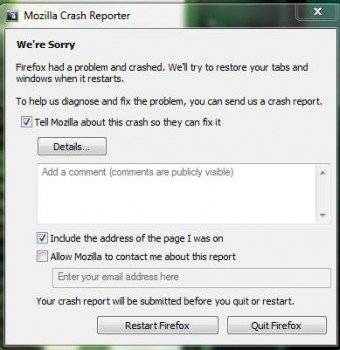
Every minute or so, firefox crashes and this error message pops up.

What's wrong and is there anything I can do to fix this?

502d81207868668.jpg
 
Computer science news on Phys.org
Since I don't know what the environment you are working in, it is hard to give a definitive answer. My first suggestion is delete Firefox and download a fresh copy.
 
mathman said:
Since I don't know what the environment you are working in, it is hard to give a definitive answer. My first suggestion is delete Firefox and download a fresh copy.

I'm using a top-of-the-line $3,500 desktop computer at my home.
 
I agree w/ the suggestion to obliterate FireFox from your computer and then download a fresh copy and reinstall.
 
Hold down your Left Shift button, while holding down shift Open Firefox,

You will be represented with this screen
http://img820.imageshack.us/img820/6119/56213741.png
Select Disable All Add-on's
Reset All User Preferences To Firefox Defaults
push enter or click on make changes and restart.

If you want to enable some of your addons again
simply just press Ctrl+Shift+A and select the addons to enable.

If that doesn't fix your issue with crashing most likely it is due to cache
goto options, advanced, network, clear the cache and set a higher limit.
ref.
http://img43.imageshack.us/img43/5339/41833496.png

I personally use AddBlocker Plus as the addon to stop spyware/addware/addbots and so forth as it blocks all add's from every site, i would highly recommend this addon to stop this from happening in the future (clicking on an add accidently can cause a lot of issues)
 
Last edited by a moderator:
Try to download another browser and see if that works.

I recommend chrome.
 
If you feel adventuresome, try Avant. It is essentially a front end where you can use IE, Firefox, or Chrome. You need IE for it to work.
 
I uninstalled and reinstalled firefox and I am still experiencing this problem. In fact, it is getting worse.

Could be a problem with my internet cache or virtual memory since there are problems and crashes when loading photos.
 

Similar threads

  • · Replies 34 ·
2
Replies
34
Views
5K
Replies
7
Views
15K
  • · Replies 12 ·
Replies
12
Views
2K
  • · Replies 3 ·
Replies
3
Views
4K
  • · Replies 20 ·
Replies
20
Views
2K
  • · Replies 3 ·
Replies
3
Views
2K
  • · Replies 11 ·
Replies
11
Views
2K
  • · Replies 13 ·
Replies
13
Views
2K
Replies
3
Views
3K
Replies
1
Views
3K