Will a New LAN Card Work in My CPU After Lightning Damage?

  • Thread starter Thread starter Wrichik Basu
  • Start date Start date
  • Tags Tags
    cpu
Click For Summary
SUMMARY

The discussion centers on the installation of a new LAN card after lightning damage to the original card connected to an Asus P7H55-M-LX motherboard. The user successfully installed a compatible LAN card found on Amazon, confirming that it works with their 100Mbps broadband connection. They noted the importance of checking motherboard specifications and disabling the onboard LAN controller to avoid conflicts. The user also shared insights on driver installation, emphasizing that Windows typically auto-detects drivers upon connection.

PREREQUISITES
  • Understanding of motherboard specifications, specifically Asus P7H55-M-LX.
  • Knowledge of LAN card compatibility and installation procedures.
  • Familiarity with BIOS settings for disabling onboard LAN controllers.
  • Basic skills in managing Windows driver installations and updates.
NEXT STEPS
  • Research how to check motherboard specifications for compatibility with hardware upgrades.
  • Learn about the process of disabling onboard LAN controllers in BIOS settings.
  • Explore driver management tools, focusing on SlimDrivers and alternatives.
  • Investigate best practices for safely installing hardware components in older PC cases.
USEFUL FOR

This discussion is beneficial for PC builders, hardware enthusiasts, and individuals troubleshooting network issues after hardware damage, particularly those working with older systems like the Asus P7H55-M-LX motherboard.

Wrichik Basu
Science Advisor
Insights Author
Gold Member
Messages
2,180
Reaction score
2,690
There must be people here who remember me discussing about lightning affecting my neighbour's appliances. Now it seems that I am also a victim.

But in my case, the problem is different: the lightning has come up through the cable of broadband connected to my PC, thereby burning the LAN card.

Now, I opened up the cabinet, and the LAN card is connected to the motherboard, as shown below:
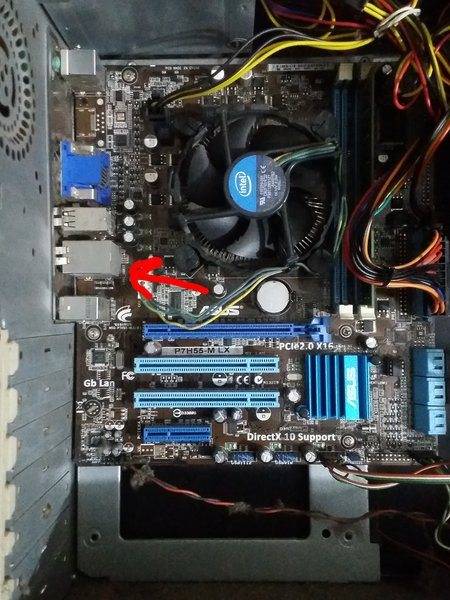
Motherboard.jpg


It is evident that I won't be able to change the LAN card without desoldering the one fixed to the motherboard, and I'm in no mood to play with the motherboard.

I was searching for LAN card online, and found a few, like https://www.amazon.com/gp/product/B00E9R7FNK/?tag=pfamazon01-20. I want to fit it in one of these ports:
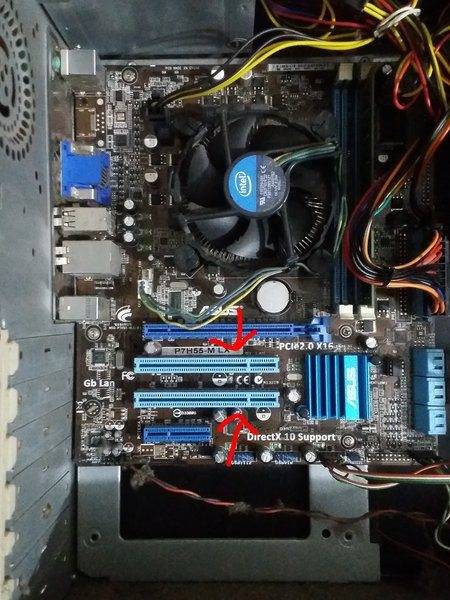
Ports.jpg


The question is, will that work? I have a 100Mbps broadband connection.

As per amazon user reviews, I won't need a CD for installation.
 

Attachments

  • Ports.jpg
    Ports.jpg
    59.4 KB · Views: 748
  • Motherboard.jpg
    Motherboard.jpg
    59.4 KB · Views: 799
Computer science news on Phys.org
Looks like that card should work, but you should check your motherboard spec and the lan card specs to ensure they are exactly compatible.
 
russ_watters said:
Looks like that card should work, but you should check your motherboard spec and the lan card specs to ensure they are exactly compatible.
How do I find the motherboard specs? I know it's made by Asus.
 
See the label P7H55-M-LX I think that is an Asus model number.
 
  • Like
Likes   Reactions: Wrichik Basu
russ_watters said:
Looks like that card should work, but you should check your motherboard spec and the lan card specs to ensure they are exactly compatible.
As per the motherboard specs and the specs of the LAN card, it should work on my windows 7.
 
CWatters said:
You might need to disable the onboard LAN controller incase enough of it is working to cause a conflict. Google found...https://www.manualslib.com/manual/438745/Asus-P7h55-M-Lx-Usb3.html?page=37

Scroll to bottom of that page.
I found a short video showing the bios settings. I found how to disable the inbuilt LAN card.


The card is no longer being detected, and is not showing up under network adapters list. But I'll still be on the safe side and disable it before loading the new one.

Do I have to change anything on bios after plugging in the card?
 
Last edited:
Usually this Windows will automatically find drivers although they may not be the latest. I would allow windows time to do its thing when you power it up. Once connected to the internet perhaps run windows update to see if there is a newer driver.
 
  • Like
Likes   Reactions: Wrichik Basu
  • #10
CWatters said:
Usually this Windows will automatically find drivers although they may not be the latest. I would allow windows time to do its thing when you power it up. Once connected to the internet perhaps run windows update to see if there is a newer driver.
OK, thank you for the help.
 
  • #11
Wrichik Basu said:
Do I have to change anything on bios after plugging in the card?
CWatters said:
Usually this Windows will automatically find drivers although they may not be the latest. I would allow windows time to do its thing when you power it up. Once connected to the internet perhaps run windows update to see if there is a newer driver.
I use the free version of SlimDrivers a lot. Works very well.
 
  • Like
Likes   Reactions: Wrichik Basu
  • #12
dlgoff said:
I use the free version of SlimDrivers a lot. Works very well.
At least one review claims it is a huge source of malware. I glanced at their webpage, the source is over 4500 lines with LOTS of cookie and advertising code.
 
  • #13
Tom.G said:
At least one review claims it is a huge source of malware. I glanced at their webpage, the source is over 4500 lines with LOTS of cookie and advertising code.
bold by me
I don't think that's true. It's a "stand alone" 28.7 KB .exe file (SlimDrivers.exe). Are you sure you looked at the free version?

BTW I've used it for several years now with no problems.
 
  • #14
dlgoff said:
I don't think that's true. It's a "stand alone" 28.7 KB .exe file (SlimDrivers.exe). Are you sure you looked at the free version?

BTW I've used it for several years now with no problems.

Yeah, it was the free version. Reading you post (and re-reading mine),
Tom.G said:
I glanced at their webpage, the source is over 4500 lines with LOTS of cookie and advertising code.
I realized my post was rather ambiguous in that the "4500 lines" I referred to was for the web page itself, not source code for the program, which I have not seen.

Sorry if that led to any confusion.

Cheers,
Tom
 
  • #15
I've only ever needed to use

a) drivers supplied on disc with the hardware and updated online from the hardware makers webvsite or
b) drivers that windows found automatically.

I don't see any advantage in using anything else unless it's all you can find.
 
Last edited:
  • Like
Likes   Reactions: Wrichik Basu and Tom.G
  • #16
Bit dated but still worth a look...

https://www.techsupportalert.com/freeware-forum/freeware-installation-and-usage/11512-slimdriver-warning.html
 
  • Like
Likes   Reactions: davenn and Tom.G
  • #17
Bought the lan card and fixed it on the slot.

20180521_130608.jpg


It's working properly. There was a problem with the screws. The CPU cabinet is about 18 years old, and if I tried to tightly screw the card, it was coming off. Anyways, I fixed it somehow with a single screw.

I thank all who have helped in choosing the accessory, and given further installation instructions, especially @CWatters.
 

Attachments

  • 20180521_130608.jpg
    20180521_130608.jpg
    82.5 KB · Views: 576
  • #18
Jolly good.
 

Similar threads

  • · Replies 15 ·
Replies
15
Views
3K
Replies
2
Views
879
  • · Replies 2 ·
Replies
2
Views
2K
  • · Replies 1 ·
Replies
1
Views
3K