Airflow direction -- Improving the cooling of my computer

Click For Summary

Discussion Overview

The discussion focuses on optimizing airflow within a computer chassis to improve cooling efficiency. Participants explore the implications of adding additional fans, their placement, and the interaction of airflow from multiple sources. The conversation includes considerations of thermal management, fan direction, and potential airflow conflicts.

Discussion Character

  • Exploratory
  • Technical explanation
  • Debate/contested

Main Points Raised

  • One participant suggests that having some exhaust fans would be more effective than having all intake fans, as it can help remove hot air from the case.
  • Another participant expresses concern about creating negative pressure inside the case, which could lead to dust accumulation, while also acknowledging the need for additional cooling for certain components.
  • There is a question about the behavior of airflow when it collides from three different directions, with three possible outcomes proposed: joining together, moving without interaction, or clashing and dispersing randomly.
  • One participant speculates that the collided airflow will likely clash and negate each other's flow, leading to random dispersion.
  • A later reply questions the effectiveness of a perforated plate in the airflow design, suggesting it may impede airflow rather than assist it.
  • Concerns are raised about the potential for hot components to create stagnant air, which could lead to overheating despite increased airflow from additional fans.

Areas of Agreement / Disagreement

Participants express differing views on the optimal configuration of fans, with some advocating for a mix of intake and exhaust fans while others highlight the challenges posed by the thermal conditions of specific components. The discussion remains unresolved regarding the best approach to airflow management.

Contextual Notes

Limitations include a lack of specific information about which components generate heat and how their placement affects airflow dynamics. The discussion also reflects uncertainty about the effectiveness of proposed solutions without empirical testing.

Riogunati
Messages
3
Reaction score
0
TL;DR
Need to know what happens after airflow from 3 different sources and 3 different directions meet
Hi,
First of all I am sorry if I post in an incorrect thread. I can ask my question in PC forums but I thought it probably better if I ask in physics forum.

So, I am trying to make the temperature in my PC better by adding additional fans, however I can't really place the fans in whatever direction I want. So after looking at the PC chassis for awhile, I found some interesting spots where I can add a new fan. I said interesting because if I put the fans at those spots, 3 airflow will meet at the middle, and I need to know what might/will happen for that situation. I attached a simple image of the directions, sorry if it's bad drawing, I suck at ms-paint.
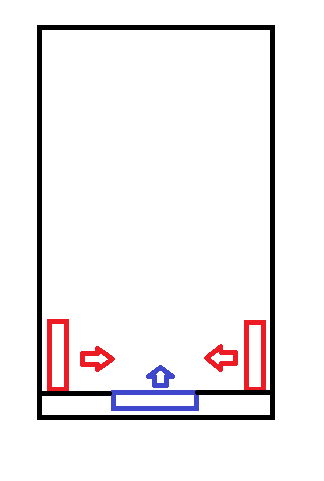
Airflow.png

All fans mentioned in this post are of the same size.
Directly ontop of the purple fan, will be another fan in the same direction as the purple one in the picture.
On the top and below of the airflow meeting point there will be a metal plate with some bit of small holes.

I hope you guys at this forum willing to help me with this.
Thank you in advance.
 
Last edited by a moderator:

Science news on Phys.org
:welcome:

It would be more effective if some of the fans were exhaust fans, blowing air out instead of in.

It is common to pair fans, one blowing into a confined space, and the other blowing out. It increases air flow in the middle.
 
  • Like
Likes   Reactions: russ_watters
Thank you for the welcome, and for the reply

If you meant have some exhaust too not just all intake in a fairly closed environment, then yes, there is 2 fans that exhausts at the opposite side. Adding more probably will put the inside of my PC case in a negative pressure condition, which I don't want (Dusty outside environment).

But since the thermal condition of (and because of) some parts needs some help, I thought to add more fans, which is those 2 red ones in the picture.

I just want to know wether the collided airflow will :
A. Join together and move toward the direction of the purple fan flow.
B. Move toward a direction without addition.
C. Clash and negate each other's flow, then the air spreads to random direction(s)

My goal is to add more fresh cool air into the chassis and direct them toward a certain direction (in the picture, UP) if that at all possible. Without adding some sort of a plate to direct the side fan's airflow. Because adding those plates might choke/bottleneck the purple fan's airflow.

I would do a live try if only good and consistent PC fans not expensive. :cry:
 
This …...

anorlunda said:
It would be more effective if some of the fans were exhaust fans, blowing air out instead of in.

Riogunati said:
If you meant have some exhaust too not just all intake in a fairly closed environment, then yes, there is 2 fans that exhausts at the opposite side. Adding more probably will put the inside of my PC case in a negative pressure condition, which I don't want (Dusty outside environment).

well you have 4 in and nothing out. This does not help with cooling as the air inside the case is only going to get hotter. make 2 of those 4 fans exhaust fans to get rid of the hot air.

Riogunati said:
I just want to know wether the collided airflow will :
A. Join together and move toward the direction of the purple fan flow.
B. Move toward a direction without addition.
C. Clash and negate each other's flow, then the air spreads to random direction(s)

probably mostly C

Again, you need to get rid of the hot air. It isn't going to do any good just circulating in the case getting hotter and hotter

Dave
 
Here is the actual diagram, sorry, should have just drawn it in the first place. The pic I posted in my first post is if you see the airflow direction from the top.
Airflow2.jpg

None of the exhaust fans' airflow can't really be reversed for another intake, because there is very hot components near it or under it (like around 70-90 degrees celsius), some almost directly under / ontop each other, so like if I put the top as another intake, that will mean pushing down hot air to parts under.
 
Riogunati said:
Summary: Need to know what happens after airflow from 3 different sources and 3 different directions meet

On the top and below of the airflow meeting point there will be a metal plate with some bit of small holes
What is the reason for the perforated plate? If anything.
You do realize that it is another impediment to the air flow.

One thing -not knowing which parts of your box is generating heat that needs to be removed, it is difficult to even give a reasonable answer. Adding another fan may increase the airflow in/ out of the box, but the hot component may just be set into stagnant air and overheat anyways.
 
  • Like
Likes   Reactions: anorlunda

Similar threads

  • · Replies 3 ·
Replies
3
Views
3K
  • · Replies 5 ·
Replies
5
Views
3K
Replies
6
Views
6K
  • · Replies 3 ·
Replies
3
Views
3K
  • · Replies 15 ·
Replies
15
Views
4K
  • · Replies 15 ·
Replies
15
Views
4K
  • · Replies 7 ·
Replies
7
Views
2K
  • · Replies 3 ·
Replies
3
Views
4K
  • · Replies 6 ·
Replies
6
Views
8K
  • · Replies 4 ·
Replies
4
Views
4K