BASIC: Blink LED w/ Push Button Using DO...WHILE Loop

  • Context:
  • Thread starter Thread starter ineedhelpnow
  • Start date Start date
  • Tags Tags
    Loop
Join the discussion
Ask a follow-up here, or get your own question answered by working scientists, mathematicians and engineers — people, not an autocomplete.
Real named experts · corrections over time · the nuance an AI answer skips
1 reply · 2K views
ineedhelpnow
Messages
649
Reaction score
0
use the DO...WHILE...LOOP statement to blink an LED at a rate of 2 times a second as long as a push button is pressed. If the push button is not being pressed, the program should wait until the button is pressed and held before blinking the LED. To solve this problem, the DO...WHILE...LOOP will need to be inside of a separate master DO...LOOP that is used to allow our program to continuously repeat itself while waiting for a button press.

please help! i have no idea what to do.
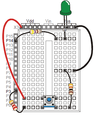
the circuit looks something like this
View attachment 3412
 

Attachments

  • asdfdg.png
    asdfdg.png
    8.5 KB · Views: 152
Physics news on Phys.org
Writing programs that do some computations with numbers or strings and output them to a console ([m]count[/m] in C++) is the easiest. As soon as we involve APIs (application program interfaces, i.e., libraries that deal with a specific topic), such as those that are used to write graphical user interface or control circuits, things become significantly more complicated. Not only are there different APIs for the same task, but those APIs are often huge and require writing a lot of code even for simple tasks. For example, reading a name from a console and printing "Hello, <name>" can be done in a couple of lines. Writing a program that displays a window with a text box, a button and a label (output area) may take tens of lines.

So, I have no idea which API you are supposed to use to work with circuits.