korobeiniki
- 2
- 0
Hi guys, after using the forum for ages for help I decided to make an account, so hopefully I might be able to contribute something as well, who knows :)
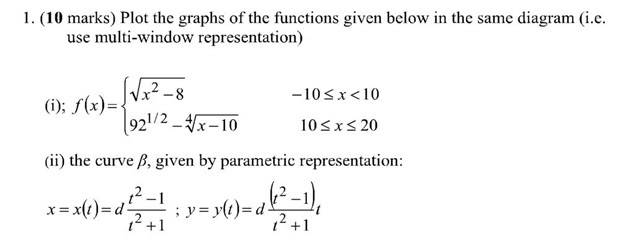
I'm a first timer with MATLAB and have been set an assignment. I'm completely stuck on question one:
The following image shows my code and the resulting figure. For some reason the second (parametric) graph is missing:
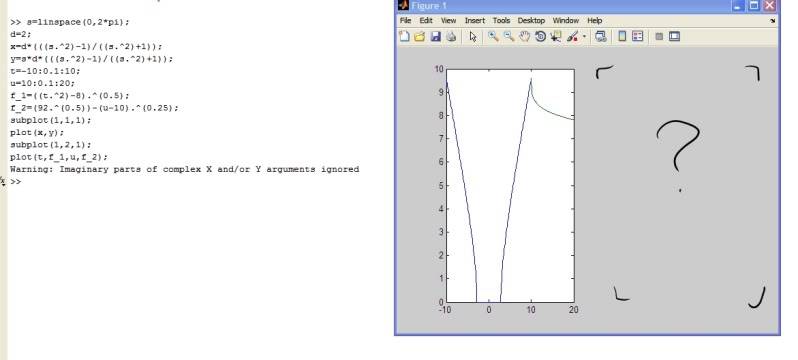
Also I'm not really happy with the code - the first function is piecewise but I've written it out as 2 separate functions. Is there some way to define this as one, piecewise, function?
Thanks for reading :)
Edit!: cracked it! my subplot command was all wrong: should've had (1,2,1) and (1,2,2) respectively. Also I was using matrix operators rather than array operators for the parametric curve. Thanks anyway!
I'm a first timer with MATLAB and have been set an assignment. I'm completely stuck on question one:
The following image shows my code and the resulting figure. For some reason the second (parametric) graph is missing:
Also I'm not really happy with the code - the first function is piecewise but I've written it out as 2 separate functions. Is there some way to define this as one, piecewise, function?
Thanks for reading :)
Edit!: cracked it! my subplot command was all wrong: should've had (1,2,1) and (1,2,2) respectively. Also I was using matrix operators rather than array operators for the parametric curve. Thanks anyway!
Last edited:
 Note that you've also got the datapoint at 10 twice (which is okay, since you're not concatenating the two vectors). To concatenate them, just do something like the following, which will put the two vectors together (x1 values followed by x2):