Bus Topology: Connecting Computers to the "Bus

  • Thread starter Thread starter Math Is Hard
  • Start date Start date
  • Tags Tags
    Bus Topology
Click For Summary
SUMMARY

Bus topology is a network configuration where all computers are connected to a single transmission line, typically using coaxial cable. The connection method involves T-connectors for attaching devices to the bus, which can be configured as either Daisy-Chain or with stubs. Multi-drop configurations allow multiple transmit (TX) and receive (RX) nodes, with specifications on stub lengths varying by network type, such as RS-485 requiring zero-length stubs. The original bus design utilized 10Base-2 coaxial cabling, which has been largely replaced by star topology networks using hubs and switches.

PREREQUISITES
  • Understanding of bus topology and its components
  • Familiarity with coaxial cabling, specifically 10Base-2
  • Knowledge of network configurations, including Daisy-Chain and stub connections
  • Basic concepts of multi-drop networks and their specifications
NEXT STEPS
  • Research the specifications for RS-485 networks and stub lengths
  • Learn about the differences between hub and switch functionalities in star topology
  • Explore the historical context and evolution of network topologies, focusing on 10Base-2
  • Investigate the practical applications of bus topology in modern networking
USEFUL FOR

Network engineers, IT professionals, and students studying computer networking who seek to understand the fundamentals of bus topology and its applications in network design.

Math Is Hard
Staff Emeritus
Science Advisor
Gold Member
Messages
4,650
Reaction score
36
http://en.kioskea.net/contents/initiation/topologi.php3
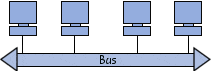
Bus topology is the simplest way a network can be organised. In bus topology, all computers are linked to the same transmission line by using a cable, usually coaxial. The word "bus" refers to the physical line that joins all the machines on the network.

initiation-images-bus.gif


What connects the cables coming from the computers to the "bus"? I can't quite get the idea of connecting these cables to another cable when connecting devices aren't mentioned.
 
Computer science news on Phys.org
The bus is just the cable running between each computer.
Like an ethernet cable - it's called a bus when it's shared (like the original ethernet) it would be better drawn with the wire looping form one machine to the nex
 
Thanks, MGB. So would it actually look more like this if it was physically set up?
 

Attachments

  • diagram.JPG
    diagram.JPG
    3.5 KB · Views: 515
Ironically it would be better to draw it as a star. The point of a bus is that a voltage on it is immediately seen by all interfaces connected to the bus.

(A star network is different - there is usually some logic in the hub to control where the data goes)
 
mgb_phys said:
Ironically it would be better to draw it as a star. The point of a bus is that a voltage on it is immediately seen by all interfaces connected to the bus.

hmm.. I'm having trouble drawing it as a star configuration without a hub (or switch) since, as you said, then I have a star topology. I less trouble envisioning it wirelessly, but I know that these networks were originally set up using coaxial cable, so there must be a way to diagram that design.
(A star network is different - there is usually some logic in the hub to control where the data goes)
Do you mean a switch? From what I've been reading, hubs seem pretty dumb, just sending the data on to every other host on the network. But I think you could have either a hub or a switch to connect the star network (I don't know this for sure).

Thanks again for your help.
 
I found the solution. The cables can be connected to other cables with T-connectors.
 
The two choices for connecting your devices to a multi-drop doubly-terminated bus are Daisy-Chain or with stubs.

For a given network type, there will be a specification for how long the stubs can be. For RS-485, for example, zero-length stubs (Daisy-Chain routing of the network twisted pair) are mandatory. For some networks, like the 78kbps control network that my company makes transceivers for, the stubs are allowed to be up to 3 meters long.
 
berkeman said:
The two choices for connecting your devices to a multi-drop doubly-terminated bus are Daisy-Chain or with stubs.

For a given network type, there will be a specification for how long the stubs can be. For RS-485, for example, zero-length stubs (Daisy-Chain routing of the network twisted pair) are mandatory. For some networks, like the 78kbps control network that my company makes transceivers for, the stubs are allowed to be up to 3 meters long.

Thanks, Berkeman. What is meant by "multi-drop" and what are "stubs"?
 
Math Is Hard said:
Thanks, Berkeman. What is meant by "multi-drop" and what are "stubs"?

Your cat is scaring me. But I'll try to answer under duress... :-p

Multi-drop means more than one TX node and one RX node. Two nodes is point-to-point at the ends of the DT bus, which is regular Ethernet comm. >Two nodes is multidrop.

But in control networks and other specialized networks, you want up to 64 nodes all working together, and that's when the multidrop 64 node network comes into play.
 
  • #10
And sorry. Stubs are the short lengths of twised pair cables that you use to connect the main bus TP to the nodes. They need to be electrically short,
 
  • #11
Thanks mucho. I'll change my avatar later. Just for you. :wink:
 
  • #12
Math Is Hard said:
hmm.. I'm having trouble drawing it as a star configuration without a hub (or switch) since, as you said, then I have a star topology. I less trouble envisioning it wirelessly, but I know that these networks were originally set up using coaxial cable, so there must be a way to diagram that design.

Bingo, and you got it right in your first diagram.

Called 10Base-2, or thinnet, the cabling was coax, and it ran a straight line, with terminators at either end. Tapping into the cable via T-connectors were leads which went to the coax cards in every computer.

That was truly the last true "bus" design in the business, as all others offer some sort of hub and spoke design, with 10Base-T being the first, basic hub, rebroadcasting data arriving at one port to all ports.

A switch simply applies some intelligence, figuring out from the packet whether to send it to a specifically intended receiver, to that receiver, or whether to rever to hub mode and broadcast. Layer 3 switches went a step further, but that's getting beyond the scope of the question!

Do you mean a switch? From what I've been reading, hubs seem pretty dumb, just sending the data on to every other host on the network. But I think you could have either a hub or a switch to connect the star network (I don't know this for sure).

Yes - both hubs and switches are star topology networks.
 

Similar threads

  • · Replies 10 ·
Replies
10
Views
3K
Replies
4
Views
3K
  • · Replies 15 ·
Replies
15
Views
2K
Replies
3
Views
2K
  • Sticky
  • · Replies 13 ·
Replies
13
Views
7K
  • · Replies 5 ·
Replies
5
Views
4K
  • · Replies 11 ·
Replies
11
Views
4K
  • · Replies 2 ·
Replies
2
Views
3K
Replies
10
Views
5K
Replies
2
Views
3K