Can anything block touchscreen buttons in Godot?

  • Thread starter Thread starter Darkmisc
  • Start date Start date
  • Tags Tags
    godot
Click For Summary
SUMMARY

The discussion centers on the challenge of managing overlapping buttons in Godot, specifically regarding touchscreen and regular buttons. The user seeks a solution to allow interaction with a regular button without triggering an underlying touchscreen button. Key insights reveal that adjusting the z-index in Godot affects visual layering but does not influence input event handling. Instead, the order of input event implementation is crucial, with references to the InputMap as a potential solution for managing input priorities.

PREREQUISITES
  • Understanding of Godot Engine's UI system
  • Familiarity with z-index and its implications in UI design
  • Knowledge of Godot's InputMap functionality
  • Basic experience with handling input events in Godot
NEXT STEPS
  • Research how to effectively use Godot's InputMap for managing input events
  • Explore techniques for layering UI elements in Godot
  • Learn about the differences between Control nodes and Button nodes in Godot
  • Investigate best practices for designing responsive touchscreen interfaces in Godot
USEFUL FOR

Game developers, UI designers, and anyone working with Godot who needs to manage overlapping input elements effectively.

Darkmisc
Messages
222
Reaction score
31
TL;DR
I have a button that overlaps with a touchscreen button. When I press the button, it also presses the touchscreen button underneath. Can I stop this from happening?
Hi everyone

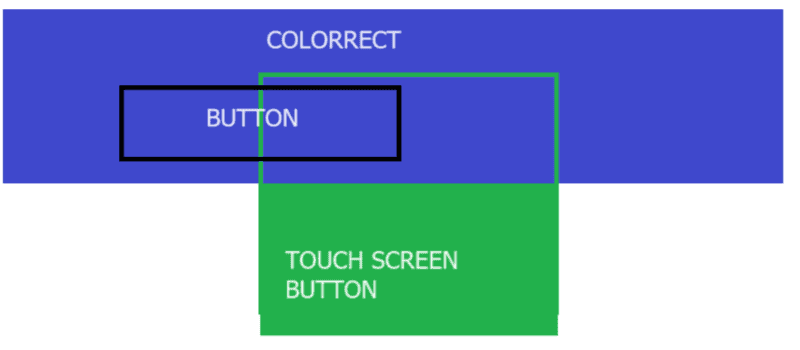
I have a button that overlaps with a touchscreen button. I want to be able to press the button without also pressing the touchscreen button. I can't use the .hide() function on the touchscreen button because I don't want to disable the whole touchscreen button.

Is there something I can use to block half of the touchscreen button (in the same way that you can block a button)?

If all else fails, I'm just going to make the button smaller or convert the touchscreen button to a regular button, but I'd rather not for aesthetic reasons. Thanks
1702447937868.png
 
Technology news on Phys.org
I'm not familiar with Godot, but that seemed to be a z-index problem to me. But looking at Godot's documentation:
https://docs.godotengine.org/en/stable/classes/class_canvasitem.html#class-canvasitem-property-z-index said:
Note: Changing the Z index of a Control only affects the drawing order, not the order in which input events are handled. This can be useful to implement certain UI animations, e.g. a menu where hovered items are scaled and should overlap others.
This seems to indicate that it is the order in which you implement the input events that determines which button event is on top. Again, not an expert with Godot, but it seems to have something to do with InputMap.
 
  • Like
Likes   Reactions: Darkmisc

Similar threads

Replies
1
Views
5K
  • · Replies 1 ·
Replies
1
Views
2K
  • · Replies 14 ·
Replies
14
Views
6K
  • · Replies 4 ·
Replies
4
Views
3K
  • · Replies 1 ·
Replies
1
Views
2K
Replies
4
Views
6K
Replies
9
Views
3K
  • · Replies 5 ·
Replies
5
Views
547
  • · Replies 0 ·
Replies
0
Views
2K
  • · Replies 1 ·
Replies
1
Views
2K