Can Photoshop CS5 Help Me Enhance a Shadowgraph?

  • Thread starter Thread starter Saladsamurai
  • Start date Start date
  • Tags Tags
    Photoshop
Click For Summary

Discussion Overview

The discussion revolves around enhancing a shadowgraph image using Photoshop CS5, with a focus on techniques for smoothing, adjusting contrast, and emphasizing key features such as electrodes and a flame. Participants explore various methods and tools for image manipulation while considering the ethical implications of altering scientific images.

Discussion Character

  • Exploratory
  • Technical explanation
  • Debate/contested

Main Points Raised

  • One participant expresses a desire to enhance a shadowgraph by smoothing the image, tweaking contrast, and brightening the background to highlight important features.
  • Another participant suggests using ImageJ, a free program, and mentions that a small amount of blur can improve the image, but raises concerns about the ethical implications of manipulating scientific images.
  • A third participant proposes that drawing the important features in a vector graphic program like Inkscape might be a quicker solution.
  • Another participant asserts that anyone familiar with Photoshop can achieve the desired enhancements.

Areas of Agreement / Disagreement

Participants do not reach a consensus on the best approach to enhance the shadowgraph, with differing opinions on the use of Photoshop versus other software and the ethical considerations of image manipulation.

Contextual Notes

There are unresolved ethical concerns regarding the manipulation of scientific images, as well as varying levels of familiarity with the software among participants.

Who May Find This Useful

This discussion may be useful for individuals interested in image processing, particularly in scientific contexts, as well as those exploring ethical considerations in image manipulation.

Saladsamurai
Messages
3,009
Reaction score
7
I mean, I am sure that it can, but maybe someone could just tell me how to do it? I have never used PS before. My school has Photoshop CS5 that I can access. Here is what I want to do.

The following image is a shadowgraph. You can see 2 "pointy things" (electrodes) and a circle (which is a flame). You can also see a bunch of defects all about the image. What I want to do is somehow "smooth out" everything and tweak the contrast so that all you really see are the important features: the electrodes and the flame. It would not hurt to make the shadows a little more pronounced (i.e. make them pop out more) by brightening the background.

Does anyone have the patience to walk me through this? Or at least get me started? :redface: Even if you can tell me what they would call the "smoothing" function.

I'll trade you a flounder.
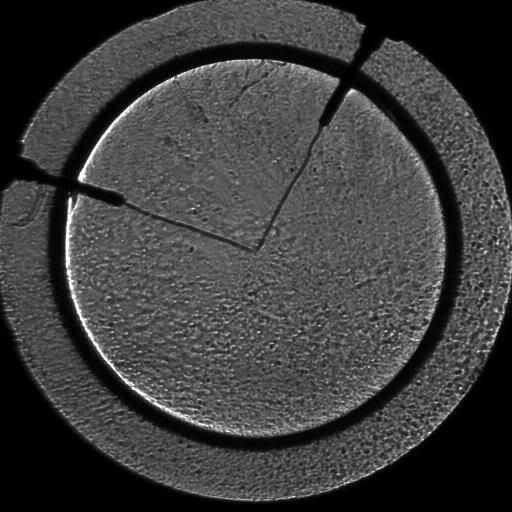
TestImage.jpg
 
Computer science news on Phys.org
What you want to do is not difficult- I'm not a Photoshop expert, but I use ImageJ (a free program) and there are a variety of tools that can be used. A small amount of blur can do wonders, for example.

However, this appears to be a scientific image (as opposed to a photograph)- you should know that doing what you are asking to do can be considered scientific fraud- there are explicit rules about what sort of image manipulations are permissible.

http://swehsc.pharmacy.arizona.edu/exppath/micro/digimage_ethics.php
http://www.uab.edu/ethicscenter/educational-materials/rcr-materials/image-manipulation/image-manipulation-bibliography

That said, if you email me the image (PM me for the address) I can try to help you.
 
Last edited by a moderator:
If you need just sketch of the important features, it will be probably easier and faster to draw them in some vector graphic program (like Inkscape).
 
lolarogers said:
An expert can do so.

Anyone can who has become familiar with Photoshop.
 

Similar threads

  • · Replies 14 ·
Replies
14
Views
2K
  • · Replies 1 ·
Replies
1
Views
2K
  • · Replies 25 ·
Replies
25
Views
6K
Replies
8
Views
6K
  • · Replies 6 ·
Replies
6
Views
2K
  • · Replies 25 ·
Replies
25
Views
5K
  • · Replies 43 ·
2
Replies
43
Views
12K
  • · Replies 8 ·
Replies
8
Views
3K
Replies
29
Views
10K
  • · Replies 1 ·
Replies
1
Views
2K