Code / Software for Dynamic Balancing (Free / Open Source)

Click For Summary

Discussion Overview

The discussion revolves around the development of software and methodologies for dynamically balancing a small assembly, specifically in the context of a DIY project involving a motor and force sensors. Participants explore various approaches, software options, and theoretical considerations related to dynamic balancing in mechanical systems.

Discussion Character

  • Exploratory
  • Technical explanation
  • Debate/contested
  • Mathematical reasoning

Main Points Raised

  • One participant proposes using an Arduino and optical sensors to acquire force waveforms for balancing an assembly.
  • Another participant raises concerns about the configuration of sensors, suggesting that having all sensors in the same plane limits the ability to resolve sideways forces.
  • A suggestion is made to increase the number of sensors to improve measurement accuracy.
  • One participant mentions that only a few selected balance weights are necessary, challenging the need for multiple screws.
  • A reference to a textbook on machine theory is provided for further theoretical insights into balancing machinery.
  • A link to a Wikipedia page listing software for rotor design and balance is shared, indicating available resources.
  • Several participants emphasize the importance of understanding the problem through personal coding experience rather than relying solely on existing software.
  • Humor is introduced in the discussion, with references to common sayings about teaching and learning, which leads to light-hearted exchanges among participants.
  • One participant shares their experience with microcontrollers and the use of MATLAB for modeling and deriving equations of motion, highlighting the complexity of the task.

Areas of Agreement / Disagreement

Participants express differing views on the configuration of sensors and the number of balance weights needed. There is no consensus on the best approach to achieve dynamic balancing, and the discussion remains unresolved regarding the optimal methodology.

Contextual Notes

Some participants note limitations in the proposed configurations and the complexity of deriving equations of motion, suggesting that modern computational tools are necessary for effective implementation.

Swamp Thing
Insights Author
Messages
1,047
Reaction score
798
TL;DR
Looking for programs that would help in dynamic balancing of small objects
I am thinking of doing a DIY project in which one sub-task would be to dynamically balance a small assembly that will be spun up by, for example, a small motor taken from a DVD drive.

As a test case, here is a setup where we would like to adjust screws S1 to S6 such that the cylinder is dynamically balanced. The motor is supported on a three-arm spider which in turn rests on three piezo buzzer elements PT1 to PT3 that will work as force sensors.
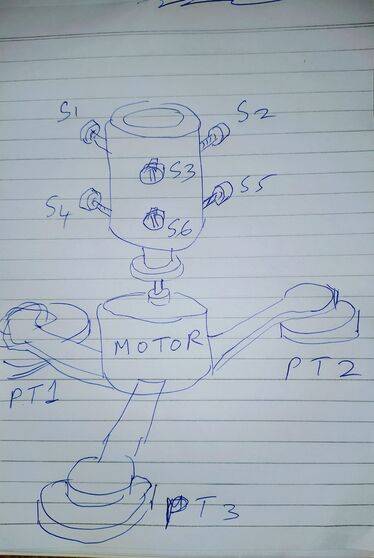
dynBal2.jpg


I will use an Arduino to acquire the force waveforms (or even try to use the sound card of my PC, to start with). There will also be an optical sensor that will produce a marker pulse as a phase reference.

Once I acquire the waveforms, what options exist in terms of Windows executables / Python code / Mathematica code / whatever that will give me at least some approximate feedback like "turn S1 one turn clockwise", "turn S4 2.5 turns anticlockwise" and so on -- such that I will end up with a balanced assembly?
 
  • Like
Likes   Reactions: Lnewqban
Engineering news on Phys.org
I have also considered such a package, so old wheel balancers could be upgraded to a notebook display.

I think there is a problem with your configuration in that all three sensors are in the same plane, and cannot resolve sideways forces. That makes it very difficult to identify which of each pair of two screws must be wound which way. Your transducers are at right angles to the force you need to measure.

A wheel balancer has four transducers arranged in quadrature pairs, on the two horizontal shaft support bearings. That makes it possible to resolve which bead requires how much balance weight.

I have seen the math needed to compute balance weight positions somewhere.
 
  • Like
Likes   Reactions: Lnewqban
Baluncore said:
I think there is a problem with your configuration in that all three sensors are in the same plane, and cannot resolve sideways forces.
That's a good point. I will try to put in 4 or 6 sensors in 2 groups separated along the axis.

Thanks!
 
Last edited:
@Swamp Thing
Further thoughts ... With six screws, you have too many degrees of freedom.
You need only two selected balance weights, or four fixed mass grub screws.

I found the reference again.
Title; Fundamentals of Machine Theory and Mechanisms.
Publisher; Springer. ISBN 978-3-319-31968-1
Series; Mechanisms and Machine Science; Volume 40.

For the theory, take a look at chapter 5; (Balancing of Machinery).
Notice the example problem solved at the end of the chapter.
 
  • Like
Likes   Reactions: Swamp Thing
You will understand the problem better if you write your own computer code.
 
Dr.D said:
You will understand the problem better if you write your own computer code.
How can you write your own code if you do not understand the problem?
 
By the time you have a correctly working computer code, you will understand the problem.

Using a code written by someone else will teach you exactly nothing about the fundamentals of the problem. If you want to understand the problem, work it out for yourself (pencil and paper work first, then implement in a computer code, then check for correctness).
 
This whole thread is fishy... :wink:
 
  • #10
@ berkman Would you explain what is fishy about it, please?
 
  • #11
Dr.D said:
@ berkman Would you explain what is fishy about it, please?
I guess my attempt at humor was too obscure, sorry.
Dr.D said:
Using a code written by someone else will teach you exactly nothing about the fundamentals of the problem. If you want to understand the problem, work it out for yourself
"If you give a person a fish, you feed them for a day, if you teach them to fish, you feed them for a lifetime"

:smile:
 
  • #12
Yep, that was a little "loose". Never fear: you will be called to task. So don't hesitate!
 
  • #13
berkeman said:
"If you give a person a fish, you feed them for a day, if you teach them to fish, you feed them for a lifetime"

Got it! Sorry I missed that.
 
  • Like
Likes   Reactions: berkeman
  • #14
Humour? Two can play at that game.

berkeman said:
"If you give a person a fish, you feed them for a day, if you teach them to fish, you feed them for a lifetime"
It is just that kind of belief and behaviour that is destroying what little is left of the natural environment. :smile:

Dr.D said:
By the time you have a correctly working computer code, you will understand the problem.
That is because you must specify the problem and it's numerical solution process, before you can write demonstrably correct code. Also, you always find your shoes in the last place you look. :smile:
 
  • Haha
Likes   Reactions: berkeman
  • #15
Baluncore said:
Also, you always find your shoes in the last place you look.
It would be really silly to continue searching for your shoes after finding them.
 
  • Haha
Likes   Reactions: Feodalherren
  • #16
Dr.D said:
It would be really silly to continue searching for your shoes after finding them.
I have been known to look for my keys while holding them in my hand.

On Topic: I have created micro controllers for similar applications. I obviously can't share proprietary code but I can tell you that our design process is to first model the system in MATLAB Simulink or SimScape Mechanics. You can then use MATLAB to push out the actual C-code for the application.

If you're going to do it all manually you'd have to derive all the equations of motion, get the transfer function, develop and tune a PID controller... Basically what I'm trying to say is that this is not a trivial task without modern computation software to aid you, and even then it's not really trivial but at least it's manageable.
 

Similar threads

  • · Replies 2 ·
Replies
2
Views
2K
  • · Replies 12 ·
Replies
12
Views
3K
  • · Replies 4 ·
Replies
4
Views
4K
  • · Replies 8 ·
Replies
8
Views
3K