Did My Old Mac Pro Die of a Broken Heart Before Its Replacement Arrived?

Click For Summary

Discussion Overview

The discussion revolves around the experiences and sentiments related to aging computers, specifically a Mac Pro and its replacement with a new iMac. Participants share anecdotes about their own devices, upgrade cycles, and the emotional attachment to technology, exploring themes of reliability, performance, and the quirks of older machines.

Discussion Character

  • Exploratory
  • Conceptual clarification
  • Debate/contested

Main Points Raised

  • One participant humorously suggests that the old Mac Pro may have "died of a broken heart" just before the arrival of the new iMac.
  • Another participant shares a personal story about their Lenovo laptop, which malfunctioned but later "cured" itself after receiving a replacement.
  • Some participants discuss the typical upgrade cycles for home and business computers, suggesting five years for home use and three years for business.
  • There are comments about the emotional connection to old computers, with references to how some devices seem to respond to their owners' loyalty or competition.
  • Participants express a desire for their old computers to fail in order to justify an upgrade, particularly for demanding applications like Blender and Microsoft Flight Simulator.
  • Discussion includes technical details about the transition from PowerPC to Intel-based Macs, with a participant recalling their history with various Mac models.
  • One participant highlights the ease of upgrading memory in the new iMac compared to older models, which require more invasive procedures.

Areas of Agreement / Disagreement

Participants share a mix of personal anecdotes and technical insights, but there is no clear consensus on the emotional or practical implications of aging computers. Multiple viewpoints on upgrade cycles and the reliability of older machines remain present.

Contextual Notes

Participants reference specific models and experiences that may not be universally applicable, and there are varying assumptions about the longevity and performance of different computer systems.

Who May Find This Useful

This discussion may be of interest to individuals considering computer upgrades, those with emotional attachments to technology, and users of older Mac systems reflecting on their experiences.

jtbell
Staff Emeritus
Science Advisor
Homework Helper
2025 Award
Messages
16,107
Reaction score
8,082
TL;DR
Farewell 2008 Mac Pro, hello 2019 iMac.
A few weeks ago I ordered a new 27" iMac with a 2TB SSD instead of the standard hybrid drive. Then the old Mac Pro died a few days before its replacement arrived. Broken heart, maybe?

Now I've jumped ahead several versions of MacOS to 10.15 a.k.a. Catalina, and have to get new versions of all my software. At least I have lots of free time to do it, between being retired and mostly stuck at home because of the pandemic. :oldeyes:

The old Mac Pro's CPU (minus the internal HDDs which I've extracted for salvaging my files) will go to an e-waste collection point eventually. The monitor will go to a thrift store.
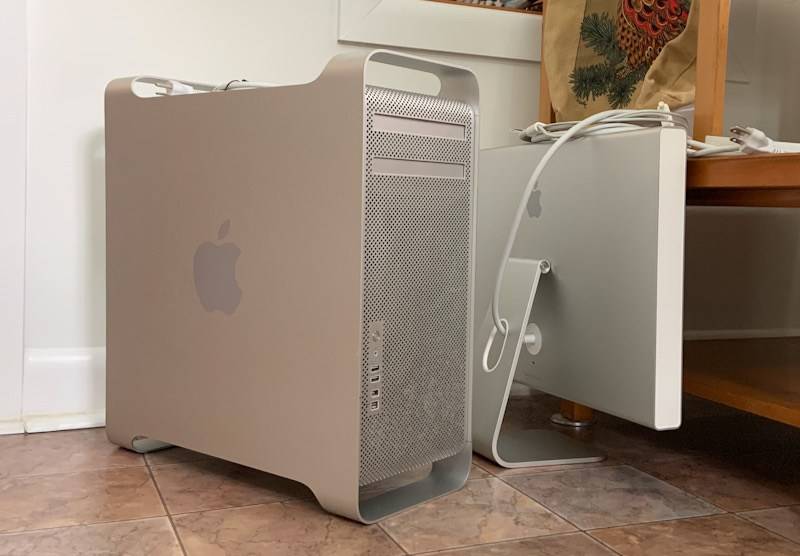
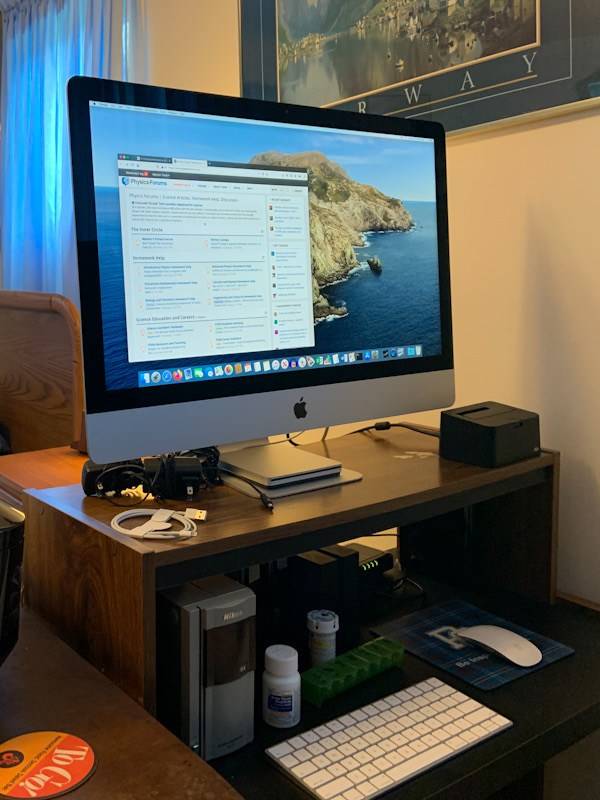
B25E627D-980B-4E7C-BB6F-58A7064FC91C.jpeg


8A29ADCB-4D08-4226-A3E4-08292596DC63.jpeg
 
  • Like
Likes   Reactions: OmCheeto
Computer science news on Phys.org
You sure that screen's big enough ? :smile:
 
  • Like
Likes   Reactions: berkeman
I think you got your moneys worth For home use, expect five years between upgrades. For business optimal upgrade is three years.
 
jtbell said:
A few weeks ago I ordered a new 27" iMac with a 2TB SSD instead of the standard hybrid drive. Then the old Mac Pro died a few days before its replacement arrived. Broken heart, maybe?
My Lenovo laptop did something freaky about 18 months ago, rendering the screen almost unreadably dim and unable to drive the remote monitor. Ordered a new laptop. When it arrived, the old one 'cured' itself, and I'm still using it now. It remains the device docked and attached to the big screen and keyboard, and the new one got pressed into service as a travel and zoom device.

So instead of getting a broken heart, it buckled down and swore to be better from now on. Some spouses respond to loyalty, and others to competition.
 
If only my old computer would die.:oldeyes: Then I could upgrade it to one that could handle the latest Blender release and the new Microsft flight sim being released next month.
 
Janus said:
If only my old computer would die.

I know a guy who knows a guy...

jtbell said:
Farewell 2008 Mac Pro,

Is that the last of the PPCs or the first of the Intels?
 
Halc said:
So instead of getting a broken heart, it buckled down and swore to be better from now on. Some spouses respond to loyalty, and others to competition.

There was a story of an experienced rose gardener who would place his spade near a sick plant and miraculously it got better.
 
Vanadium 50 said:
I know a guy who knows a guy...
While I have been known to hit a computer before (I once used an old Mac that would hang up on start up from time to time, and the only way to get it going was to give it a good whack on the side), I've never considered putting a hit out on a computer.
 
phinds said:
You sure that screen's big enough ?
No need for virtual reality goggles!

The old 23" Apple Cinema display was pretty good for its day, and I wasn't dissatisfied with it at the end, but the Retina display is definitely nice.

Vanadium 50 said:
Is that the last of the PPCs or the first of the Intels?

I had to look that up, it's been so long. The first Intel-based Macs were in 2006. The iMac, MacBook, and Mac Mini came first, then the Mac Pro which replaced the PowerMac G5 (PPC) tower. My 2008 machine was the third version of that first-generation Mac Pro.

I had Parallels Desktop on it, running both Windows 7 and Ubuntu Linux. After I get settled in with my new MacOS stuff, I'll add some more memory to the iMac and install updated versions of the other stuff on it.

One reason I chose the 27" iMac is that (unlike the smaller models) you can easily upgrade the memory yourself. It has a hatch in the back that reveals the memory slots, whereas with the smaller iMacs you have to pry open the case and void your warranty. And Apple charges an arm and a leg to install more memory as a custom configuration. :frown:

jedishrfu said:
I think you got your moneys worth For home use, expect five years between upgrades.

Before the Mac Pro, in fact I usually went 5-6 years between upgrades, going all the way back to my original Macintosh SE in 1987 or '88. No hard disk, two floppy disk drives, and a whopping 1 MB of memory!
 
  • #10
Vanadium 50 said:
I know a guy who knows a guy...
But. . . . :wink:

Does he own, you know, a studio. . . on 16th Avenue ?

.