Errors when plotting but not when evaluating

  • Context: Mathematica 
  • Thread starter Thread starter member 428835
  • Start date Start date
  • Tags Tags
    Errors Plotting
Click For Summary

Discussion Overview

The discussion revolves around a problem encountered while plotting in Mathematica, specifically related to the evaluation of expressions involving vectors and functions. Participants explore issues with plotting performance and the evaluation order of functions.

Discussion Character

  • Technical explanation, Debate/contested, Exploratory

Main Points Raised

  • One participant describes an issue with plotting at a specific line in their code, noting that while individual evaluations yield expected results, combining them in a plot does not work as intended.
  • Another participant suggests that the problem may stem from Mathematica attempting to evaluate a function using a numerical value for a variable, proposing a modified code snippet to address this.
  • A later reply indicates that the suggested modification still results in long computation times, leading the participant to question the efficiency of the approach compared to manual calculations.
  • One participant comments on the complexity of understanding the order of operations in Mathematica, hinting at potential confusion in the evaluation process.

Areas of Agreement / Disagreement

Participants express uncertainty about the root cause of the issue, with no consensus on a definitive solution. Multiple approaches are discussed, but the effectiveness of these methods remains unresolved.

Contextual Notes

Participants note that the performance of the plotting function may depend on the evaluation order and the specific implementation of the code, which could lead to varying results based on how expressions are structured.

member 428835
Hi PF!

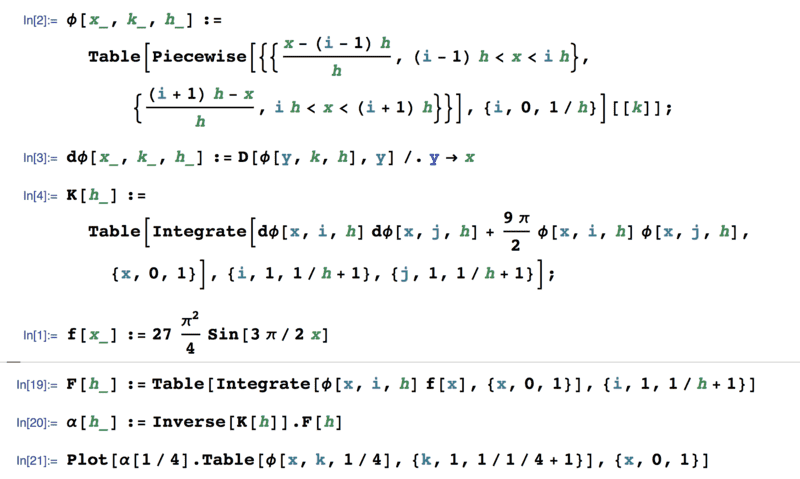
Attached is a screenshot of my code:
Screen Shot 2018-03-13 at 1.07.00 PM.png

The issue I'm facing is not being able to plot at line 21. It's weird because when I evaluate ##\alpha[1/4]## on it's own line I instantly receive a 5X1 vector. When I evaluate the Table[##\phi##] statement also shown in line 21 on it's own line I receive instantly a 5X1 vector too. Then when I copy-paste these results and dot them into each other I instantly get a good answer. So why can I not do this on the same line?

On line 21, I've tried changing the ##x## variable in ##\phi## to a ##z## and plotting in ##z##, but it takes so long to run this way. I've also tried evaluating ##\alpha## since this seems to be the issue, but again no luck.

Any help would be awesome!
 

Attachments

  • Screen Shot 2018-03-13 at 1.07.00 PM.png
    Screen Shot 2018-03-13 at 1.07.00 PM.png
    25.2 KB · Views: 1,015
Physics news on Phys.org
I'm not sure, but it could be because it is trying to evaluate ##\phi## using a numerical value for ##x##. Try and see if the following helps:
Code:
Plot[\[Alpha][1/4].Table[\[Phi][xx, k, 1/4], {k, 1, 1/1/4 + 1}] /.
  xx -> x, {x, 0, 1}]
 
DrClaude said:
I'm not sure, but it could be because it is trying to evaluate ##\phi## using a numerical value for ##x##. Try and see if the following helps:
Code:
Plot[\[Alpha][1/4].Table[\[Phi][xx, k, 1/4], {k, 1, 1/1/4 + 1}] /.
  xx -> x, {x, 0, 1}]
Yea I tried this but it takes a ridiculous amount of time. Much longer than if I compute manually and then take the dot product. I'm glad I tried this first though! Makes me think I am doing something right!
 
It's hard sometimes to know in which order Mathematica is doing things.
 

Similar threads

  • · Replies 5 ·
Replies
5
Views
3K
  • · Replies 4 ·
Replies
4
Views
4K
  • · Replies 5 ·
Replies
5
Views
3K
  • · Replies 11 ·
Replies
11
Views
3K
  • · Replies 6 ·
Replies
6
Views
2K
  • · Replies 5 ·
Replies
5
Views
3K
  • · Replies 5 ·
Replies
5
Views
2K
  • · Replies 3 ·
Replies
3
Views
3K
  • · Replies 4 ·
Replies
4
Views
3K
  • · Replies 4 ·
Replies
4
Views
3K