Finding earlier Posts Quickly?

  • Thread starter WWGD
  • Start date
16 replies · 2K views · last reply
Science Advisor
Homework Helper
Messages
7,926
Reaction score
13,241
Hi All,
I would like to see my posts in reverse order, i.e., listed from the earliest to the latest, if possible.
I know I can use the " Your Content" link within " MY PF" , but then I have to repeatedly go to the
latest and repeat this process, click "7" ( Please see below):
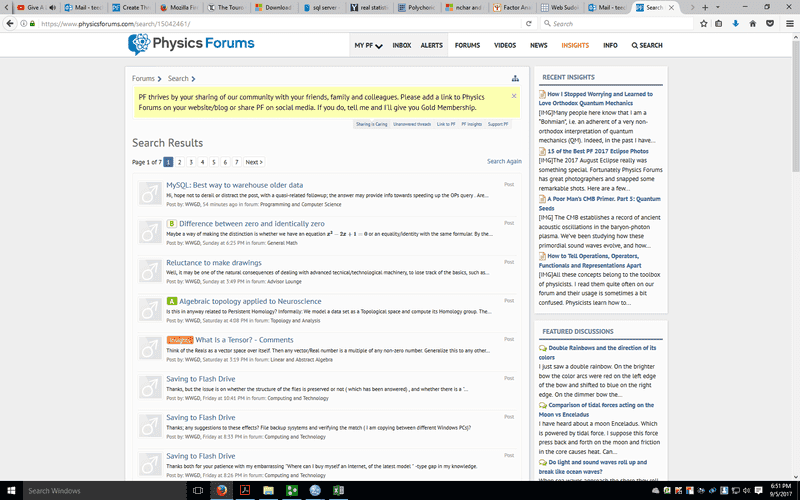
Physics Forums search results page showing page 1 of 7 with a list of recent threads, a Recent Insights sidebar and Featured Discussions sidebar.


( Sorry, I don't know how to enlarge the screenshot ) until I reach the end of my posts, which takes a lot of time. Is there a way of having the order of the output inverted, or doing the search in a different way?
( Sorry, I searched other posts but did not see an answer).
Thanks.
 
Not exactly what you've asked for, but the usual search function with "posted by" has an option "newer than". I sometimes think, whether I should insert search tags in my posts, but I never think about it, when I write one.

F_FAA 4563 :biggrin:
 
  • Like
Likes   Reactions: WWGD
There is no proper way to find your oldest posts, unfortunately. The search function is limited to 200 results and has no "oldest first" option.
 
  • Like
Likes   Reactions: WWGD
WWGD said:
Sorry, I don't know how to enlarge the screenshot...
I'm not sure you can... PF might have an automatic picture resizer that limits the size to 800px × 500px, or less ?

Firefox Page Info dialog on the Media tab showing a PNG attachment from physicsforums.com with size 86.35 KB and dimensions 800px × 500px, with a preview of a Physics Forums search page below.
 
However, the picture I just posted is a little bigger... ?

Firefox Page Info dialog on the Media tab listing image addresses, types, sizes and alternate text, with the selected entry showing 800px by 515px dimensions and 73.43 KB JPEG size.
Lol... I'm really not sure how anything works...o_O
 
Last edited:
OCR said:
I'm not sure you can... PF might have an automatic picture resizer that limits the size to 800px × 500px, or less ?
Images are resized to a max of 800x600
 
Greg Bernhardt said:
Images are resized to a max of 800x600
Replying to all, it is possible. Open up a EDIT paint program, paste in, and then you can resize. EDIT: I looked it up after posting, sorry did not post it earlier.
 
Last edited:
WWGD said:
Replying to all, it is possible. Open up a pint program, paste in, and then you can resize. EDIT: I looked it up after posting, sorry did not post it earlier.
What is a "pint program" ? Oh, wait. You probably mean "paint", yes?
 
phinds said:
What is a "pint program" ? Oh, wait. You probably mean "paint", yes?
Yes, just edited. My bad.
 
phinds said:
What is a "pint program" ?
Traditionally, a "pint program" would be the same as a "one-eighth of a gallon program" ...

But I think WWGD is lost somewhere in studying topology, so it might be... ""an any unit, "of an any unit program", program"" ....:approve:

You just never know about those guys ..... :olduhh:

3D rendered model of a plain cylindrical mug with a loop handle on the right side, shown in light blue-grey with an open top.
 
Last edited:
  • Like
Likes   Reactions: WWGD and phinds
OCR said:
Traditionally, a "pint program" would be the same as a "one-eighth of a gallon program" ...
I can't believe I missed something so obvious. Good catch.
 
OCR said:
Traditionally, a "pint program" would be the same as a "one-eighth of a gallon program" ...

But I think WWGD is lost somewhere in studying topology, so it might be... ""an any unit, "of an any unit program", program"" .
...
According to Occam's Razor, he might simply have missed the last call.
 
  • Like
Likes   Reactions: phinds
fresh_42 said:
...
According to Occam's Razor, he might simply have missed the last call.
Damn. ANOTHER obvious interpretation that I missed. I'm slipping.
 
phinds said:
Damn. ANOTHER obvious interpretation that I missed. I'm slipping.
Actually, I cut myself while using Occam's razor . I spilled a pint of blood, which paint(ed) my shirt in red ;).
 
WWGD said:
Actually, I cut myself while using Occam's razor . I spilled a pint of blood, which paint(ed) my shirt in red ;).
OK, now you're going too far :smile:
 
  • Like
Likes   Reactions: fresh_42 and WWGD
Lol... I have no idea why this showed up in my posts...
OCR said:
...:approve:
phinds said:
Good catch.
Thank you, phinds... :ok:
 
Last edited: