Python Fitting xtickslabels on a plot (matplotlib)

Click For Summary
To improve the spacing and resolution of x-tick labels in the provided plot code, it is suggested to reduce the number of ticks displayed. Instead of showing a tick for each day, displaying ticks for every seventh day can enhance readability. This can be achieved by modifying the x-tick settings to use a step parameter, which simplifies the x-tick labels while maintaining clarity. Additionally, to ensure that the title and y-label fit well within the figure, the `tight_layout()` function is recommended, as it adjusts the layout to prevent cropping. The example code demonstrates these adjustments, including setting appropriate font sizes and rotations for better visibility. The final output can be saved with high resolution for quality presentation.
schniefen
Messages
177
Reaction score
4
TL;DR
Fitting xtickslabels on plot
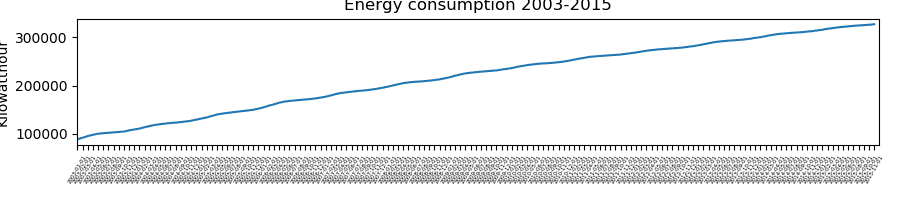
How could I improve the below code to fit all the xtickslabels on my plot more nicely (i.e. more spacing between the labels, higher resolution)? Thanks!
Python:
from pyplot import *
yearmonthday=['2003-01-01', '2003-02-01', '2003-03-01', ...] #len(yearmonthday) is 155
kwh = [88883, 99221, 100002, ...]
fig,ax=subplots(figsize=(9,2))
ax.plot(range(len(kwh)),kwh)
ax.set_xticks(range(len(yearmonthday)))
ax.set_xticklabels(yearmonthday, fontsize = 4,rotation=60)
ax.set_xlim(0,155,310)
fig.tight_layout()
ax.set_title('Energy consumption 2003-2015')
ax.set_ylabel('Kilowatthour')

plotx.png
 
Technology news on Phys.org
I propose to reduce the number of the ticks. You don't have to display a tick for each of the day, you can display only every second day for example, or every seventh day (if you prefer weekly basis).
Below I slightly updated your lines 6 and 7, in order to display a tick for every "step"-th day.

Python:
step = 7
ax.set_xticks(range(0, len(yearmonthday), step))
ax.set_xticklabels(yearmonthday[::step], fontsize=4, rotation=60)
 
  • Like
Likes schniefen and Ibix
You're right, it's not necessary to display all dates. However, how would one make the title and the ylabel also fit into the figure? fig.tight_layout() fits the xtickslabels into the figure, but displaces the title and the ylabel somewhat outside of it.

Python:
fig,ax=subplots(figsize=(8,3))
ax.plot(range(len(kwh)),kwh)
step = 7
ax.set_xticks(range(0, len(yearmonthday), step))
ax.set_xticklabels(yearmonthday[::step], fontsize=10, rotation=60)
ax.set_xlim(0,155)
ax.set_yticks([100000,200000,300000])
ax.set_yticklabels(['$10^5$','$2 \cdot 10^5$','$3\cdot10^5$'], fontsize=10)
plt.tight_layout()
ax.set_title('Energy consumption 2003-2015')
ax.set_ylabel('Kilowatthour')
savefig('plotx.png',dpi=1200)
plotx.png
 
Although I don't have your data, I tried to reproduce your code in jupyter notebook with %matplotlib inline option. And both, ylabel and title, look OK, not cropped as in your figure.
 
  • Like
Likes schniefen
Learn If you want to write code for Python Machine learning, AI Statistics/data analysis Scientific research Web application servers Some microcontrollers JavaScript/Node JS/TypeScript Web sites Web application servers C# Games (Unity) Consumer applications (Windows) Business applications C++ Games (Unreal Engine) Operating systems, device drivers Microcontrollers/embedded systems Consumer applications (Linux) Some more tips: Do not learn C++ (or any other dialect of C) as a...