Fixing Picture Placement Below Margin

Click For Summary
SUMMARY

The issue of a picture being rendered 2 inches below the margin is caused by the placement of the node labeled "z" in the TikZ drawing commands. Specifically, using the command \draw -- node {$z$} (0,2.5in); results in the node being positioned at the midpoint of the line, creating unwanted white space above it. To correct this, users should place the node directly at the desired point by using \draw (0,0) -- (0,3) node[above] {$z$};, which eliminates the extra space and positions "z" correctly at the top of the bounding box.

PREREQUISITES
  • Familiarity with TikZ 2.10 syntax and commands
  • Understanding of node placement in TikZ drawings
  • Knowledge of LaTeX document structure
  • Basic experience with coordinate systems in graphics programming
NEXT STEPS
  • Explore TikZ documentation on "Placing nodes on a curve explicitly" and "Placing nodes on a curve implicitly"
  • Learn about TikZ path options and their effects on drawing
  • Investigate the use of bounding boxes in TikZ for layout adjustments
  • Practice creating complex TikZ diagrams with multiple nodes and paths
USEFUL FOR

This discussion is beneficial for LaTeX users, graphic designers utilizing TikZ for illustrations, and anyone looking to refine their skills in precise node placement within vector graphics.

Dustinsfl
Messages
2,217
Reaction score
5
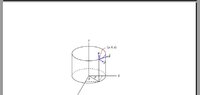
This picture is on a blank piece of paper but is rendered 2in below the margin. Why is this happening? I want it to be at the top of page right below the margin.
The $z$ node is causing the problem. If I remove the $z$ node, the picture moves back to the top. What can I do about this?
Code:
\begin{center}
\begin{tikzpicture}[scale = 1.25]
\draw (0,0) -- (0,3);
\draw (0,0) -- (2.5,0);
\draw (0,0) -- (-1,-1.7);
\draw (-1.5,0) arc (180:360:1.5cm and .5cm);
\draw[dashed] (-1.5,0) arc (180:0:1.5cm and .5cm);
\draw (-1.5,0) -- (-1.5,2);
\draw (1.5,0) -- (1.5,2);
\draw (-1.5,2) arc (180:360:1.5cm and .5cm);
\draw (-1.5,2) arc (180:0:1.5cm and .5cm);
\draw -- node {$y$} (2.1in,0);
\draw -- node {$z$} (0,2.5in);
\draw -- node {$x$} (-.86in,-1.5in);
\end{tikzpicture}
\end{center}
 
Last edited:
Physics news on Phys.org
As you can see there is huge gap from where the 1in margin is to the start of the tikz picture
View attachment 544
 

Attachments

  • tikzissue.jpg
    tikzissue.jpg
    8.8 KB · Views: 117
dwsmith said:
Code:
\draw (0,0) -- (0,3);
...
\draw -- node {$z$} (0,2.5in);
This is a strange way to write "z". I did not know it is possible to omit the first point in the \draw command. Apparently, the second \draw command above is equivalent to

Code:
\path (0,0) -- node {$z$} (0,2.5in);

The command \path without options does not draw anything. "The only effect is that the area occupied by the picture is (possibly) enlarged so that the path fits inside the area. To actually “do” something with the path, an option like draw or fill must be given somewhere on the path" (TikZ 2.10 manual, chapter 14). The command \draw is a contraction for \path[draw].

Next, by default when "node" is specified before the second point, the node is placed midway on the line (section 16.9). So what happens is the picture is enlarged to encompass the point (0,2.5in), but "z" is drawn only at (0,1.25in).
 
Evgeny.Makarov said:
This is a strange way to write "z". I did not know it is possible to omit the first point in the \draw command. Apparently, the second \draw command above is equivalent to

Code:
\path (0,0) -- node {$z$} (0,2.5in);

The command \path without options does not draw anything. "The only effect is that the area occupied by the picture is (possibly) enlarged so that the path fits inside the area. To actually “do” something with the path, an option like draw or fill must be given somewhere on the path" (TikZ 2.10 manual, chapter 14). The command \draw is a contraction for \path[draw].

Next, by default when "node" is specified before the second point, the node is placed midway on the line (section 16.9). So what happens is the picture is enlarged to encompass the point (0,2.5in), but "z" is drawn only at (0,1.25in).

I am confused. What is going wrong?
 
Because of the instruction

\draw -- node {$z$} (0,2.5in);

your picture includes the point (0,2.5in), but "z" is drawn at (0,1.25in). Thus, there is 1.25in of white space above (the center of) "z". You can see this if you add the line

\draw (current bounding box.north west) rectangle (current bounding box.south east);

before "\end{tikzpicture}". You can also replace

\draw -- node {$z$} (0,2.5in);

with

\draw (0,0) -- node {$z$} (0,2.5in);

to see that the top end of the line lies on the top edge of the bounding box and "z" is directly in the middle of that line.
 
Evgeny.Makarov said:
Because of the instruction

\draw -- node {$z$} (0,2.5in);

your picture includes the point (0,2.5in), but "z" is drawn at (0,1.25in). Thus, there is 1.25in of white space above (the center of) "z". You can see this if you add the line

\draw (current bounding box.north west) rectangle (current bounding box.south east);

before "\end{tikzpicture}". You can also replace

\draw -- node {$z$} (0,2.5in);

with

\draw (0,0) -- node {$z$} (0,2.5in);

to see that the top end of the line lies on the top edge of the bounding box and "z" is directly in the middle of that line.

Ok I understand. I had to adjust as such to get z in the correct place though. How else can I specify it?
 
dwsmith said:
Ok I understand. I had to adjust as such to get z in the correct place though. How else can I specify it?
Yes, I should have said this earlier. When "node {...}" is placed not between "--" and a point, but after a point, then the node is placed at that point. You can also specify options like [above] after "node". So, you can get the same result, but without the extra space above if you replace

Code:
\draw (0,0) -- (0,3);

with

Code:
\draw (0,0) -- (0,3) node[above] {$z$};

This is described in sections "Placing nodes on a curve explicitly" and "Placing nodes on a curve implicitly" (or something like that) in the manual.
 

Similar threads

Replies
2
Views
2K
  • · Replies 0 ·
Replies
0
Views
6K
  • · Replies 3 ·
Replies
3
Views
5K
  • · Replies 2 ·
Replies
2
Views
1K
  • · Replies 2 ·
Replies
2
Views
5K
  • Poll Poll
  • · Replies 1 ·
Replies
1
Views
2K
  • · Replies 1 ·
Replies
1
Views
1K
  • · Replies 4 ·
Replies
4
Views
3K