MATLAB Forcing the best fit line to pass through a certain point (Octave)

Click For Summary
SUMMARY

The discussion focuses on forcing a best fit line to pass through the origin using Octave. Users suggest modifying the model from the standard linear regression equation \(y = mx + b\) to \(y = mx\), which requires calculating the slope \(m\) using the formula \(m = \frac{\sum_i x_i y_i}{\sum_i x_i^2}\). Although Octave lacks the fitlm function found in MATLAB, it offers alternative linear regression methods. Participants emphasize that while this approach can achieve the desired graph, it compromises the statistical validity of the regression analysis.

PREREQUISITES
  • Understanding of linear regression concepts
  • Familiarity with Octave syntax and functions
  • Basic knowledge of polynomial fitting and error minimization
  • Experience with plotting in Octave
NEXT STEPS
  • Research Octave's linear regression methods at Octave Linear Regression Documentation
  • Learn how to implement custom regression models in MATLAB using fitlm
  • Explore the implications of forcing regression lines through the origin on statistical analysis
  • Investigate Julia's capabilities for linear regression and its differences from MATLAB and Octave
USEFUL FOR

Data analysts, statisticians, and researchers who need to visualize linear relationships in data while understanding the limitations of forcing regression lines through specific points.

Wrichik Basu
Science Advisor
Insights Author
Gold Member
Messages
2,180
Reaction score
2,690
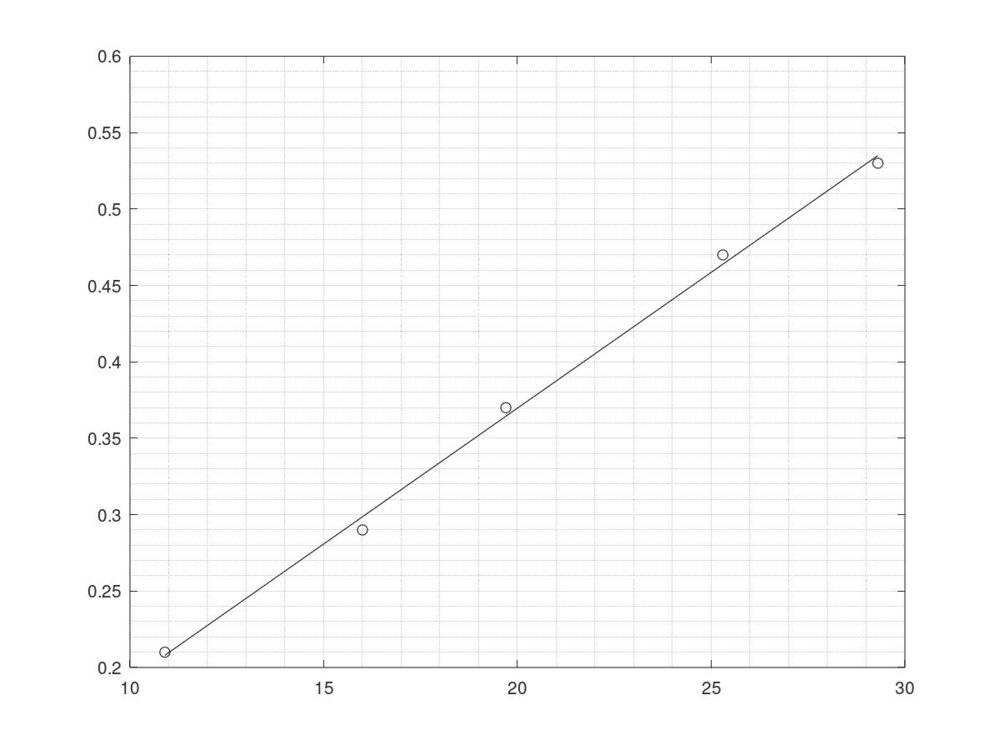
I have the following code in Octave:
Matlab:
h = [29.3 25.3 19.7 16.0 10.9];
v = [0.53 0.47 0.37 0.29 0.21];
plot(h,v,'obk')
hold on
p = polyfit(h,v,1);
y = polyval(p,h);
plot(h,y,'-bk')
And I get a good graph:
viscosity.jpg


I can extrapolate the best fit line using the following code:
Matlab:
x = -1:0.01:11;
>> y = polyval(p,x);
>> plot(x,y,'--r')
and if I zoom on the graph, I get this:
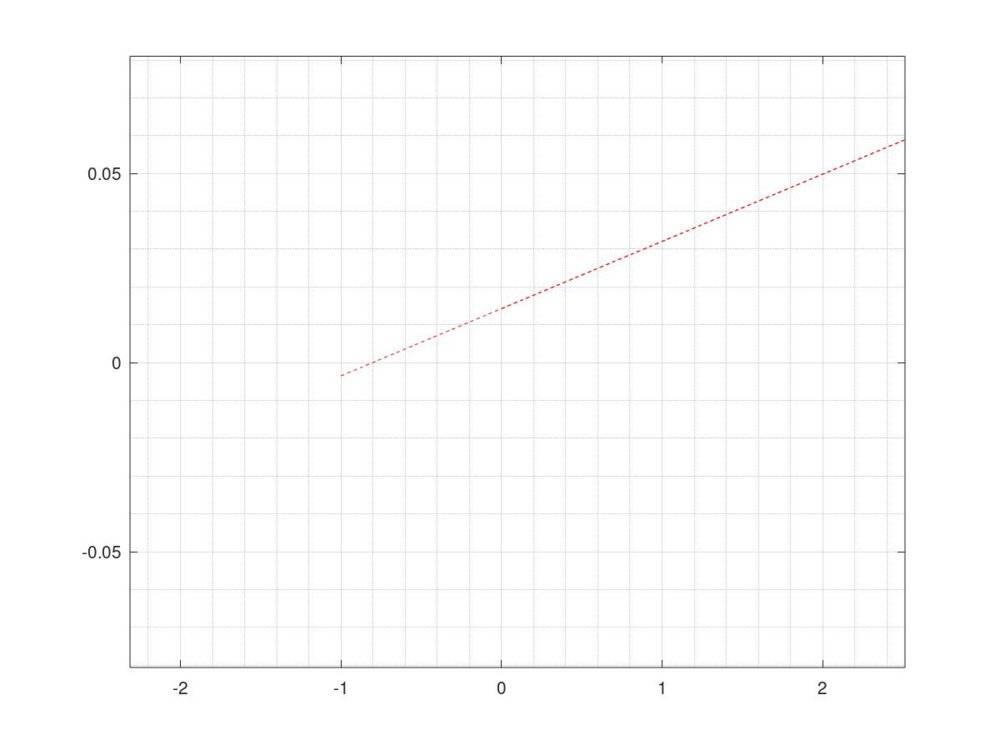
extrapolated.jpg

Evidently, the line doesn't pass through (0,0).

But I have to make it pass through the Origin. In that case, it will no longer be the best fit line, but nevertheless it will serve my purpose.

Any idea on how to do this?
 
Physics news on Phys.org
Find the angle of the line through origin that minimizes mean squared error.
 
Wrichik Basu said:
Evidently, the line doesn't pass through (0,0).

But I have to make it pass through the Origin. In that case, it will no longer be the best fit line, but nevertheless it will serve my purpose.

Any idea on how to do this?

Yes. You're fitting a different model. Instead of ##y = mx + b## you want to fit ##y = mx##. I don't know if you can do it with polyfit(), but the math is pretty simple.

Minimize the square error E
##E = \sum_i (y - y_i)^2 = \sum_i (mx_i - y_i)^2 = \sum_i m^2 x_i^2 - 2 \sum_i mx_i y_i + \sum_i y_i^2##

##dE/dm = 0 \\
\Rightarrow 2m \sum_i x_i^2 - 2\sum_i x_i y_i = 0 \\
\Rightarrow m = (\sum_i x_i y_i )/ (\sum_i x_i^2)##

That is the best fit value of ##m## for the model ##y = mx##, and you should interpolate / extrapolate using that model.
 
  • Like
Likes Wrichik Basu
In the MATLAB function fitlm, you can specify the desired model that does not have a constant term using a modelspec like 'Y ~ A + B + C – 1' . See https://www.mathworks.com/help/stats/fitlm.html#bt0ck7o-modelspec
I believe that their other linear regression tools have similar capabilities. I don't know about Octave.
 
Last edited:
FactChecker said:
I don't know about Octave.
Octave says that fitlm has not yet been implemented.
 
@RPinPA Thanks, that works fine. I plotted the function using fplot, and I am getting the desired results.
jedishrfu said:
You could add 0,0 to your collection of points.
Good idea.
 
jedishrfu said:
You could add 0,0 to your collection of points.
That would draw the line toward (0,0). You may need to add it many times to get it as close as you want and then all the statistical calculations would be messed up.
 
  • Like
Likes Wrichik Basu and jedishrfu
FactChecker said:
That would draw the line toward (0,0). You may need to add it many times to get it as close as you want and then all the statistical calculations would be messed up.

Sometimes cheap solutions work but not as well as one would like that’s why they’re cheap.

Octave apparently doesn’t have the fitlm() function but does have some linear regression methods.

https://octave.sourceforge.io/optim/function/LinearRegression.html
 
  • #10
jedishrfu said:
Sometimes cheap solutions work but not as well as one would like that’s why they’re cheap.
Absolutely, I don't expect any better. How much can one provide for free? There are some major differences between Matlab and Octave. For example, for symbolic math, Octave depends on SymPy, while Matlab was created much before Python.
 
  • Like
Likes jedishrfu
  • #11
I sometimes use freemat when I need to compute a quick plot. It has much of the core Matlab functionality and is easy to install.

More recently, Julia from MIT has come online to challenge Matlab in performance. Much of its syntax is similar to Matlab with notable differences in how arrays are referenced ie parens in Matlab vs square brackets in Julia. Many folks are extending the Julia ecosystem with new packages on github everyday. It’s main weakness is its IDE which is cobbled together using Juno or using Jupyter notebooks. The notebooks are preferred over the IDE but Matlab users have a great IDE that’s hard to give up.
 
  • Like
Likes Wrichik Basu
  • #12
In general forcing a regression line to go through the origin is not a good idea -- it renders the traditional correlation and r^2 values meaningless, for example. You should only do it if you have a valid reason (theoretical or other) do do so.
 
  • Like
Likes jedishrfu
  • #13
statdad said:
In general forcing a regression line to go through the origin is not a good idea -- it renders the traditional correlation and r^2 values meaningless, for example. You should only do it if you have a valid reason (theoretical or other) do do so.
I know that. I do it only when I am forced to plot a graph of ##y=mx## rather than ##y=mx+c## because of the nature of the underlying equation.
 
  • Like
Likes jedishrfu

Similar threads

  • · Replies 14 ·
Replies
14
Views
3K
  • · Replies 2 ·
Replies
2
Views
8K
  • · Replies 4 ·
Replies
4
Views
5K
  • · Replies 5 ·
Replies
5
Views
8K
Replies
14
Views
11K
  • · Replies 3 ·
Replies
3
Views
3K
  • · Replies 1 ·
Replies
1
Views
3K
  • · Replies 1 ·
Replies
1
Views
2K
Replies
2
Views
3K
  • · Replies 15 ·
Replies
15
Views
3K