Troubleshooting Best Fit Line and Distance Calculation in MATLAB

  • Context: MATLAB 
  • Thread starter Thread starter Wrichik Basu
  • Start date Start date
  • Tags Tags
    Data Fit Line Points
Click For Summary

Discussion Overview

The discussion revolves around troubleshooting a MATLAB function designed to plot experimental data, calculate a best fit line, and determine the distance of data points from this line. Participants explore issues related to the calculation of distances, the use of MATLAB functions like polyfit and polyval, and the implications of different types of distance measurements.

Discussion Character

  • Technical explanation
  • Debate/contested
  • Mathematical reasoning

Main Points Raised

  • One participant describes their function for plotting data and calculating distances but notes that all distances are returning as zero, despite the graphical representation suggesting otherwise.
  • Another participant suggests creating test data and reviewing the MATLAB API documentation for the subs function to ensure it is used correctly.
  • A participant questions whether the distance being calculated is the Y error or the perpendicular distance to the line, suggesting that there are easier methods for calculating Y error.
  • Some participants discuss the limitations of the polyfit function, indicating it minimizes vertical distances rather than perpendicular distances, and suggest using principal component analysis (PCA) for better results.
  • There is a request for clarification on the difference between vertical and perpendicular distances, as well as inquiries about MATLAB functions for PCA.
  • One participant expresses frustration with MATLAB's licensing and tool availability, particularly regarding the need for the Statistics toolbox to perform PCA.
  • Suggestions are made for alternative statistical software, including R and Excel, as well as considerations for upgrading hardware to support newer versions of MATLAB.

Areas of Agreement / Disagreement

Participants express differing views on the effectiveness of the polyfit function for the intended purpose, with some advocating for PCA as a better approach. There is no consensus on the best method to calculate the desired distances, and the discussion remains unresolved regarding the optimal solution.

Contextual Notes

Participants highlight limitations related to MATLAB's licensing and the availability of certain functions, as well as the potential need for additional software tools to achieve the desired analysis.

Who May Find This Useful

This discussion may be useful for individuals working with MATLAB for data analysis, particularly those interested in regression analysis, distance calculations, and principal component analysis.

Wrichik Basu
Science Advisor
Insights Author
Gold Member
Messages
2,186
Reaction score
2,694
I have some experimental data, and I would like to plot a graph in MATLAB and also find the best fit line. I also want to find the distance between each point and the best fit line, and if the distance is greater than 1 unit, an error will be shown.

For this, I have written a function. Here it is:

Matlab:
function [] = plot2d(X,Y);
 
    %The aim of this function is to read
    % X and Y from the user, and plot the points.
    % The best fit line shall be shown.
 
    hold off;
 
    %this plots the given data points
    plot(X,Y,'.k', 'MarkerSize', 20);
 
    hold on;
 
    %here, we are calculating the best fit line
    p = polyfit(X,Y,1);
    f = polyval(p, X);
    plot(X, f, '-r');
 
    %necessary plot settings
    zoom on;
    set(gca, 'xminorgrid', 'on', 'yminorgrid', 'on');
 
    syms x1 y1 x2 y2 x y;
 
    %finding the equation of the best fit line
    x1 = X(1);
    x2 = X(end);
    y1 = f(1);
    y2 = f(end);
    m = (y2 - y1) / (x2 - x1);
 
    eqn = y - y1 == m * (x - x1);
 
    %simplifying the equation
    eqn = simplify(eqn);
 
    %writing the equation in Ax + By + C = 0 form and removing the rhs to make it an algebraic expression
    eqn2 = lhs(eqn) - rhs(eqn);
 
    coefx = coeffs(eqn2,x);
 
    %coefficient of x
    cx = coefx(end);
 
    coefy = coeffs(eqn2,y);
 
    %coefficient of y
    cy = coefy(end);
 
    %finding number of data points given
    sz = numel(X);
 
    for i = 1:1:sz
     
        x = X(i);
        y = f(i);
     
        %evaluating the expression by putting in values
        p = subs(eqn2);
     
        %calculating final distance
        dist = p / sqrt(cx^2 + cy^2);
     
        if dist > 1
            disp("Error for point (" + x + "," + y + ")");
        end
         
             
    end
 
    hold off;
 
end
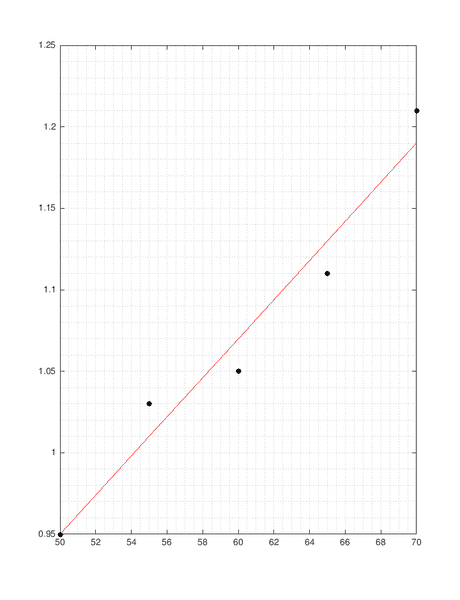
Matlab gives me a good graph:

Figure 2018-08-01 20_19_01.png


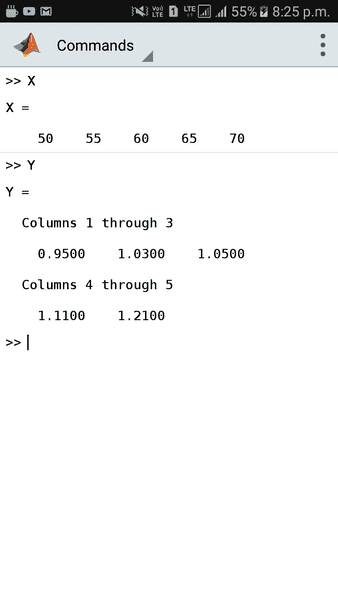
The data is:

Screenshot_20180801-202541.png


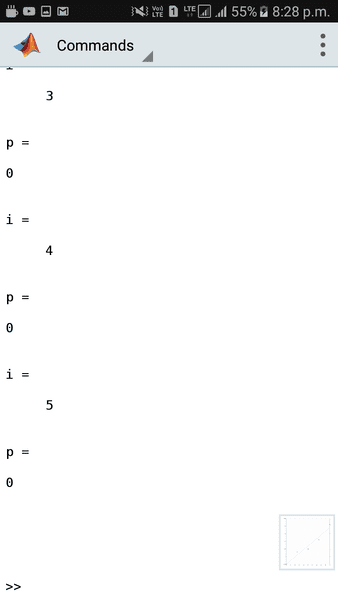
But all distances of points are coming to be 0. Because the subs(eqn2) is yielding a 0. From the graph, it is evident that all points do not lie on the line. But I'm still getting a 0. I know this because I printed p from the function. This is what I got:
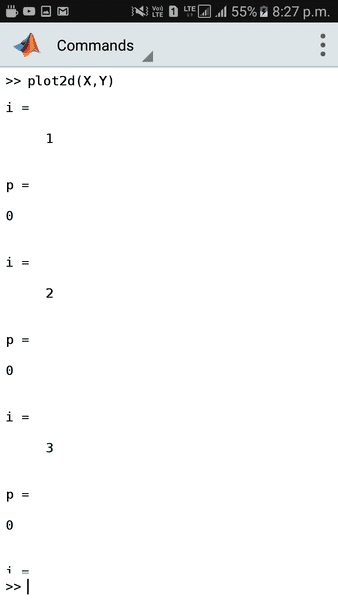
Screenshot_20180801-202755.png


Screenshot_20180801-202801.png


Any help is appreciated. Where am I going wrong?

Any ideas?

I use MATLAB mobile, version R2018a.
 

Attachments

  • Figure 2018-08-01 20_19_01.png
    Figure 2018-08-01 20_19_01.png
    12.1 KB · Views: 869
  • Screenshot_20180801-202541.png
    Screenshot_20180801-202541.png
    5.7 KB · Views: 731
  • Screenshot_20180801-202755.png
    Screenshot_20180801-202755.png
    4.1 KB · Views: 709
  • Screenshot_20180801-202801.png
    Screenshot_20180801-202801.png
    4.7 KB · Views: 695
Last edited:
Physics news on Phys.org
My suggestion is to make some test data and a small program that illustrates the problem. Focus on the subs and at the Matlab api description of subs to see if you’re using it correctly.

Usually there are examples of the function that you can try too.
 
jedishrfu said:
My suggestion is to make some test data and a small program that illustrates the problem. Focus on the subs and at the Matlab api description of subs to see if you’re using it correctly.

Usually there are examples of the function that you can try too.
The problem is that, I tried by putting values in eqn2 myself. I did this by printing eqn2, and then manually putting in values. The answers are truly coming to 0. But from the graph, the distance cannot be 0. That is the bottleneck. The points do not lie on the best fit line, but the equation of the best fit line shows that all the points lie on it. I think the problem is coming from the polyfit or polyval functions.
 
What is this line used for?

Matlab:
    eqn = y - y1 == m * (x - x1);
 
jedishrfu said:
What is this line used for?

Matlab:
    eqn = y - y1 == m * (x - x1);
That line finds the equation of the best fit line using the formula $$y - y_1 = m(x-x_1)$$
 
Is your "distance" the Y error or is it the perpondicular distance to the line? If it is the former, there are easier ways to get the Y error. If it is the latter, consider principle components.
 
FactChecker said:
Is your "distance" the Y error or is it the perpondicular distance to the line? If it is the former, there are easier ways to get the Y error. If it is the latter, consider principle components.
It is the perpendicular distance of each point from the best fit line.

Can you elaborate a bit on the principle components? For computation of distance, I have used the formula $$\dfrac{Ax+By+C}{\sqrt{A^2+B^2}}$$ where ##x## and ##y## are from the data.
 
The MATLAB function polyfit is not doing what you want to do. It is minimizing the sum-squares of the y errors -- the vertical distance to the line.
To minimize the sum-squared perpendicular distances, the first principle component is what you want. From https://en.wikipedia.org/wiki/Principal_component_analysis#Further_considerations :

"Given a set of points in Euclidean space, the first principal component corresponds to a line that passes through the multidimensional mean and minimizes the sum of squares of the distances of the points from the line."
 
FactChecker said:
The MATLAB function polyfit is not doing what you want to do. It is minimizing the sum-squares of the y errors -- the vertical distance to the line.
To minimize the sum-squared perpendicular distances, the first principle component is what you want. From https://en.wikipedia.org/wiki/Principal_component_analysis#Further_considerations :

"Given a set of points in Euclidean space, the first principal component corresponds to a line that passes through the multidimensional mean and minimizes the sum of squares of the distances of the points from the line."
Two questions:

1. What is the difference between vertical and perpendicular distances?
2. Is there any known function in MATLAB to make a graph from first PCA?
 
  • #11
FactChecker said:
1) See, for instance, https://benediktehinger.de/blog/sci...sion-lines-and-the-first-principal-component/
2) In MATLAB, use [COEFF,SCORE] = princomp(X). The first row of COEFF will give you the first principle component. I think that you will have to plot it yourself.
Thanks for the function. But princomp has been removed; it has now become pca in R2018a.

However, I will not be able to use it, because it requires me to buy the Statistics toolbox. In fact, my MATLAB is not licensed, and that's why I can use it only on mobile. :frown:
 
  • #12
A good, free statistics package is R. It is well respected and documented. In fact, it ranks fairly high on the list of most often used programming languages. But naturally there is a learning curve. If you will do a lot of statistics, it may be worth getting and learning.

Apparently, PCA can be done in Excel. I am not familiar with that. See https://www.quora.com/Which-is-the-...xcel-to-perform-principal-components-analysis
 
Last edited:
  • Like
Likes   Reactions: Wrichik Basu
  • #13
I am indeed heartbroken with matlab. Just now, I found that they have stopped supporting 32-bit pc. The last supporting version was R2015b, which is no longer sold now. Perhaps I am done with MATLAB for the moment, and I should shift to some other language.
 
  • #14
Or perhaps you should upgrade your computer.
 
  • #15
Image Analyst said:
Or perhaps you should upgrade your computer.
That's costly. What I have decided is, I will buy the software and additional toolboxes, but keep on using it in the mobile app. I don't need simulink at this moment, so I think I'm fine with whatever I can do on the app.
 

Similar threads

  • · Replies 12 ·
Replies
12
Views
7K
  • · Replies 8 ·
Replies
8
Views
3K
  • · Replies 5 ·
Replies
5
Views
4K
Replies
1
Views
3K
  • · Replies 4 ·
Replies
4
Views
1K
  • · Replies 12 ·
Replies
12
Views
4K
  • · Replies 9 ·
Replies
9
Views
4K
  • · Replies 4 ·
Replies
4
Views
2K
  • · Replies 5 ·
Replies
5
Views
3K
  • · Replies 2 ·
Replies
2
Views
8K