Python Improving Fourier Transform Visualization in Python

Click For Summary
Thibaut seeks to enhance his Python code for better visualization of Fourier transforms, noting that the zero-order peak is misaligned and details of the peaks are unclear. The discussion highlights that the default output of the Discrete Fast Fourier Transform (FFT) in NumPy organizes frequency components in a specific order, with the zero-frequency term first. To center the zero-frequency component, users can apply the fftshift function. Additionally, improving the visualization can be achieved by selecting a color map with higher contrast, which is detailed in the Matplotlib documentation.
Tibo123
Messages
6
Reaction score
0
Hello,

My name is Thibaut. I am looking to improve my code in python in order to have a better look a my Fourier transform. as you can see on the image, we barely see any detail of the peaks on the image. Also it's not centred. the zero order peak in on the corner, not in the centre.

Any idea how to fix it?

Thibaut

image: click here
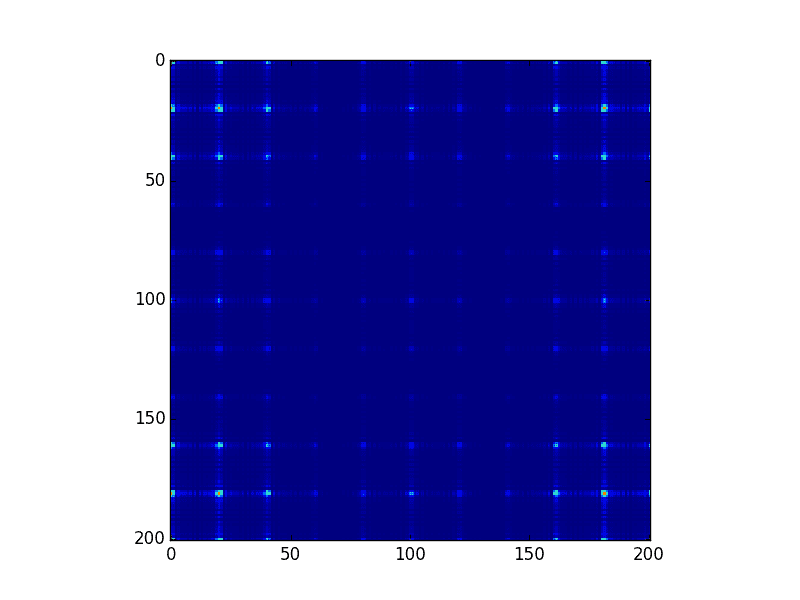
figure_1.png


Python:
import numpy as np
import matplotlib.pyplot as pltx = np.linspace(-100, 100.0, 201.0, endpoint = True)
y = np.linspace(-100, 100.0, 201.0, endpoint = True)
xx, yy = np.meshgrid(x, y, sparse=True)
def f1(a,b):
    return np.piecewise(a, [abs(a) < 2, abs(a) >= 2], [1, 0]) * np.piecewise(b, [abs(b) < 2, abs(b) >= 2], [1, 0])
       
def f2(r,c):
    spacing=10
    a=np.zeros([r,c])
    for ii in range (r):
        for jj in range(c):
           if (ii%spacing)==0 and (jj%spacing)==0 and abs(ii-100)<55 and abs(jj-100)<55:
               a[ii,jj]=1
           else:
               a[ii,jj]=0
    return a

h = np.fft.fft2(f1(xx,yy))
g = np.fft.fft2(f2(201,201))

k=abs(h)*abs(g)plt.imshow(np.abs(k),interpolation='nearest')     
#plt.imshow(f1(xx,yy),interpolation='nearest')
#plt.imshow(f2(200,200),interpolation='nearest')
plt.show()
 
Technology news on Phys.org
It is good practice to read the documentation behind some of these "ready-to-use" functions when using them.

By default, the Discrete Fast Fourier Transform in Numpy returns the components in standard order, which contains the zero-frequency term first, followed by the positive frequency terms (in increasing order) up till the Nyquist frequency and finally the negative frequency terms (in decreasing negative order). The reason for this default behaviour is due to the way the FFT algorithm works, if I'm not mistaken. With this knowledge, you can re-order the array yourself, or use the in-built fftshift function.

As for your visualisation, you can always change the colour map to one with better contrast for your data range. The details can be easily found on the matplotlib website.
 
Learn If you want to write code for Python Machine learning, AI Statistics/data analysis Scientific research Web application servers Some microcontrollers JavaScript/Node JS/TypeScript Web sites Web application servers C# Games (Unity) Consumer applications (Windows) Business applications C++ Games (Unreal Engine) Operating systems, device drivers Microcontrollers/embedded systems Consumer applications (Linux) Some more tips: Do not learn C++ (or any other dialect of C) as a...

Similar threads

  • · Replies 7 ·
Replies
7
Views
4K
Replies
4
Views
5K
  • · Replies 7 ·
Replies
7
Views
3K
  • · Replies 2 ·
Replies
2
Views
3K
Replies
9
Views
8K