- 2,180
- 2,690
When I refer to something from a different website, I try to quote the necessary parts so as to preserve the information in case of a link rot. While doing the same in this thread, the part inside the quote became quite large. When I clicked on "Preview", I could see only a small part of what was inside the quote:
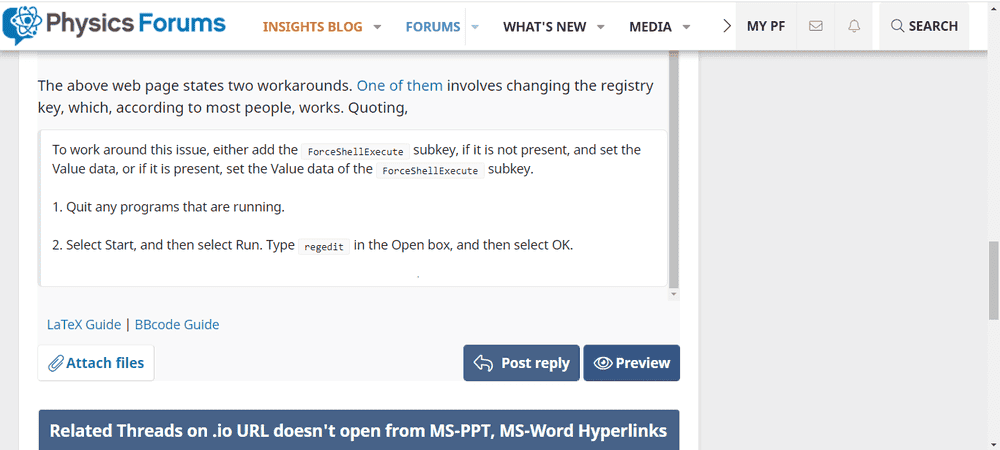
This seems to be a bug throughout the site; I tested in this forum and the outcome was the same.
Steps to reproduce:
1. Copy the following into a reply box:
2. Click on "Preview" button.
This also happens when I post the reply: only that small portion is initially visible. Upon refreshing the page, the full quote is visible. Unfortunately, refreshing the page (after saving the draft) closes the preview, and when I generate it again, the same problem crops up.
This seems to be a bug throughout the site; I tested in this forum and the outcome was the same.
Steps to reproduce:
1. Copy the following into a reply box:
Code:
[QUOTE]
To work around this issue, either add the [ICODE]ForceShellExecute[/ICODE] subkey, if it is not present, and set the Value data, or if it is present, set the Value data of the [ICODE]ForceShellExecute[/ICODE] subkey.

Adding the Internet Subkey to the Registry and Setting the Value Data

1. Quit any programs that are running.

2. Select Start, and then select Run. Type [ICODE]regedit[/ICODE] in the Open box, and then select OK.

3. In Registry Editor, browse to one of the following subkeys (create the keys when they do not exist):

For a 32-Bit version of Office on 64-bit version of Windows
[ICODE]HKLM\SOFTWARE\Wow6432Node\Microsoft\Office\9.0\Common\Internet\[/ICODE]

For a 32-Bit version of Office on 32-bit version of Windows
[ICODE]HKEY_LOCAL_MACHINE\SOFTWARE\Microsoft\Office\9.0\Common\Internet[/ICODE]

For a 64-Bit version of Office on 64-bit version of Windows
[ICODE]HKEY_LOCAL_MACHINE\SOFTWARE\Microsoft\Office\9.0\Common\Internet[/ICODE]

4. Make sure the Internet subkey is selected. On the Edit menu, point to New, and then select DWORD Value. Add the following registry value:

Value Name: [ICODE]ForceShellExecute[/ICODE]

5. Double-click [ICODE]ForceShellExecute[/ICODE], and then set the Value data to 1. Select OK.

6. On the Registry menu, select Exit.[/QUOTE]
2. Click on "Preview" button.
This also happens when I post the reply: only that small portion is initially visible. Upon refreshing the page, the full quote is visible. Unfortunately, refreshing the page (after saving the draft) closes the preview, and when I generate it again, the same problem crops up.
