Matlab Switch w/ string function

Click For Summary
SUMMARY

The discussion focuses on using a switch statement in MATLAB to categorize student years based on input numbers. The original code included an unused vector, which was corrected by replacing the input statement with an index from the vector. The final solution utilizes the fprintf function to display the year as a string, correcting the format specifier from %8i to %s for string output. This approach effectively meets the exercise requirements while enhancing output clarity.

PREREQUISITES
  • Understanding of MATLAB syntax and functions
  • Familiarity with control flow statements, specifically switch-case
  • Knowledge of string formatting in MATLAB using fprintf
  • Basic debugging techniques in MATLAB
NEXT STEPS
  • Explore MATLAB switch-case statement documentation
  • Learn about MATLAB fprintf function and its formatting options
  • Investigate MATLAB debugging tools and techniques
  • Study MATLAB arrays and indexing for effective data manipulation
USEFUL FOR

Students learning MATLAB programming, educators teaching programming concepts, and developers seeking to improve their MATLAB coding skills.

ineedhelpnow
Messages
649
Reaction score
0
hey hey :)

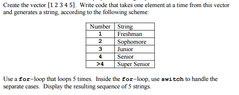
View attachment 4843

So this is the code i came up with
Code:
%% part 2
  x=[1 2 3 4 5];
  % 1 is freshman
  % 2 is softmore
  % 3 is junior
  % 4 is senior 
  % >4 is super senior
  for i=1:5
      s=input('number: ');
      switch s
          case 1
              yearNumber='freshman';
          case 2
              yearNumber='softmore';
          case 3
              yearNumber='junior';
          case 4
              yearNumber='senior';
          otherwise
              yearNumber='super senior';
      end
      disp(yearNumber)
  end

Needless to say, I have absolutely no idea what I'm doing so I'd really appreciate help :)
 

Attachments

  • 123.png
    123.png
    11.8 KB · Views: 101
Physics news on Phys.org
Hi,

It seems that there is no compilation error (I didn't run it, but looks good) but you did something different from what the exercise says.

You can notice that by looking at the fact that you create a vector x=[1 2 3 4 5] but you don't use it any more, so why do you need to create it?

I think the way to solve this is replace the instruction
Code:
s=input('number: ');
by
Code:
s=x(i);
which means that you are taking the number at position $i$ in the vector $x$ and so you are taking one number of the vector at a time, just as the exercise is stated :)
 
Thank You! I was confused about where to put that x back in :o But how can I get it to also display "number: x " (whatever x may be) for each case?
 
Well, I think our code now fits quite good what the exercise says but, if you want to put some text on it, I would do the following.

Inside the for loop and instead of the disp sentence you can write
Code:
fprintf('\n  Number: %8i\n', yearNumber)

frpintf do more or less the same than disp, but have a few more options.

The ' ... ' means that there is an string inside.
\n is for writing in a new line.
And %8i is a declaration of the type of the next argument yearNumber, which in this case may be displayed as an 8 characters integer. (The italics aren't exactly correct, but you can think on it that way)
 
Code:
%% part 2
  x=[1 2 3 4 5];
  % 1 is freshman
  % 2 is softmore
  % 3 is junior
  % 4 is senior 
  % >4 is super senior
  for i=1:5
      s=x(i);
      switch s
          case 1
              yearNumber='freshman';
          case 2
              yearNumber='softmore';
          case 3
              yearNumber='junior';
          case 4
              yearNumber='senior';
          otherwise
              yearNumber='super senior';
      end
      fprintf('\n  Number: %8i\n', yearNumber)
  end
Code:
  Number:      102

  Number:      114

  Number:      101

  Number:      115

  Number:      104

  Number:      109

  Number:       97

  Number:      110

  Number:      115

  Number:      111

  Number:      102

  Number:      116

  Number:      109

  Number:      111

  Number:      114

  Number:      101

  Number:      106

  Number:      117

  Number:      110

  Number:      105

  Number:      111

  Number:      114

  Number:      115

  Number:      101

  Number:      110

  Number:      105

  Number:      111

  Number:      114

  Number:      115

  Number:      117

  Number:      112

  Number:      101

  Number:      114

  Number:       32

  Number:      115

  Number:      101

  Number:      110

  Number:      105

  Number:      111

  Number:      114

This is what Matlab gave me
 
Oh sorry, I mixed up what was going on.Instead of %8i you should write %s since yearNumber is not an integer, is a string. (So you want to wirte things like Number: Junior ?:confused:)

Anyhow I don't know why you have 10 sentences instead of 5, I don't have Malab right now so I can't run the program.

My recommendation for you is to debug the program and run it step by step in order to see what Matlab is writing on. Try to do it, I will try to come back to this thread when I get Matlab again if you can't solve it.
 

Similar threads

  • · Replies 4 ·
Replies
4
Views
2K
  • · Replies 2 ·
Replies
2
Views
4K
  • · Replies 1 ·
Replies
1
Views
2K
  • · Replies 6 ·
Replies
6
Views
4K
  • · Replies 8 ·
Replies
8
Views
2K
  • · Replies 3 ·
Replies
3
Views
5K
  • · Replies 4 ·
Replies
4
Views
3K
  • · Replies 5 ·
Replies
5
Views
2K
  • · Replies 2 ·
Replies
2
Views
2K
  • · Replies 8 ·
Replies
8
Views
3K