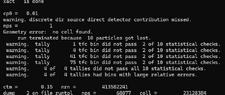
MCNP6 Error: "Geometry error: no cell found"
- Thread starter ameermukhtar
- Start date
-
- Tags
- Radiation Simulation
Click For Summary
Discussion Overview
The discussion revolves around an error encountered in MCNP6, specifically a "Geometry error: no cell found" message. Participants explore potential solutions related to the bounding sphere and object placement within the geometry, focusing on technical aspects of the software's input and visualization features.
Discussion Character
- Technical explanation, Debate/contested
Main Points Raised
- One participant describes their ongoing issue with MCNP6 and requests assistance from the community.
- Another participant explains that the bounding sphere defines the experiment area and suggests that objects should not extend beyond it. They recommend checking the corners of specific geometrical shapes to identify any overlaps.
- A follow-up response reiterates the previous advice and suggests increasing the size of the bounding sphere as a potential fix.
- A later reply indicates that the problem has been resolved after following the suggested advice.
Areas of Agreement / Disagreement
The discussion shows a progression from problem identification to a proposed solution, with one participant confirming that the issue was resolved. However, the initial problem and its resolution are based on individual experiences, and no broader consensus on the underlying cause of the error is established.
Similar threads
- · Replies 4 ·
- · Replies 6 ·
- · Replies 2 ·
- · Replies 0 ·