Newer versions of JDK have a "private" JRE?

  • Topic: Java 
  • Thread starter Thread starter Wrichik Basu
  • Start date Start date
  • Tags Tags
    java
Join the discussion
Registration is free. Start your own thread to ask a follow-up.
1 reply · 2K views
Science Advisor
Insights Author
Gold Member
Messages
2,188
Reaction score
2,694
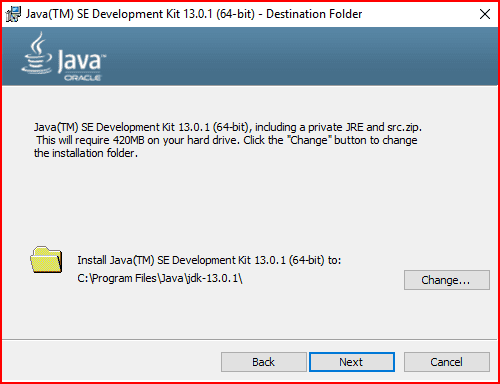
I had JDK 12.0.1 for some time and recently upgraded to JDK 13.0.1. During the installation, this screen was shown:
jdk13.png

I know that newer versions of JDK have no accompanying separate JRE; the standalone JRE currently available is 1.8.0u231. But what is the story about this "private" JRE? How to access it from command line?

Some months ago, while developing a GUI application in NetBeans using JDK 12.0.1, I had discovered that while I can run the application within NetBeans, I cannot execute the .jar file outside the IDE in terminal. This was because I did not have a standalone JRE at that point of time. But NetBeans was still executing the programs. Was it using this "private" JRE?
 
Physics news on Phys.org
Wrichik Basu said:
But what is the story about this "private" JRE?

The private JRE is required to run the tools included with the JDK, i.e. it is only for the JDK. It has no registry settings - talking about Windows. Also, it is contained entirely in its own jre directory. Its location is known only to the JDK.

The public JRE on the other hand, can be used by other Java apps, it exists outside the JDK and it is registered with the Windows Registry. If java.exe file is copied to the Windows System directory, it becomes the default system Java platform.

As for why not a standalone JRE from Java 11 on, there are some pretty fair reasons, at least from a company perspective:

The JRE is not a real part of OpenJDK i.e. it is a Sun (and Oracle later on) creation. So, by eliminating it makes this difference between Oracle JDK and OpenJDK disappear. Second, there was a removal of some client deployment technologies, so there is no primary reason for JRE existence anymore. Also, JRE is not a means to accomplish a small footprint anymore, for various reasons beginning from Java 9.

Wrichik Basu said:
How to access it from command line?

JAVA_HOME environment variable should exist (or created, if not) and be set to point to the directory where the JDK software is located. Also, you have to update the system path. You can find very easily how to do it by googling it, in case you don't know.

Wrichik Basu said:
Some months ago, while developing a GUI application in NetBeans using JDK 12.0.1, I had discovered that while I can run the application within NetBeans, I cannot execute the .jar file outside the IDE in terminal. This was because I did not have a standalone JRE at that point of time. But NetBeans was still executing the programs. Was it using this "private" JRE?

See above about private JRE.
 
  • Informative
Likes   Reactions: Wrichik Basu